Free Monthly Parking Receipt Generator
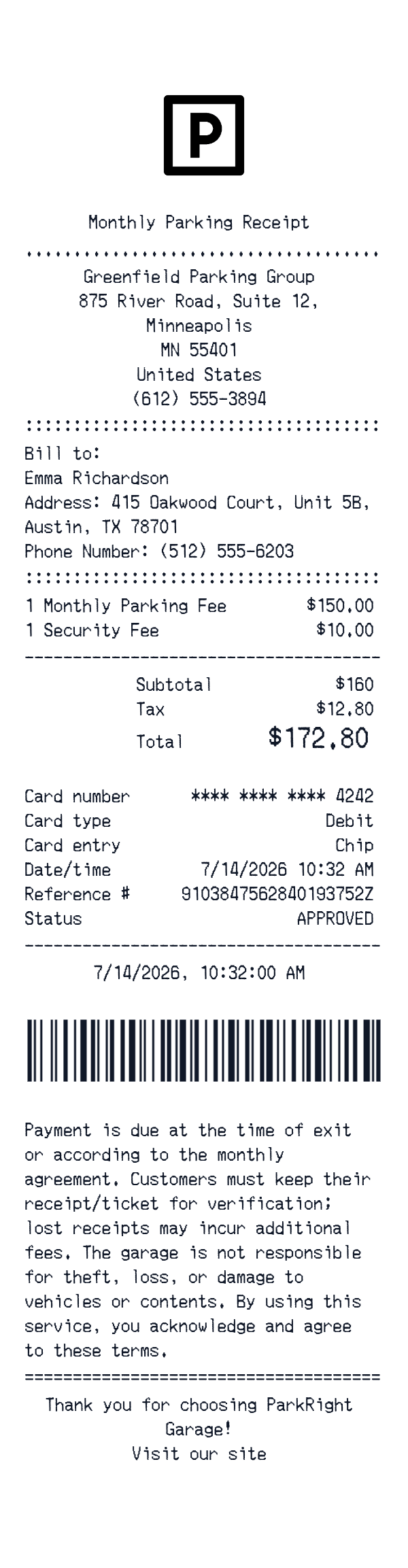
This monthly parking receipt template is an itemized parking receipt for a recurring garage or lot fee. It presents the facility, customer, monthly fee, security fee, tax, and card payment details in a simple receipt layout. The editor lets you replace the sample values with your own.
- ✔Create a receipt in seconds
- ✔No design skills needed
- ✔Fully customizable
- ✔Add custom logo
- ✔Edit line items
- ✔Choose payment method
- ✔Add or remove receipt elements
What's on a real Monthly Parking Receipt?
Every part of the receipt has a purpose. Here is what you will find on this template and why it matters.
Facility header
The garage or lot name, address, and phone number identify the parking provider. It helps the customer know where the fee was paid.
Customer details
The billed customer's name and contact information tie the receipt to a person or account. For monthly parking, it clarifies who holds the agreement.
Date and time
The transaction date and time place the payment in context. On monthly receipts, it can also mark when the fee or agreement was recorded.
Fee lines
The parking fee and any add-on service lines show what the customer is being charged. Monthly parking often includes a base fee plus a separate service charge.
Payment method
The payment block records how the charge was paid. For card payments, it typically includes the last four digits, card type, and approval status.
Totals
Subtotal, tax, and total summarize the charge. They show how the fee and any add-ons combine into the final amount.
Barcode
A barcode or ticket number supports lookup and verification of the parking session or monthly account.
Terms and footer
A short terms message and thank-you note set expectations about receipt retention, liability, and customer acknowledgment.
How the sample is arranged
This template comes pre-filled with a realistic sample receipt. Here is what it contains, top to bottom.
Header: Monthly Parking Receipt, then Greenfield Parking Group, 875 River Road, Suite 12, Minneapolis, MN 55401, United States, (612) 555-3894. Bill to: Emma Richardson, 415 Oakwood Court, Unit 5B, Austin, TX 78701, (512) 555-6203. Items: Monthly Parking Fee, 1 at $150.00; Security Fee, 1 at $10.00. Totals: Subtotal $160, Tax $12.80, Total $172.80. Payment: Debit card, chip, **** **** **** 4242, 7/14/2026 10:32 AM, Reference # 9103847562840193752Z, APPROVED. Then date/time, barcode, terms, and ParkRight Garage thank-you.
How to make a Monthly Parking Receipt?
With our Receipt Maker, creating any receipt is as easy as 1, 2, 3.
Customize your receipt
Customize every detail, from items to pricing and payment details, with ease.
Export your receipt
One-click export, ready to print.
Where a Monthly Parking Receipt comes in handy
Personal parking records
Keep a simple record of monthly garage fees and charges.
Travel parking costs
Track recurring parking costs while traveling or staying in another city.
Charge review
Check that the monthly fee, security fee, and tax add up.
Film and app mockups
Create sample parking receipt visuals for film, TV, or app design.
Driving education
Prepare sample monthly parking receipts for bookkeeping or classroom training.
Digitizing paper tickets
Turn faded paper parking tickets into a clean digital sample.
Tips for a Monthly Parking Receipt
- 1Keep the math consistent: the monthly fee, security fee, tax, and total should all add up.
- 2Include a transaction or ticket number, since parking receipts usually carry one for lookup.
- 3For card payments, print only the last four digits of the card, not the full number.
- 4Use a plausible date and time for the monthly parking agreement or payment session.
- 5Show the customer name and address so the monthly account is easy to identify.
Similar Templates
More receipt templates like this one — pick one and generate your own receipt in seconds.
Get started in 1 minute
- ✔Create receipts in seconds
- ✔Customize everything
- ✔Easy with our Receipt Builder
