Free Donation Receipt Generator
This donation receipt template is a clean, editable layout for documenting a charitable gift. It includes organization details, donor information, a single donation line, payment details, and a barcode. Use it for personal giving records, nonprofit training samples, or creative mockups. The editor lets you replace the sample fields with your own details.
- ✔Create a receipt in seconds
- ✔No design skills needed
- ✔Fully customizable
- ✔Add custom logo
- ✔Edit line items
- ✔Choose payment method
- ✔Add or remove receipt elements
What's on a real Donation Receipt?
Every part of the receipt has a purpose. Here is what you will find on this template and why it matters.
Organization header
The organization name, address, and contact details identify the charity or nonprofit receiving the gift. This block helps place the receipt in a clear institutional context.
Donation date
The date/time line records when the donation was made or processed. It helps keep the gift tied to a specific moment in a record.
Donor block
The donor section lists the person or entity making the gift, often with address and contact details. It helps identify who made the donation.
Donation line
The item or gift line states the donation description and amount. It keeps the record itemized and easy to review.
Total
The total line shows the overall donation amount. It makes the gift value clear at a glance.
Payment details
The payment block records the method used and transaction details, such as card type or status. It supports a complete record of how the gift was processed.
Barcode
A barcode at the bottom can support scanning or linking the record to a file. It adds a compact identification element to the layout.
How the sample is arranged
This template comes pre-filled with a realistic sample receipt. Here is what it contains, top to bottom.
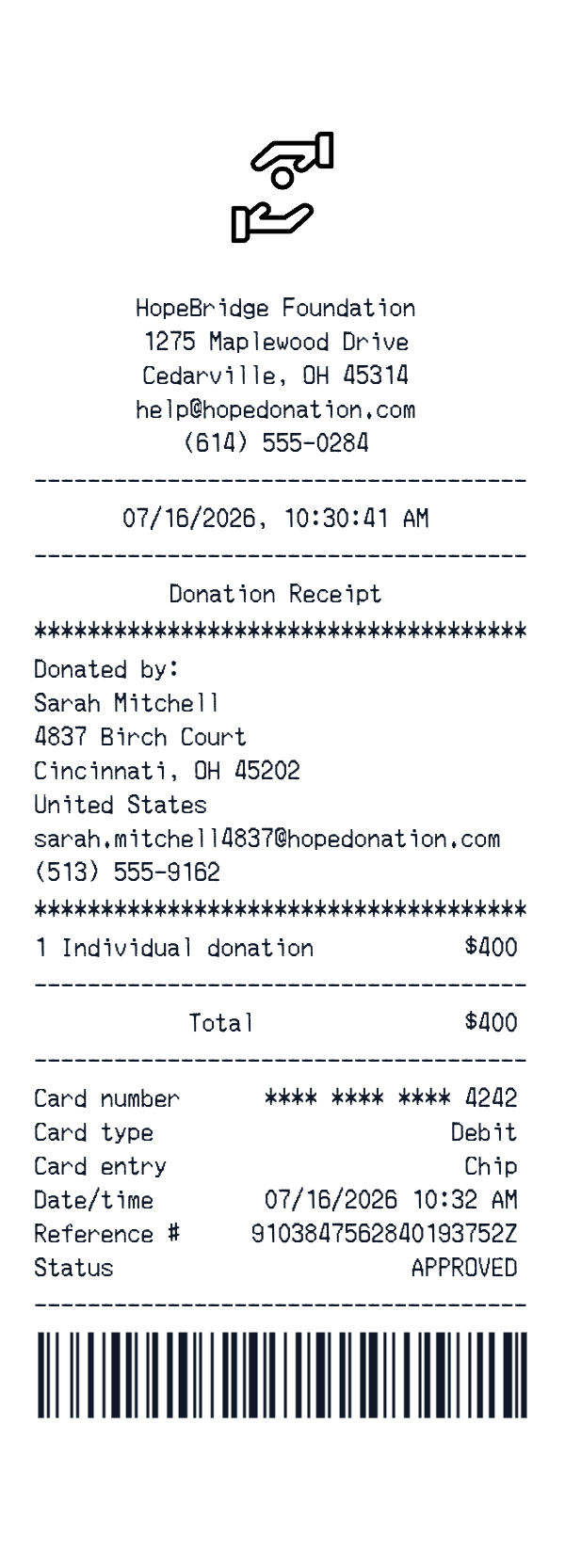
HopeBridge Foundation, 1275 Maplewood Drive, Cedarville, OH 45314, help@hopedonation.com, (614) 555-0284. 07/16/2026, 10:30:41 AM; Donation Receipt; Donated by Sarah Mitchell, 4837 Birch Court, Cincinnati, OH 45202, United States, sarah.mitchell4837@hopedonation.com, (513) 555-9162. Individual donation, quantity 1, price 400. Total 400. Card payment: **** **** **** 4242, Debit, Chip, 07/16/2026 10:32 AM, Reference # 9103847562840193752Z, APPROVED. Barcode.
How to make a Donation Receipt?
With our Receipt Maker, creating any receipt is as easy as 1, 2, 3.
Customize your receipt
Customize every detail, from items to pricing and payment details, with ease.
Export your receipt
One-click export, ready to print.
Where a Donation Receipt comes in handy
Personal giving records
Keep a personal record of charitable gifts across the year.
Year-end giving review
Review a year of charitable giving in one clean summary.
Nonprofit training
Prepare sample donation documents for nonprofit training or education.
Film and design mockups
Build mockups for film, TV, or design projects.
Digitizing paper receipts
Turn paper donation receipts into a clean digital format.
Recurring donations
Track recurring donations across the year.
Gift documentation
Document cash or in-kind gifts in personal records.
Tips for a Donation Receipt
- 1State the donation amount clearly and separately from any other figures.
- 2Add a receipt number and the donation date, both expected on donation records.
- 3Match the payment details to the method used, such as card last four digits or a check number.
- 4Keep the layout formal and plain, since donation receipts are simpler than retail receipts.
- 5Use the donor's full name as it should appear in personal giving records.
Similar Templates
More receipt templates like this one — pick one and generate your own receipt in seconds.
Get started in 1 minute
- ✔Create receipts in seconds
- ✔Customize everything
- ✔Easy with our Receipt Builder
