Free Mediterraneo Cucina Italiana Receipt Generator
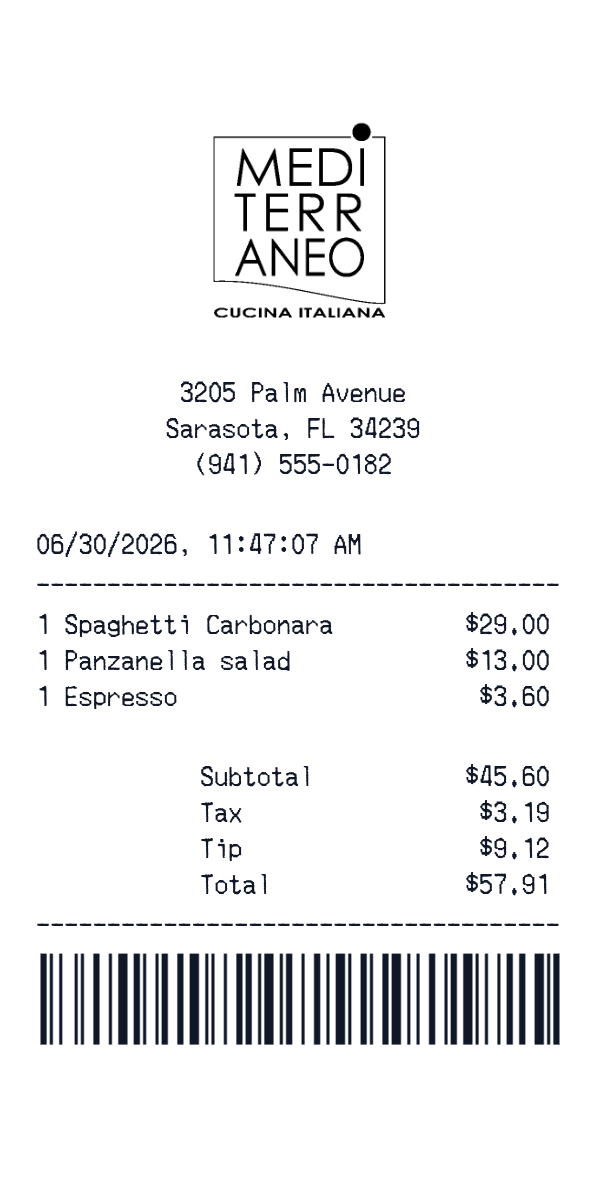
This Mediterraneo Cucina Italiana Receipt template is a sample restaurant check with a Sarasota business header, itemized dishes, tax, tip, and total. It is useful for personal dining records, training samples, or creative mockups.
The sample opens in the editor with every field customizable.
- ✔Create a receipt in seconds
- ✔No design skills needed
- ✔Fully customizable
- ✔Add custom logo
- ✔Edit line items
- ✔Choose payment method
- ✔Add or remove receipt elements
What's on a real Mediterraneo Cucina Italiana Receipt?
Every part of the receipt has a purpose. Here is what you will find on this template and why it matters.
Business header
Shows the restaurant name, street address, city, and phone number. It identifies the dining business for the record.
Date and time
Prints the visit date and time, often to the minute. It helps place the meal in a personal log.
Itemized courses
Lists dishes, sides, or drinks with quantities and prices. This makes the meal contents easy to review.
Subtotal and tax
Separates the pre-tax meal amount from sales tax. The tax line clarifies what was added before the final amount.
Tip line
Appears above the total on dine-in checks. It records the amount added for service.
Total
Shows the final amount after subtotal, tax, and tip. It is the key figure for the meal record.
Barcode
Adds a scannable code near the bottom. It gives the layout a typical point-of-sale closing element.
How the sample is arranged
This template comes pre-filled with a realistic sample receipt. Here is what it contains, top to bottom.
Business header: 3205 Palm Avenue, Sarasota, FL 34239, phone (941) 555-0182. Date and time: 06/30/2026, 11:47:07 AM. Items: Spaghetti Carbonara, 1 at $29.00; Panzanella salad, 1 at $13.00; Espresso, 1 at $3.60. Totals: Subtotal $45.60, Tax $3.19, Tip $9.12, Total $57.91. Payment: no payment method is shown. Closing: a barcode appears at the bottom.
How to make a Mediterraneo Cucina Italiana Receipt?
With our Receipt Maker, creating any receipt is as easy as 1, 2, 3.
Customize your receipt
Customize every detail, from items to pricing and payment details, with ease.
Export your receipt
One-click export, ready to print.
Where a Mediterraneo Cucina Italiana Receipt comes in handy
Personal dining records
Keep a personal record of restaurant visits and their costs.
Dining budget
Track dining-out spending and build a personal monthly budget.
Meal cost review
Review an itemized meal against courses, tax, tip, and total.
Film and app mockups
Create sample Italian restaurant checks for film, TV, or design work.
Hospitality training
Prepare sample checks for hospitality, service, or bookkeeping training.
Digitizing paper checks
Turn faded paper checks into a clean digital image.
Tips for a Mediterraneo Cucina Italiana Receipt
- 1Keep the math consistent: course prices, subtotal, tax, tip, and total should all add up.
- 2List items in course order, from appetizer to main, side, dessert, and drinks.
- 3Show the tax separately, and place the tip line above the total.
- 4Use a clear date and time for the restaurant visit.
Similar Templates
More receipt templates like this one — pick one and generate your own receipt in seconds.
Get started in 1 minute
- ✔Create receipts in seconds
- ✔Customize everything
- ✔Easy with our Receipt Builder
