Free Starbucks Receipt Generator
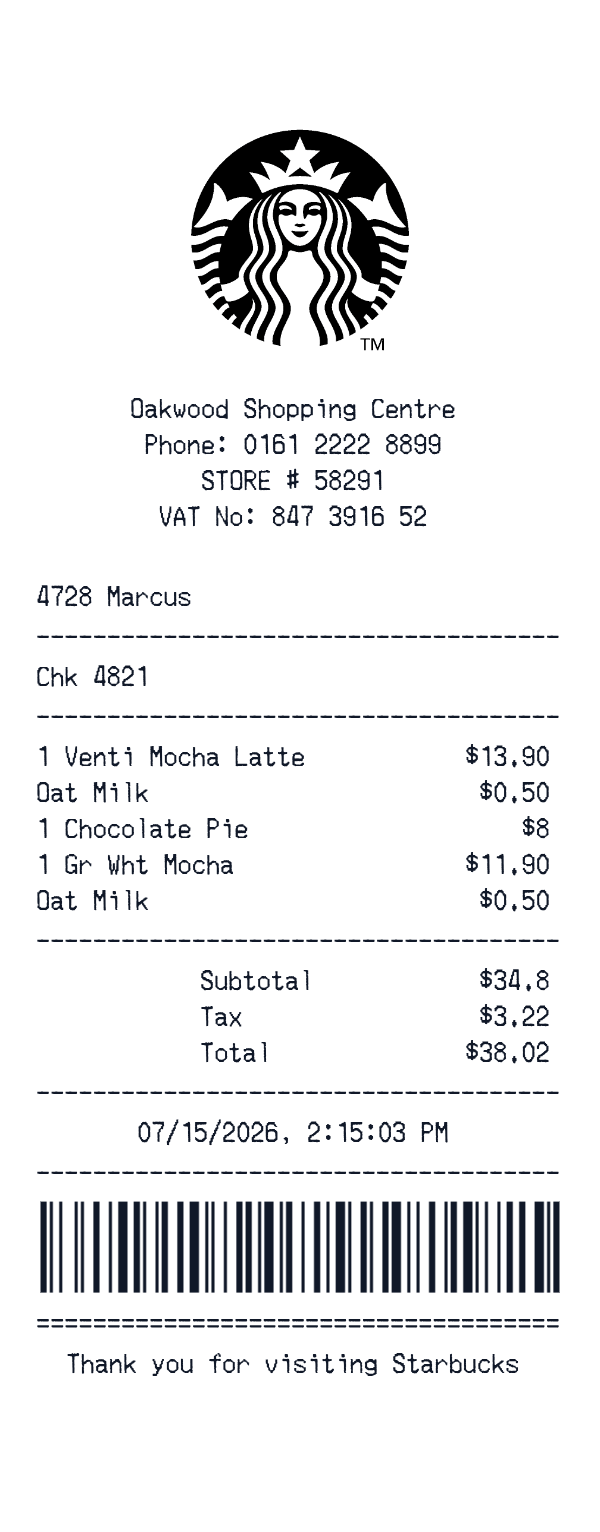
This Starbucks-style receipt template is a cafe-style itemized receipt for drinks, food, and small add-ons. It includes a store header, check line, item list, tax, and a closing thank-you message.
It is useful for personal cafe records, budget samples, hospitality training, or design mockups. The editor lets you adjust the fields, colors, and layout.
- ✔Create a receipt in seconds
- ✔No design skills needed
- ✔Fully customizable
- ✔Add custom logo
- ✔Edit line items
- ✔Choose payment method
- ✔Add or remove receipt elements
What's on a real Starbucks Receipt?
Every part of the receipt has a purpose. Here is what you will find on this template and why it matters.
Venue header
The cafe or store name with address or outlet details, so the purchase location is clear.
Store reference
A store number, tax number, or similar identifier that links the receipt to a particular outlet.
Check or order line
A short transaction label, such as a check number or server code, used to reference the visit.
Itemized lines
The drinks, food items, and extras listed with quantities and prices, showing what was included in the order.
Date and time
The date and time of the purchase, which helps place the visit in a specific day and service period.
Totals and tax
The subtotal, tax amount, and final total, giving a clear breakdown of the amount due.
Barcode or closing mark
A barcode or other closing mark that can appear near the end of the receipt for scanning or layout.
Closing message
A short thank-you or loyalty note that closes the receipt and gives it a cafe-style finish.
How the sample is arranged
This template comes pre-filled with a realistic sample receipt. Here is what it contains, top to bottom.
Oakwood Shopping Centre header with STORE # 58291, VAT No: 847 3916 52, and Phone: 0161 2222 8899. Custom lines show 4728 Marcus and Chk 4821. Items list Venti Mocha Latte, Oat Milk, Chocolate Pie, Gr Wht Mocha, and Oat Milk with quantities 1, blank, 1, 1, and blank and prices 13.90, 0.50, 8, 11.90, and 0.50. Subtotal 34.8 and Tax 3.22 lead to Total 38.02. No payment line is pre-filled. Date 07/15/2026, 2:15:03 PM, a barcode, and Thank you for visiting Starbucks close the layout.
How to make a Starbucks Receipt?
With our Receipt Maker, creating any receipt is as easy as 1, 2, 3.
Customize your receipt
Customize every detail, from items to pricing and payment details, with ease.
Export your receipt
One-click export, ready to print.
Where a Starbucks Receipt comes in handy
Personal cafe records
Keeping a personal record of cafe visits and purchased drinks.
Food budget tracking
Tracking cafe spending and building a personal food budget.
Meal cost review
Checking a cafe purchase against the itemized drinks and total.
Film and app mockups
Creating cafe receipt mockups for film, TV, apps, or design.
Hospitality training samples
Preparing sample cafe receipts for bookkeeping or hospitality training.
Digitizing paper receipts
Turning faded paper cafe receipts into a clean digital format.
Tips for a Starbucks Receipt
- 1Keep the math consistent: item prices, subtotal, tax, and total should all add up.
- 2Use plausible cafe prices for drinks, add-ons, and small food items.
- 3Include a check or order number, since it is one of the first details people notice.
- 4Show the tax separately and keep the date and time plausible for the visit.
- 5Add a short thank-you line at the end for a natural cafe receipt finish.
Similar Templates
More receipt templates like this one — pick one and generate your own receipt in seconds.
Get started in 1 minute
- ✔Create receipts in seconds
- ✔Customize everything
- ✔Easy with our Receipt Builder
