Free DoorDash Receipt Generator
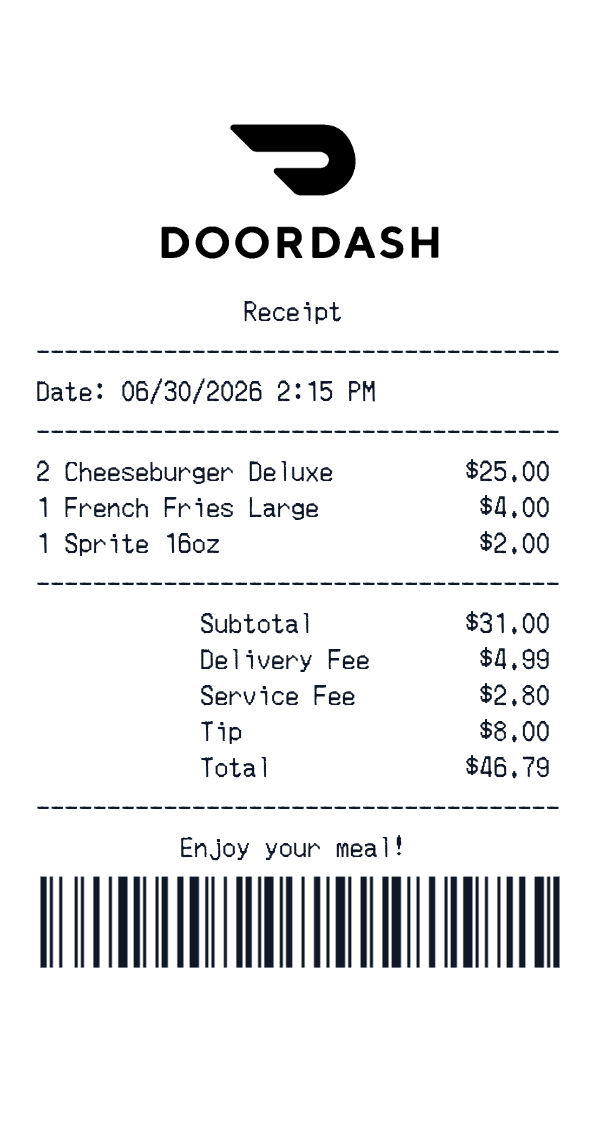
This DoorDash-style receipt template is a food-delivery receipt layout with a simple header, date and time, itemized meal lines, delivery-related totals, and a barcode. It is useful for personal meal records, sample bookkeeping, education, or creative mockups.
The editor is where you can adjust the business line, items, fees, tip, message, and barcode before downloading or printing.
- ✔Create a receipt in seconds
- ✔No design skills needed
- ✔Fully customizable
- ✔Add custom logo
- ✔Edit line items
- ✔Choose payment method
- ✔Add or remove receipt elements
What's on a real DoorDash Receipt?
Every part of the receipt has a purpose. Here is what you will find on this template and why it matters.
Business header
The top line identifies the venue or order source, giving the receipt a clear starting point.
Date and time
The visit or order timestamp helps place the meal in a specific day and time window.
Itemized meal lines
Each dish or drink appears with its quantity and price, so the meal contents are easy to review.
Delivery and service fees
Separate fee lines show the extra costs added to the food subtotal for delivery and platform service.
Tip line
The tip amount is listed before the final total, which is common on food and delivery receipts.
Total amount
The final total combines the food, fees, and tip into one amount for the order.
Barcode and closing line
A barcode and short message can close the receipt, adding a compact visual footer.
How the sample is arranged
This template comes pre-filled with a realistic sample receipt. Here is what it contains, top to bottom.
The header shows only the business line 'Receipt' with no address, phone, or email. The date and time line reads 'Date: 06/30/2026 2:15 PM'. The item list includes Cheeseburger Deluxe, 2 at 25.00, French Fries Large, 1 at 4.00, and Sprite 16oz, 1 at 2.00. The totals are Subtotal 31.00, Delivery Fee 4.99, Service Fee 2.80, Tip 8.00, and Total 46.79. No payment method appears in the sample. The closing lines include 'Enjoy your meal!' and a barcode.
How to make a DoorDash Receipt?
With our Receipt Maker, creating any receipt is as easy as 1, 2, 3.
Customize your receipt
Customize every detail, from items to pricing and payment details, with ease.
Export your receipt
One-click export, ready to print.
Where a DoorDash Receipt comes in handy
Personal meal records
Keep a personal record of a delivered meal and its costs.
Food budget tracking
Track food spending and delivery fees in a personal budget.
Meal cost review
Review itemized dishes, fees, tip, and final total after a meal.
Film and app mockups
Build a delivery-receipt mockup for film, TV, apps, or design.
Hospitality training samples
Prepare sample food-delivery receipts for bookkeeping or hospitality training.
Digitizing paper receipts
Turn a faded paper food receipt into a clean digital layout.
Tips for a DoorDash Receipt
- 1Keep the math consistent: item prices, subtotal, delivery fee, service fee, tip, and total should all add up.
- 2Use a clear date and time, since the sample shows the order timestamp near the top.
- 3List each food item with its quantity and price before adding the delivery and service fee lines.
- 4Place the tip line before the total, which matches common food and delivery receipt layouts.
- 5Keep the closing message short, such as a simple thank-you or meal line, above the barcode.
Similar Templates
More receipt templates like this one — pick one and generate your own receipt in seconds.
Get started in 1 minute
- ✔Create receipts in seconds
- ✔Customize everything
- ✔Easy with our Receipt Builder
