Free Carrefour Receipt Generator
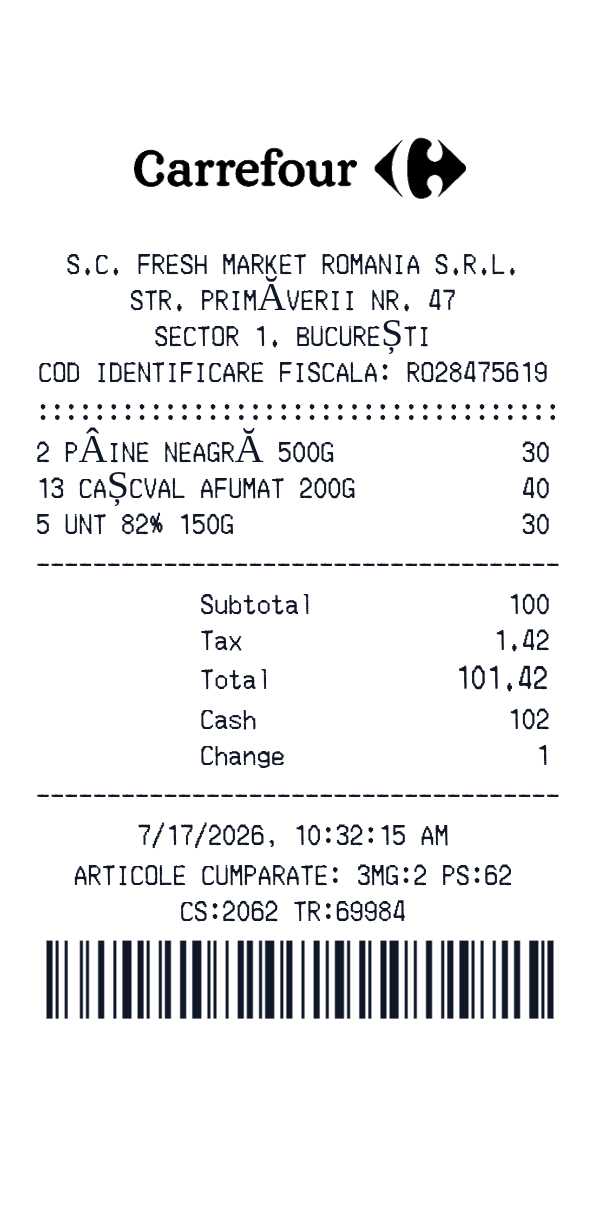
This Carrefour-style grocery receipt template is an itemized supermarket receipt layout. It pre-fills a Romanian store header, product lines, totals, cash payment, date and time, and a closing barcode.
Use it to build a clean sample receipt for personal records, budgeting, education, or design mockups. The editor lets you adjust every field before downloading.
- ✔Create a receipt in seconds
- ✔No design skills needed
- ✔Fully customizable
- ✔Add custom logo
- ✔Edit line items
- ✔Choose payment method
- ✔Add or remove receipt elements
What's on a real Carrefour Receipt?
Every part of the receipt has a purpose. Here is what you will find on this template and why it matters.
Store header
The store name, address, and tax identifier identify the location and legal entity behind the purchase.
Date and time
The purchase timestamp records when the transaction occurred, which helps order and review the record.
Itemized products
Each product line lists the item name, quantity, and price, so the receipt shows what was bought.
Subtotal and tax
The subtotal and tax lines separate the pre-tax amount from the tax added, leading to the final total.
Payment and change
The payment section shows the amount tendered and change returned, or the relevant card details for a card purchase.
Closing code and barcode
A closing message and barcode can record transaction codes or item counts for store reference.
How the sample is arranged
This template comes pre-filled with a realistic sample receipt. Here is what it contains, top to bottom.
Business header: S.C. FRESH MARKET ROMANIA S.R.L., STR. PRIMĂVERII NR. 47, SECTOR 1. BUCUREȘTI, COD IDENTIFICARE FISCALA: RO28475619. Items: PÂINE NEAGRĂ 500G ×2 at 30, CAȘCVAL AFUMAT 200G ×13 at 40, UNT 82% 150G ×5 at 30. Totals: Subtotal 100, Tax 1.42, Total 101.42. Payment: Cash 102, Change 1. Date/time: 7/17/2026, 10:32:15 AM. Custom message: ARTICOLE CUMPARATE: 3MG:2 PS:62 CS:2062 TR:69984. Barcode.
How to make a Carrefour Receipt?
With our Receipt Maker, creating any receipt is as easy as 1, 2, 3.
Customize your receipt
Customize every detail, from items to pricing and payment details, with ease.
Export your receipt
One-click export, ready to print.
Where a Carrefour Receipt comes in handy
Personal grocery records
Keep a clean record of a supermarket purchase and its line items.
Household food budget
Track weekly food spending from an itemized store receipt.
Trip cost review
Review what a shopping trip cost, line by line.
Film and app mockups
Build a grocery checkout mockup for film, TV, or design work.
Retail education
Prepare a sample itemized grocery receipt for retail or bookkeeping lessons.
Digitizing paper receipts
Turn a paper grocery receipt you already have into a clean digital image.
Tips for a Carrefour Receipt
- 1Keep product names short, as grocery registers often print abbreviated names rather than full descriptions.
- 2Keep the item count message consistent with the number of product lines shown in the receipt.
- 3Match the tax line to the subtotal so the final total is easy to follow.
- 4Use a plausible date and time for the shopping trip, including a specific clock time.
Similar Templates
More receipt templates like this one — pick one and generate your own receipt in seconds.
Get started in 1 minute
- ✔Create receipts in seconds
- ✔Customize everything
- ✔Easy with our Receipt Builder
