Free Grocery Receipt Generator
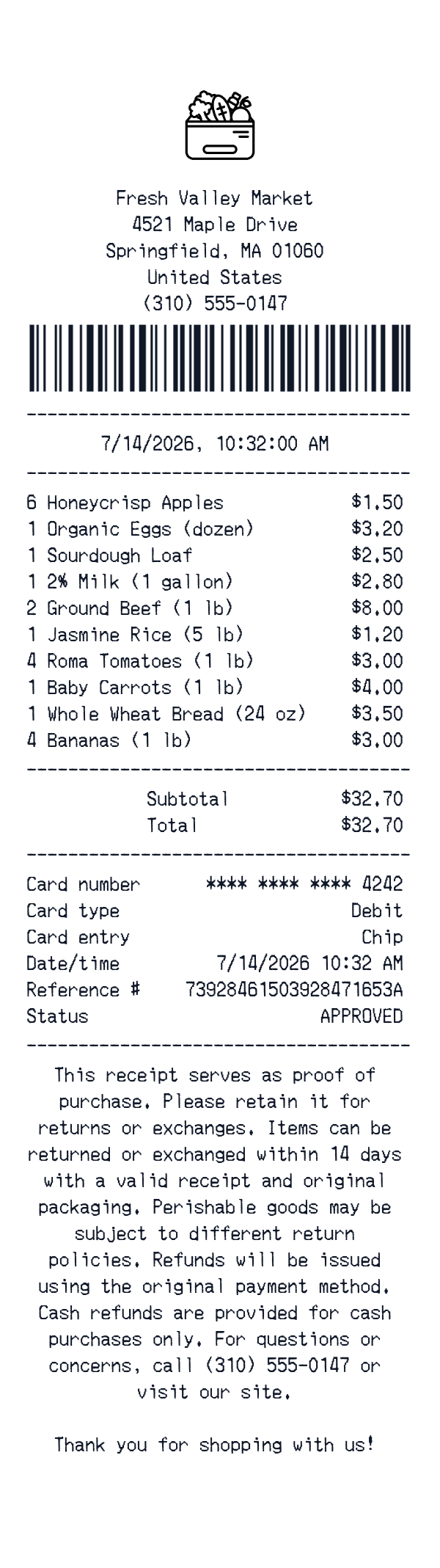
Grocery Receipt is an itemized grocery receipt template for a store purchase with product lines, a total, and card payment details. It fits personal purchase records, household food budgets, and sample receipts for training or design work.
The editor lets you replace the sample store, products, prices, and payment block.
- ✔Create a receipt in seconds
- ✔No design skills needed
- ✔Fully customizable
- ✔Add custom logo
- ✔Edit line items
- ✔Choose payment method
- ✔Add or remove receipt elements
What's on a real Grocery Receipt?
Every part of the receipt has a purpose. Here is what you will find on this template and why it matters.
Store header
The store name, address, and phone identify the merchant and give a contact point for the purchase record.
Date and time
The purchase date and time anchor the record and help sort shopping trips.
Itemized products
Each product line lists the item, quantity, and price, which makes the total easy to check.
Subtotal and total
The subtotal and final total show the amount before and after any adjustments, giving a clear cost summary.
Payment details
The payment block shows the method, masked card digits, and approval status for the transaction.
Barcode
A barcode gives the receipt a scannable identifier.
Closing message
A short note or thank-you line closes the receipt and can include store contact details.
How the sample is arranged
This template comes pre-filled with a realistic sample receipt. Here is what it contains, top to bottom.
Fresh Valley Market, 4521 Maple Drive, Springfield, MA 01060, United States, (310) 555-0147. Barcode, then 7/14/2026, 10:32:00 AM. Ten item lines with quantities and prices: Honeycrisp Apples, Organic Eggs, Sourdough Loaf, 2% Milk, Ground Beef, Jasmine Rice, Roma Tomatoes, Baby Carrots, Whole Wheat Bread, Bananas. Subtotal $32.70; Total $32.70. Card payment: **** **** **** 4242, Debit, Chip, 7/14/2026 10:32 AM, Reference # 73928461503928471653A, APPROVED. Closing message includes store phone and thank-you line.
How to make a Grocery Receipt?
With our Receipt Maker, creating any receipt is as easy as 1, 2, 3.
Customize your receipt
Customize every detail, from items to pricing and payment details, with ease.
Export your receipt
One-click export, ready to print.
Where a Grocery Receipt comes in handy
Personal purchase records
Keep a clear record of grocery shopping and its costs.
Household food budget
Track household food spending and keep a clear budget picture.
Weekly spending summary
Organize a week of grocery spending into a clean summary.
Trip cost review
Review what a grocery trip cost, line by line.
Film and app mockups
Build sample grocery receipts for film, TV, apps, or design.
Retail education
Prepare sample grocery receipts for retail or bookkeeping education.
Digitizing paper receipts
Turn paper grocery receipts into a clean digital format.
Tips for a Grocery Receipt
- 1Use abbreviated product names, since grocery registers often print short codes rather than full titles.
- 2For produce lines, show a PLU code and weight-based price instead of a simple unit price.
- 3Keep the item count line consistent with the number of product lines in the list.
- 4This sample has no tax line, so keep the subtotal and total the same.
- 5For card payments, print only the last four digits in the payment block.
Similar Templates
More receipt templates like this one — pick one and generate your own receipt in seconds.
Get started in 1 minute
- ✔Create receipts in seconds
- ✔Customize everything
- ✔Easy with our Receipt Builder
