Free Tesco Receipt Generator
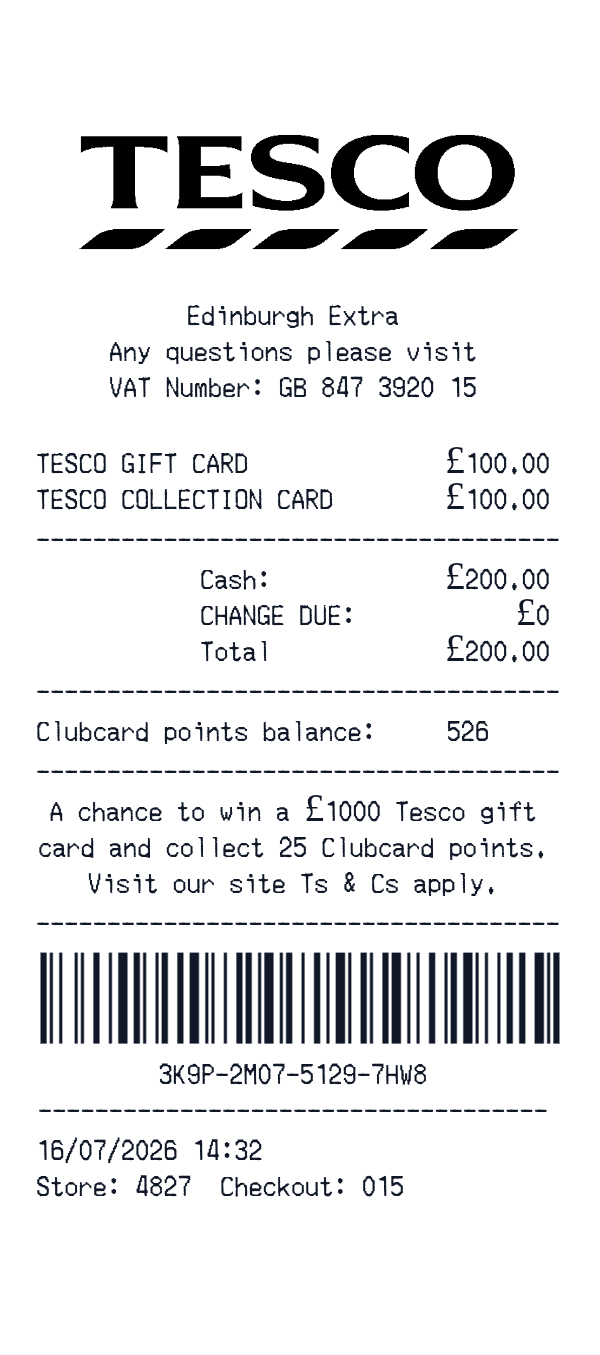
This Tesco-style receipt template is a grocery receipt layout with a store header, itemized lines, totals, loyalty and promotional messages, a transaction code, and a barcode.
It is useful for personal records, budget samples, education, and creative mockups. The editor lets you customize the sample fields.
- ✔Create a receipt in seconds
- ✔No design skills needed
- ✔Fully customizable
- ✔Add custom logo
- ✔Edit line items
- ✔Choose payment method
- ✔Add or remove receipt elements
What's on a real Tesco Receipt?
Every part of the receipt has a purpose. Here is what you will find on this template and why it matters.
Store header
Identifies the outlet with the store name, location or service line, and tax reference. It anchors the receipt to a specific store.
Date and register line
Shows when the sale happened and which store and checkout processed it. This helps tie the receipt to a specific transaction.
Itemized lines
Lists the products or services purchased with their prices. The item list is the core record of what was bought.
Loyalty line
Records points or rewards information when a loyalty card is used. It helps the shopper track rewards earned or remaining.
Payment and total
Shows the amount paid, any change due, and the final total. This section summarizes the money side of the purchase.
Code and barcode
Provides a transaction reference and scannable barcode. Stores use it for internal lookups and price checks.
How the sample is arranged
This template comes pre-filled with a realistic sample receipt. Here is what it contains, top to bottom.
Header: Edinburgh Extra, Any questions please visit, VAT Number: GB 847 3920 15. Items: TESCO GIFT CARD 100.00, TESCO COLLECTION CARD 100.00. Totals: Total 200.00. Payment: Cash 200.00, CHANGE DUE 0. Loyalty and promo: Clubcard points balance 526, chance to win a £1000 Tesco gift card. Barcode: present. Code: 3K9P-2M07-5129-7HW8. Date and register: 16/07/2026 14:32, Store 4827, Checkout 015.
How to make a Tesco Receipt?
With our Receipt Maker, creating any receipt is as easy as 1, 2, 3.
Customize your receipt
Customize every detail, from items to pricing and payment details, with ease.
Export your receipt
One-click export, ready to print.
Where a Tesco Receipt comes in handy
Personal purchase records
Keeping a personal record of grocery shopping and its costs.
Household food budget
Tracking household food spending and keeping a clear budget picture.
Trip cost review
Reviewing what a shopping trip cost, line by line.
Film and app mockups
Building mockups for film, TV, apps, or design projects.
Retail education samples
Preparing sample receipts for retail or bookkeeping education.
Digitizing paper receipts
Digitizing paper grocery receipts into a clean digital format.
Tips for a Tesco Receipt
- 1Use abbreviated product names, because real grocery registers often print short codes rather than full titles.
- 2Keep the item count line consistent with the number of product lines shown in the item list.
- 3Include a loyalty card number if the store has a rewards program, and match the points balance to the shopper.
- 4For cash payments, show the cash amount and change due so the total and payment amount are easy to check.
Similar Templates
More receipt templates like this one — pick one and generate your own receipt in seconds.
Get started in 1 minute
- ✔Create receipts in seconds
- ✔Customize everything
- ✔Easy with our Receipt Builder
