Free AT&T Retail Store Receipt Generator
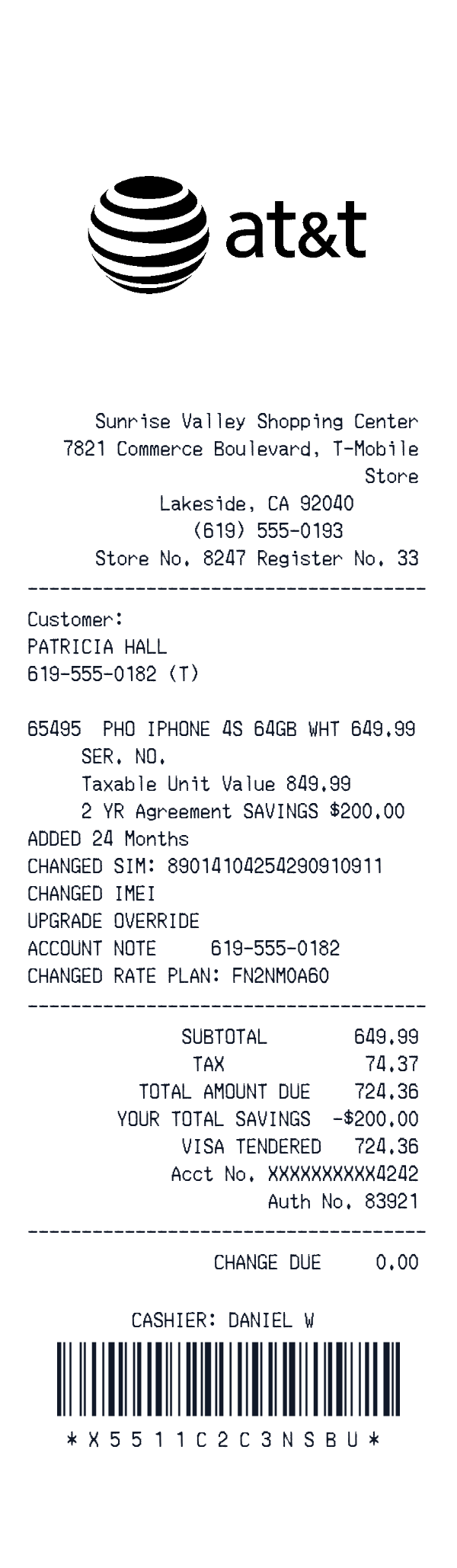
This AT&T-style retail store receipt template is a narrow, register-style layout for a shopping-center store sale. It pre-fills a customer block, a device line, agreement savings, SIM and IMEI notes, totals, card payment, cashier, and a bottom barcode. The editor lets you adjust the store details, notes, totals, and payment before saving your version.
- ✔Create a receipt in seconds
- ✔No design skills needed
- ✔Fully customizable
- ✔Add custom logo
- ✔Edit line items
- ✔Choose payment method
- ✔Add or remove receipt elements
What's on a real AT&T Retail Store Receipt?
Every part of the receipt has a purpose. Here is what you will find on this template and why it matters.
Store header
The top identifies the store location, contact number, store number, and register number so the receipt can be tied to a specific register.
Customer and account notes
This block records the customer name, phone number, and any account or device changes made during the visit.
Device and service lines
The main line item shows the product code, abbreviated device name, taxable unit value, agreement savings, and service months.
Totals
Subtotal, tax, total amount due, and savings are listed together so the amount owed and any discount are easy to check.
Payment and change
The payment section shows the tender type, card last four, authorization number, and change due when the sale is completed.
Closing codes
A cashier line and barcode or code string near the bottom help identify the transaction for later review.
How the sample is arranged
This template comes pre-filled with a realistic sample receipt. Here is what it contains, top to bottom.
Business header: Sunrise Valley Shopping Center, 7821 Commerce Boulevard, T-Mobile Store, Lakeside, CA 92040, (619) 555-0193, Store No. 8247 Register No. 33. Customer line: PATRICIA HALL, 619-555-0182 (T), 65495 PHO IPHONE 4S 64GB WHT 649.99, Taxable Unit Value 849.99, 2 YR Agreement SAVINGS $200.00, ADDED 24 Months, SIM, IMEI, UPGRADE OVERRIDE, CHANGED RATE PLAN: FN2NM0A60. Totals: SUBTOTAL 649.99, TAX 74.37, TOTAL AMOUNT DUE 724.36, YOUR TOTAL SAVINGS -$200.00. Payment: VISA TENDERED 724.36, Acct No. XXXXXXXXXX4242, Auth No. 83921, CHANGE DUE 0.00. Closing: CASHIER: DANIEL W and barcode.
How to make a AT&T Retail Store Receipt?
With our Receipt Maker, creating any receipt is as easy as 1, 2, 3.
Customize your receipt
Customize every detail, from items to pricing and payment details, with ease.
Export your receipt
One-click export, ready to print.
Where a AT&T Retail Store Receipt comes in handy
Personal purchase records
Keep a personal record of a retail store purchase and its line items.
Household budget tracking
Track household spending on devices, accessories, and related store purchases.
Line-by-line review
Review the device, notes, and totals line by line after the fact.
App and film mockups
Build receipt mockups for app, film, TV, or website projects.
Retail education
Prepare sample receipts for retail, telecom, or bookkeeping education and training.
Digitizing paper receipts
Digitize a faded or damaged paper store receipt into a clean image.
Tips for a AT&T Retail Store Receipt
- 1Use abbreviated product names, such as PHO IPHONE 4S 64GB WHT, instead of long product titles.
- 2Keep the math consistent: the subtotal, tax, total amount due, and savings should add up correctly.
- 3For card payments, show only the last four digits of the card number and include the authorization number.
- 4Include the store number, register number, cashier line, and barcode if the layout has room.
- 5Use the date and time that match the purchase record you are documenting.
Similar Templates
More receipt templates like this one — pick one and generate your own receipt in seconds.
Get started in 1 minute
- ✔Create receipts in seconds
- ✔Customize everything
- ✔Easy with our Receipt Builder
