Free Maverik Receipt Generator
This Maverik-style receipt template is a gas-station receipt layout with a header, item lines, totals, payment, and barcode. It is useful for personal records, bookkeeping samples, education, and creative projects. The editor lets you replace the sample fields with your own details.
- ✔Create a receipt in seconds
- ✔No design skills needed
- ✔Fully customizable
- ✔Add custom logo
- ✔Edit line items
- ✔Choose payment method
- ✔Add or remove receipt elements
What's on a real Maverik Receipt?
Every part of the receipt has a purpose. Here is what you will find on this template and why it matters.
Station header
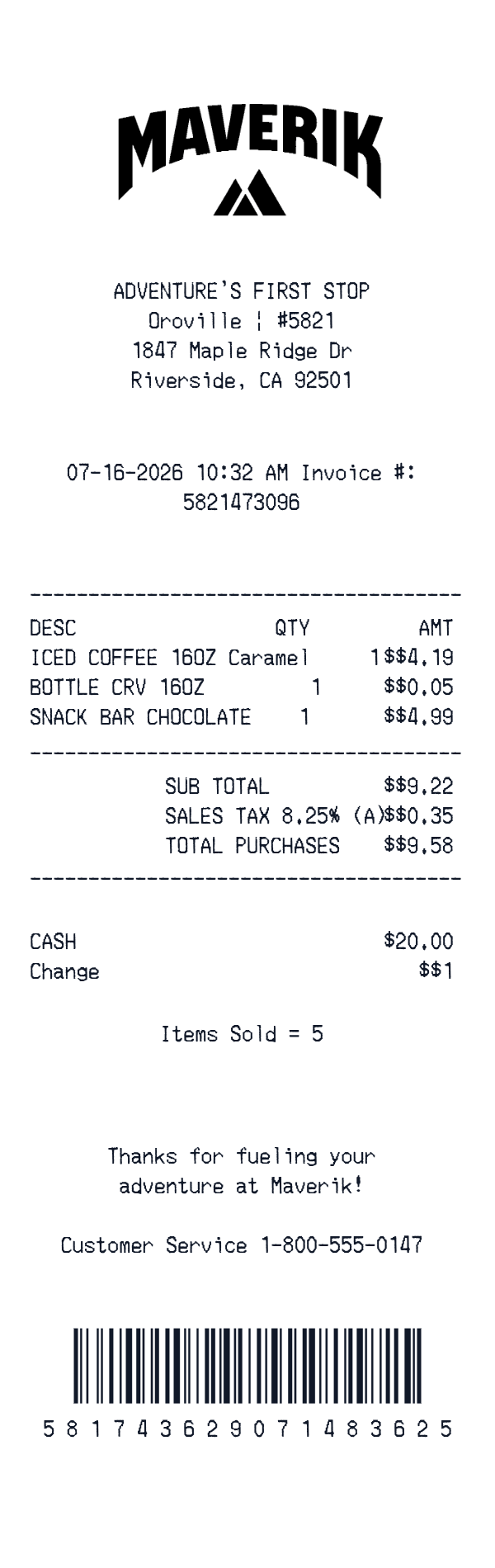
The station name and address identify where the purchase happened. This is the first block on most fuel receipts.
Date and invoice line
The date, time, and invoice number record when the transaction occurred. They help match the receipt to a specific fill-up or purchase.
Item lines
Quantity, description, and amount columns list each purchased item. They show what was sold and how each line is priced.
Totals and tax
The subtotal, sales tax, and final total break down the cost. The tax rate makes the calculation easier to check.
Payment line
The payment method shows how the customer paid, such as cash or card. Change or card details may appear here.
Barcode and code
A barcode or spaced numeric code appears near the bottom. It is a transaction reference used on many printed receipts.
How the sample is arranged
This template comes pre-filled with a realistic sample receipt. Here is what it contains, top to bottom.
ADVENTURE'S FIRST STOP, Oroville | #5821, 1847 Maple Ridge Dr, Riverside, CA 92501. 07-16-2026 10:32 AM Invoice #: 5821473096; Items Sold = 5. QTY DESC AMT: 1 ICED COFFEE 16OZ Caramel $4.19, 1 BOTTLE CRV 16OZ $0.05, 1 SNACK BAR CHOCOLATE $4.99. CASH $20.00, Change $1. SUB TOTAL $9.22, SALES TAX 8.25% (A) $0.35, TOTAL PURCHASES $9.58. Thanks for fueling your adventure at Maverik! Customer Service 1-800-555-0147; barcode 5 8 1 7 4 3 6 2 9 0 7 1 4 8 3 6 2 5.
How to make a Maverik Receipt?
With our Receipt Maker, creating any receipt is as easy as 1, 2, 3.
Customize your receipt
Customize every detail, from items to pricing and payment details, with ease.
Export your receipt
One-click export, ready to print.
Where a Maverik Receipt comes in handy
Personal fuel stop records
Keep your own record of a Maverik-style fuel stop and convenience purchases.
Trip cost breakdown
Break down a road trip stop by items, tax, and total cost.
Film and TV mockups
Create a Maverik-style receipt prop for film, TV, or design projects.
Driving education samples
Use a sample Maverik-style receipt in bookkeeping or driving education materials.
Digitizing paper receipts
Turn a faded paper Maverik-style receipt into a clean editable image.
Convenience purchase records
Record items, tax, cash, and change for your own personal purchase log.
Tips for a Maverik Receipt
- 1Keep the math consistent: subtotal plus sales tax should equal the final total.
- 2Show the sales tax separately with its rate, as the sample does with 8.25%.
- 3Use the item columns for quantity, description, and amount so each line is easy to read.
- 4Keep the payment and change lines aligned with the cash amount and final total.
Similar Templates
More receipt templates like this one — pick one and generate your own receipt in seconds.
Get started in 1 minute
- ✔Create receipts in seconds
- ✔Customize everything
- ✔Easy with our Receipt Builder
