Free BP Receipt Generator
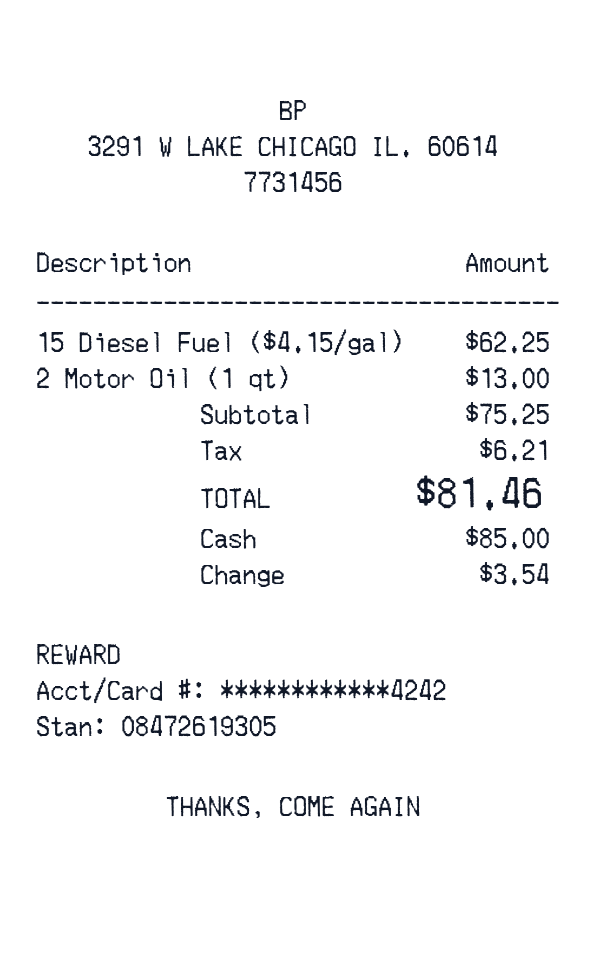
This BP-style gas receipt template is an itemized fuel receipt with a station header, two item lines, subtotal, tax, total, cash payment, and reward/closing notes. It is useful for personal fuel records, bookkeeping samples, training materials, and design mockups.
The Receiptum editor lets you adjust the fields, colors, and layout before downloading or printing.
- ✔Create a receipt in seconds
- ✔No design skills needed
- ✔Fully customizable
- ✔Add custom logo
- ✔Edit line items
- ✔Choose payment method
- ✔Add or remove receipt elements
What's on a real BP Receipt?
Every part of the receipt has a purpose. Here is what you will find on this template and why it matters.
Station header
The top block identifies the station by name and location, which helps place the purchase in the right context.
Reward note
A short reward or account block can carry an account or card reference and a station code for the sample.
Item lines
The itemized list shows fuel and add-on products with quantity and line price, so the charge can be reviewed line by line.
Totals
Subtotal, tax, and final total summarize the amount due after all lines are added.
Cash payment
The payment section records cash tender and change, matching the final total for a cash transaction.
Closing message
A brief closing line adds a thank-you or service note at the bottom of the receipt.
How the sample is arranged
This template comes pre-filled with a realistic sample receipt. Here is what it contains, top to bottom.
Business header: BP, 3291 W Lake Chicago IL. 60614, and 7731456. Item lines: Diesel Fuel ($4.15/gal), quantity 15, line 62.25; Motor Oil (1 qt), quantity 2, line 13.00. Totals: Subtotal 75.25, Tax 6.21, TOTAL 81.46. Payment: Cash 85.00, Change 3.54. Closing notes: REWARD, Acct/Card #: ************4242, Stan: 08472619305, then THANKS, COME AGAIN.
How to make a BP Receipt?
With our Receipt Maker, creating any receipt is as easy as 1, 2, 3.
Customize your receipt
Customize every detail, from items to pricing and payment details, with ease.
Export your receipt
One-click export, ready to print.
Where a BP Receipt comes in handy
Fuel expense records
Documenting your own fuel purchases for personal vehicle expense tracking.
Personal fuel budget
Keeping a running record of fuel costs for a personal vehicle.
Trip cost breakdown
Breaking down trip costs by fuel when planning a road trip.
Film and TV mockups
Building fuel receipt mockups for film, TV, apps, or design projects.
Driving education
Preparing sample fuel receipts for bookkeeping or driving education.
Digitizing old receipts
Digitizing faded paper fuel receipts into a clean digital format.
Tips for a BP Receipt
- 1Keep the math consistent: gallons times price per gallon should equal the fuel subtotal.
- 2Use a fuel price that matches the period, such as the sample's diesel price per gallon.
- 3Show the fuel tax separately, as the sample does with subtotal and tax lines.
- 4Match the cash payment to the total by adding cash tender and change.
Similar Templates
More receipt templates like this one — pick one and generate your own receipt in seconds.
Get started in 1 minute
- ✔Create receipts in seconds
- ✔Customize everything
- ✔Easy with our Receipt Builder
