Free Hilton Hotel Receipt Generator
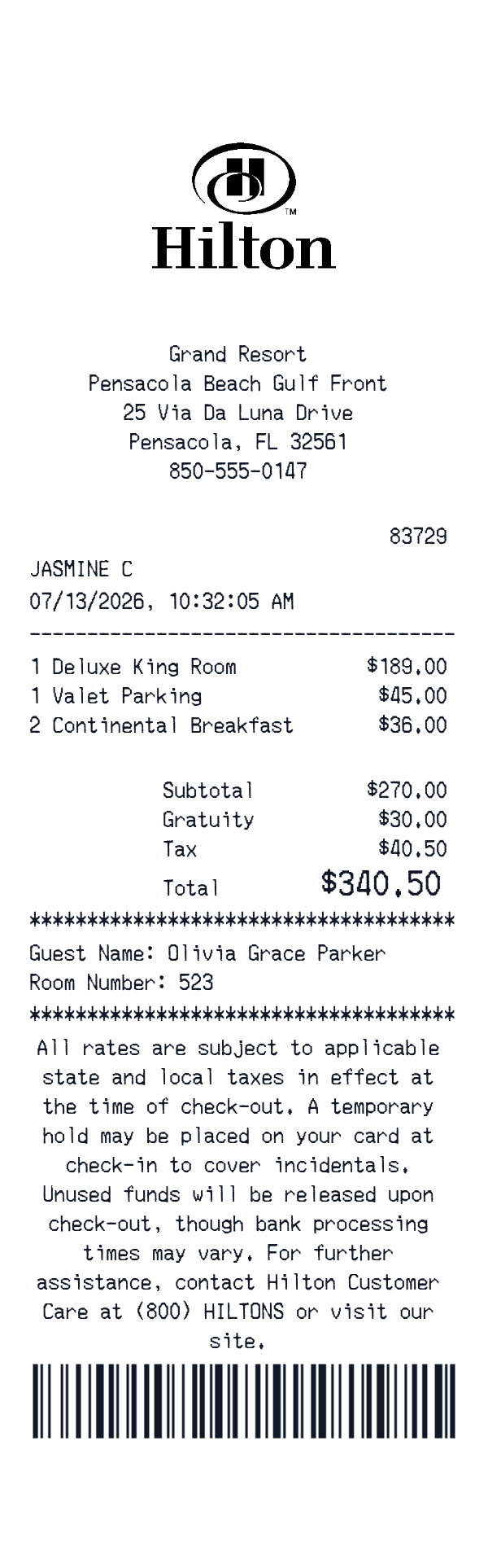
This Hilton-style hotel receipt template pre-fills a Grand Resort folio with guest, room, charge, and total details. It is useful for personal trip records, travel education, or creative mockups of a hotel stay. The editor lets you adjust the fields and download the finished image.
- ✔Create a receipt in seconds
- ✔No design skills needed
- ✔Fully customizable
- ✔Add custom logo
- ✔Edit line items
- ✔Choose payment method
- ✔Add or remove receipt elements
What's on a real Hilton Hotel Receipt?
Every part of the receipt has a purpose. Here is what you will find on this template and why it matters.
Business header
The property name and address identify the hotel. They help place the folio in the right location.
Contact line
A phone number gives a point of contact for questions about the stay.
Folio reference
A folio or reservation number links the charges to a single booking.
Guest and room details
The guest name and room number identify who the folio belongs to.
Date and time
The printed date and time mark when the folio was issued.
Charges list
Room rate, parking, food, and other extras are listed as separate line items.
Totals
Subtotal, gratuity, tax, and final total show how the bill is built.
Barcode
A barcode can store a reference number for scanning or record keeping.
How the sample is arranged
This template comes pre-filled with a realistic sample receipt. Here is what it contains, top to bottom.
Grand Resort header with Pensacola Beach Gulf Front, 25 Via Da Luna Drive, Pensacola, FL 32561, and phone 850-555-0147. Then 83729, JASMINE C, and 07/13/2026, 10:32:05 AM appear above the items. The item list shows Deluxe King Room, Valet Parking, and Continental Breakfast. Totals show Subtotal 270.00, Gratuity 30.00, Tax 40.50, and Total 340.50. No payment method is shown; guest name Olivia Grace Parker, room 523, and a tax/hold note close before the barcode.
How to make a Hilton Hotel Receipt?
With our Receipt Maker, creating any receipt is as easy as 1, 2, 3.
Customize your receipt
Customize every detail, from items to pricing and payment details, with ease.
Export your receipt
One-click export, ready to print.
Where a Hilton Hotel Receipt comes in handy
Trip cost records
Keep a clean record of hotel stay costs for personal budgeting.
Stay cost review
Review room, parking, and food charges on a single folio.
Business travel log
Log business travel stays and costs in a personal travel ledger.
Travel education
Prepare sample hotel folios for travel or bookkeeping education.
Film and design mockups
Build mockups for film, TV, or design projects.
Digitizing paper receipts
Turn paper hotel receipts into a clean digital format.
Tips for a Hilton Hotel Receipt
- 1Show check-in and check-out dates and the number of nights, since they anchor the folio.
- 2Break the total into room rate, taxes and fees, and incidentals so each charge is easy to check.
- 3Include a folio or confirmation number so the charges can be tied to one booking.
- 4For card payments, print only the last four digits when the payment method is shown.
Similar Templates
More receipt templates like this one — pick one and generate your own receipt in seconds.
Get started in 1 minute
- ✔Create receipts in seconds
- ✔Customize everything
- ✔Easy with our Receipt Builder
