Free Food Delivery Receipt Generator
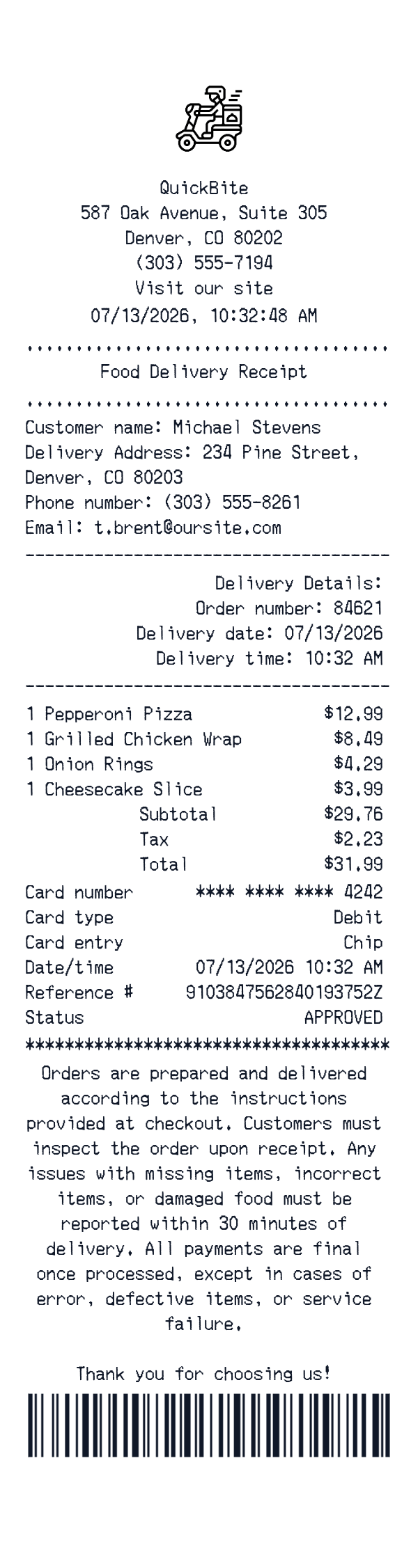
This Food Delivery Receipt template is a printable sample for itemized delivery orders from a restaurant or food service business. It shows the business header, customer and delivery details, ordered items, totals, and card payment information.
You can open it in the Receiptum editor, change the text, items, and totals, then download the finished receipt as a PNG image or print it.
- ✔Create a receipt in seconds
- ✔No design skills needed
- ✔Fully customizable
- ✔Add custom logo
- ✔Edit line items
- ✔Choose payment method
- ✔Add or remove receipt elements
What's on a real Food Delivery Receipt?
Every part of the receipt has a purpose. Here is what you will find on this template and why it matters.
Business header
The venue name, street address, and phone number identify the food business and give the reader basic contact context.
Date and time
The timestamp marks when the order was placed or delivered, which helps match the receipt to a specific transaction.
Customer and delivery details
Customer name, delivery address, and contact information tie the itemized order to the person who received it.
Order details
An order number and delivery date or time provide a reference point for the transaction.
Itemized food lines
Each dish or side appears with its quantity and price, so the ordered meal can be reviewed line by line.
Totals
Subtotal, tax, and final total show how the payment amount is calculated.
Payment block
The payment method and masked card details show how the order was paid without revealing the full card number.
Barcode
A barcode at the end can serve as a visual reference for scanning or matching the receipt to an order.
How the sample is arranged
This template comes pre-filled with a realistic sample receipt. Here is what it contains, top to bottom.
QuickBite appears at the top with its Denver address and phone number, then the date, time, and Food Delivery Receipt title. Customer name, delivery address, phone, email, order number, delivery date, and delivery time follow. Items are Pepperoni Pizza, Grilled Chicken Wrap, Onion Rings, and Cheesecake Slice, each quantity 1 with its price. Totals show Subtotal 29.76, Tax 2.23, and Total 31.99. Payment is a Debit card ending 4242, chip entry, reference 9103847562840193752Z, and APPROVED status. A closing message and barcode end the layout.
How to make a Food Delivery Receipt?
With our Receipt Maker, creating any receipt is as easy as 1, 2, 3.
Customize your receipt
Customize every detail, from items to pricing and payment details, with ease.
Export your receipt
One-click export, ready to print.
Where a Food Delivery Receipt comes in handy
Delivery order records
Keep a personal record of food delivery orders and totals.
Food budget tracking
Track delivered meal spending and compare it with a personal budget.
Meal cost review
Review itemized delivery dishes, tax, and final total after checkout.
Film and app mockups
Use the layout for food delivery scenes, app screens, or design work.
Hospitality training
Prepare sample delivery receipts for bookkeeping or hospitality training exercises.
Digitizing paper receipts
Turn faded paper delivery receipts into a clean digital image.
Tips for a Food Delivery Receipt
- 1Keep item prices, subtotal, tax, and total mathematically consistent before downloading the finished receipt.
- 2Include an order number and delivery timestamp, since delivery receipts usually need a clear reference point.
- 3Show only the last four digits of a card when the payment block uses card details.
- 4Match customer name, delivery address, and phone number to the same order details in the sample.
Similar Templates
More receipt templates like this one — pick one and generate your own receipt in seconds.
Get started in 1 minute
- ✔Create receipts in seconds
- ✔Customize everything
- ✔Easy with our Receipt Builder
