Free Dragut Kebab Spain Receipt Generator
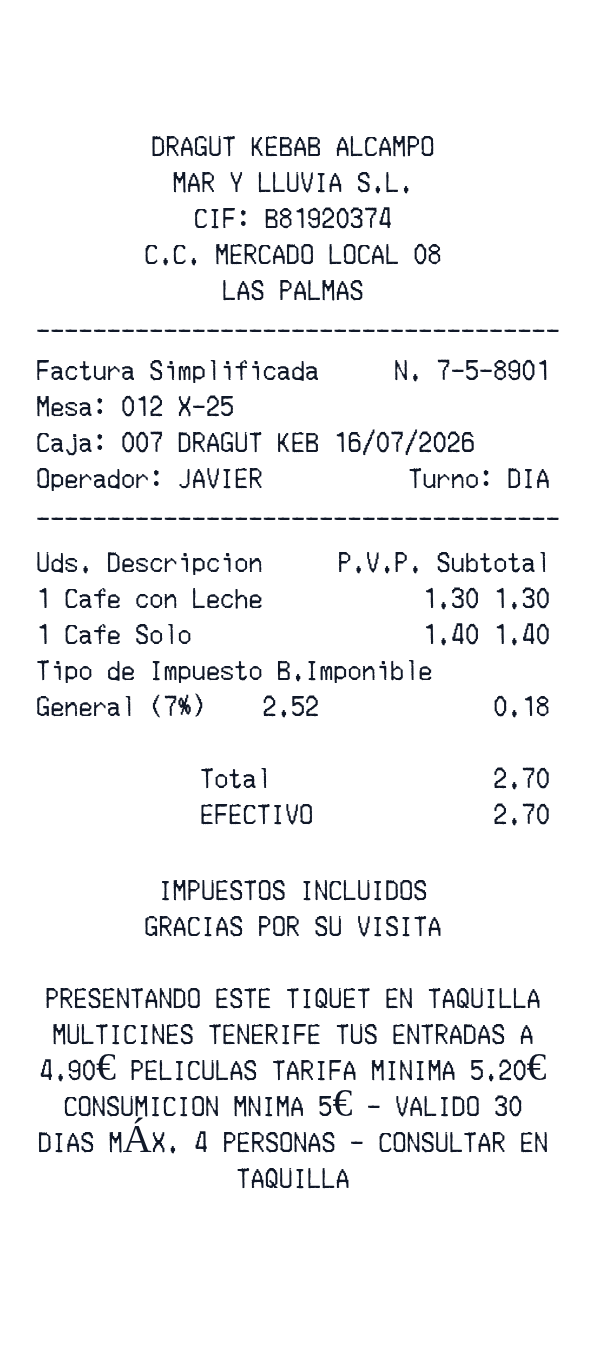
This Dragut Kebab Spain-style receipt template is a Spanish food receipt layout with a header, itemized lines, tax, and a cash total. It is useful for keeping personal meal records, preparing hospitality training samples, or building design mockups. The editor lets you adjust the business details, item lines, totals, and footer message before downloading or printing.
- ✔Create a receipt in seconds
- ✔No design skills needed
- ✔Fully customizable
- ✔Add custom logo
- ✔Edit line items
- ✔Choose payment method
- ✔Add or remove receipt elements
What's on a real Dragut Kebab Spain Receipt?
Every part of the receipt has a purpose. Here is what you will find on this template and why it matters.
Business header
The restaurant name, company line, address, and tax identifier identify the food venue.
Service details
Table, register, operator, shift, and date details tie the visit to a counter or dine-in service.
Itemized lines
Each sold item appears with quantity, description, unit price, and line subtotal.
Tax summary
The tax block shows the taxable base, rate, and tax amount.
Total and payment
The final total and cash payment amount close the financial section.
Footer message
A footer message can include a thank-you note or short offer.
How the sample is arranged
This template comes pre-filled with a realistic sample receipt. Here is what it contains, top to bottom.
Business header: DRAGUT KEBAB ALCAMPO, MAR Y LLUVIA S.L., CIF B81920374, C.C. MERCADO LOCAL 08, LAS PALMAS. Service lines: Factura Simplificada N. 7-5-8901, Mesa 012 X-25, Caja 007 DRAGUT KEB 16/07/2026, Operador JAVIER, Turno DIA. Items: 1 Café con Leche at 1.30, 1 Café Solo at 1.40. Tax: base 2.52, General 7% tax 0.18. Total: 2.70, paid EFECTIVO 2.70. Footer: IMPUESTOS INCLUIDOS, GRACIAS POR SU VISITA, and a Multicines Tenerife offer.
How to make a Dragut Kebab Spain Receipt?
With our Receipt Maker, creating any receipt is as easy as 1, 2, 3.
Customize your receipt
Customize every detail, from items to pricing and payment details, with ease.
Export your receipt
One-click export, ready to print.
Where a Dragut Kebab Spain Receipt comes in handy
Personal dining records
Keep a personal record of kebab and cafe visits.
Food budget
Track food spending and build a personal budget.
Meal cost review
Review a meal purchase against itemized drinks and total.
Film and app mockups
Build mockups for film, TV, apps, or design projects.
Hospitality training
Prepare sample food receipts for hospitality or bookkeeping training.
Digitizing paper receipts
Turn faded paper food receipts into a clean digital format.
Tips for a Dragut Kebab Spain Receipt
- 1Keep item prices, subtotal, tax, and total consistent so the sample reads as a coherent food receipt.
- 2Use a Spanish-style header with venue name, company line, address, and tax identifier.
- 3Include table, register, operator, shift, and date lines for counter-service or dine-in samples.
- 4Show the tax base, rate, and tax amount separately before the final total.
- 5Use a cash line when the sample payment method is cash.
Similar Templates
More receipt templates like this one — pick one and generate your own receipt in seconds.
Get started in 1 minute
- ✔Create receipts in seconds
- ✔Customize everything
- ✔Easy with our Receipt Builder
