Free Douglas Pharmacy Receipt Generator
This Douglas Pharmacy-style receipt template is an itemized pharmacy receipt layout with a card-payment detail block. It is useful for personal purchase records, bookkeeping samples, education and training, creative mockups, and digitizing paper receipts you already have. Open the template in the editor to adjust the header, order lines, payment details, and closing message.
- ✔Create a receipt in seconds
- ✔No design skills needed
- ✔Fully customizable
- ✔Add custom logo
- ✔Edit line items
- ✔Choose payment method
- ✔Add or remove receipt elements
What's on a real Douglas Pharmacy Receipt?
Every part of the receipt has a purpose. Here is what you will find on this template and why it matters.
Business header
The pharmacy name, address, and phone number identify the location where the purchase was recorded.
Order line
The purchase or order description and amount show what was bought and its cost.
Order number
A purchase identifier helps distinguish one transaction from another in personal records or samples.
Subtotal
The subtotal lists the amount before payment details are added.
Payment block
Card network, contactless or PIN validation, and cardholder copy lines document how the purchase was paid.
Transaction identifiers
Merchant reference, terminal, period, and transaction numbers give the payment event specific identifying details.
Date and auth code
The date, time, and authorization code identify when and how the card payment was approved.
Closing total
The final total and closing message wrap up the amount and the receipt state.
How the sample is arranged
This template comes pre-filled with a realistic sample receipt. Here is what it contains, top to bottom.
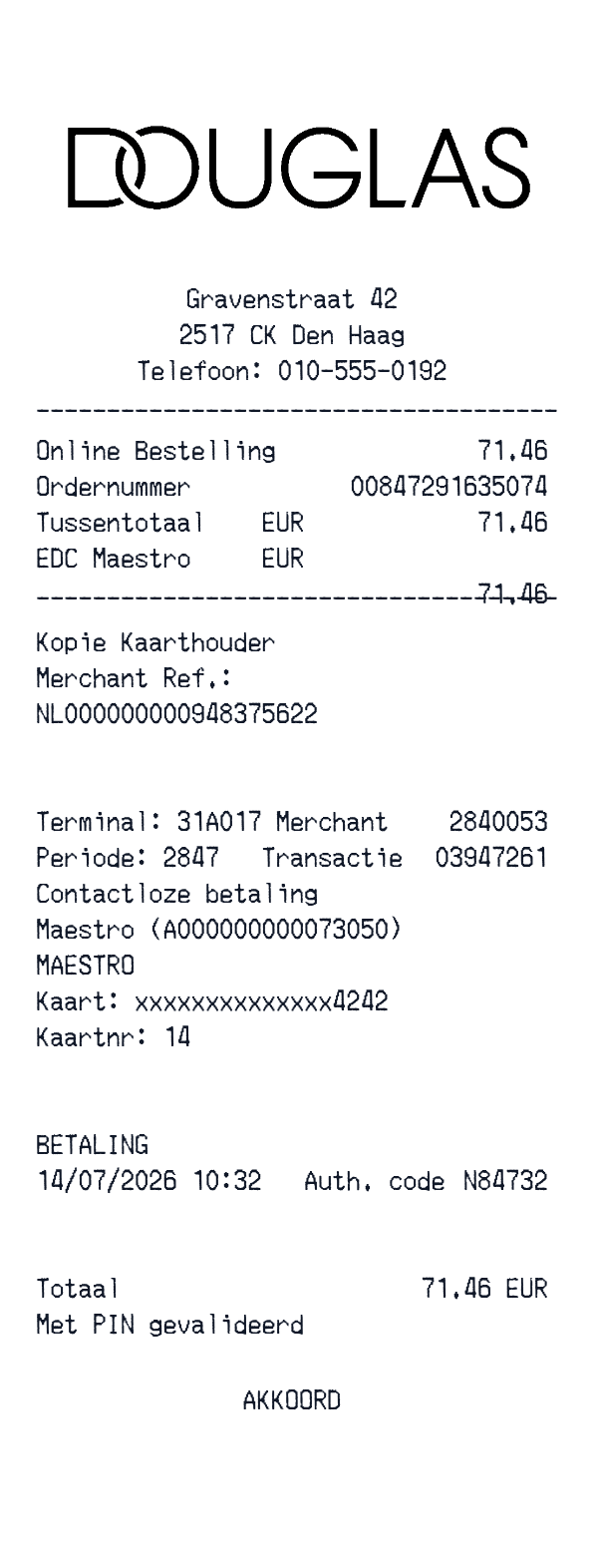
The sample opens with the business header: Gravenstraat 42, 2517 CK Den Haag, Telefoon: 010-555-0192. It lists Online Bestelling at 71.46 and Ordernummer 00847291635074, followed by Tussentotaal EUR 71.46. Payment lines show EDC Maestro EUR 71.46, Kopie Kaarthouder, Merchant Ref.: NL000000000948375622, Terminal: 31A017 Merchant 2840053, Periode: 2847 Transactie 03947261. Card details include Contactloze betaling, Maestro (A000000000073050), MAESTRO, Kaart: xxxxxxxxxxxxxx4242, Kaartnr: 14, BETALING, 14/07/2026 10:32 Auth. code N84732. The closing block shows Totaal 71.46 EUR, Met PIN gevalideerd, and AKKOORD.
How to make a Douglas Pharmacy Receipt?
With our Receipt Maker, creating any receipt is as easy as 1, 2, 3.
Customize your receipt
Customize every detail, from items to pricing and payment details, with ease.
Export your receipt
One-click export, ready to print.
Where a Douglas Pharmacy Receipt comes in handy
Personal purchase records
Keep a clean record of a pharmacy purchase and its card payment.
Personal files copy
Keep a personal copy of a pharmacy purchase record for your files.
Pharmacy education
Prepare sample pharmacy receipt layouts for classroom or training exercises.
Film and design mockups
Build mockup pharmacy receipts for film, TV, or design work.
Digitizing paper receipts
Digitize a paper pharmacy receipt you already have into a clean layout.
Payment detail layouts
Arrange card payment lines, last four digits, and validation text.
Tips for a Douglas Pharmacy Receipt
- 1Include the order number near the top, since it identifies the purchase.
- 2Show the medication or order line with its amount on the same line.
- 3For card payments, show only the last four digits and the validation line.
- 4Keep the totals separate: subtotal, payment amount, and final total.
- 5Use a plain, information-dense layout typical of pharmacy receipts and card-payment details.
Similar Templates
More receipt templates like this one — pick one and generate your own receipt in seconds.
Get started in 1 minute
- ✔Create receipts in seconds
- ✔Customize everything
- ✔Easy with our Receipt Builder
