Free Walgreens Receipt Generator
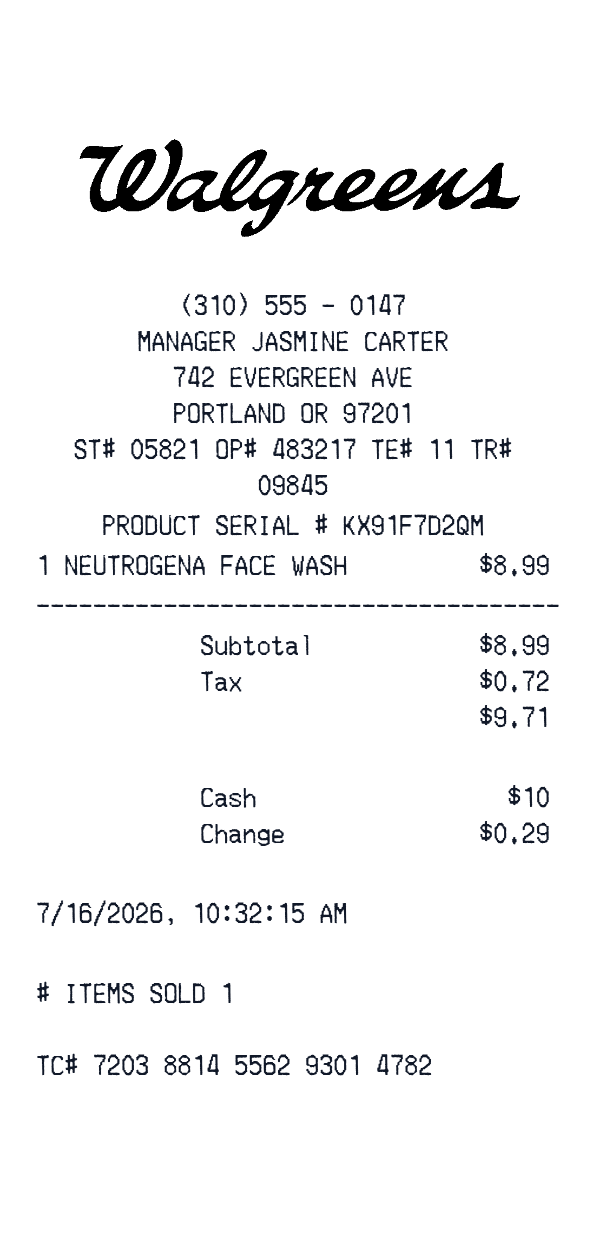
This Walgreens-style receipt template is a pre-filled itemized receipt for pharmacy or retail purchases. It includes a store header, one product line, subtotal, tax, total, cash payment, and date details. The editor lets you adjust the fields, then download the finished receipt as a PNG image or print it directly.
- ✔Create a receipt in seconds
- ✔No design skills needed
- ✔Fully customizable
- ✔Add custom logo
- ✔Edit line items
- ✔Choose payment method
- ✔Add or remove receipt elements
What's on a real Walgreens Receipt?
Every part of the receipt has a purpose. Here is what you will find on this template and why it matters.
Store header
The pharmacy or retail store name, address, and phone number identify the location where the purchase was recorded.
Staff and transaction codes
Manager name, store, operator, tender, and transaction numbers help match the receipt to a register entry.
Product line
The item name, quantity, and price show what was sold and how the amount was calculated.
Subtotal and tax
These lines break down the amount before tax and the tax added, making the total easier to check.
Payment and change
The payment method, amount tendered, and change given document how the customer settled the total.
Date and serial details
The transaction date, time, serial, or tracking numbers provide a clear record of when and how the sale was logged.
How the sample is arranged
This template comes pre-filled with a realistic sample receipt. Here is what it contains, top to bottom.
The header shows (310) 555 - 0147, MANAGER JASMINE CARTER, 742 EVERGREEN AVE, PORTLAND OR 97201, and ST# 05821 OP# 483217 TE# 11 TR# 09845. A product serial line shows KX91F7D2QM. The item line shows NEUTROGENA FACE WASH, quantity 1, $8.99. Subtotal is $8.99, tax is $0.72, and total is $9.71. Cash payment is $10, with change $0.29. The date and time are 7/16/2026, 10:32:15 AM. The closing line shows # ITEMS SOLD 1 and TC# 7203 8814 5562 9301 4782.
How to make a Walgreens Receipt?
With our Receipt Maker, creating any receipt is as easy as 1, 2, 3.
Customize your receipt
Customize every detail, from items to pricing and payment details, with ease.
Export your receipt
One-click export, ready to print.
Where a Walgreens Receipt comes in handy
Pharmacy purchase records
Keep a personal record of pharmacy or retail purchases and their costs.
Personal spending files
Track everyday pharmacy or retail spending in a simple file.
Training sample documents
Prepare sample pharmacy receipts for education or training exercises.
Film and design mockups
Build receipt mockups for film, TV, or design projects.
Digitizing paper receipts
Turn a paper pharmacy receipt you already have into a clean digital image.
Retail itemized records
Keep an itemized record of retail purchases for personal files.
Tips for a Walgreens Receipt
- 1Keep the store header, manager line, and transaction codes in the same compact order shown in the sample.
- 2Use plain, information-dense lines for the item, subtotal, tax, total, cash payment, and change.
- 3If the receipt includes a product serial or tracking number, place it near the top or closing lines.
- 4Use a clear date and time, and keep the cash amount and change consistent with the total.
- 5Keep the layout simple, like a pharmacy or retail register printout, without extra decorative elements.
Similar Templates
More receipt templates like this one — pick one and generate your own receipt in seconds.
Get started in 1 minute
- ✔Create receipts in seconds
- ✔Customize everything
- ✔Easy with our Receipt Builder
