Free 501(c)(3) Donation Receipt Generator
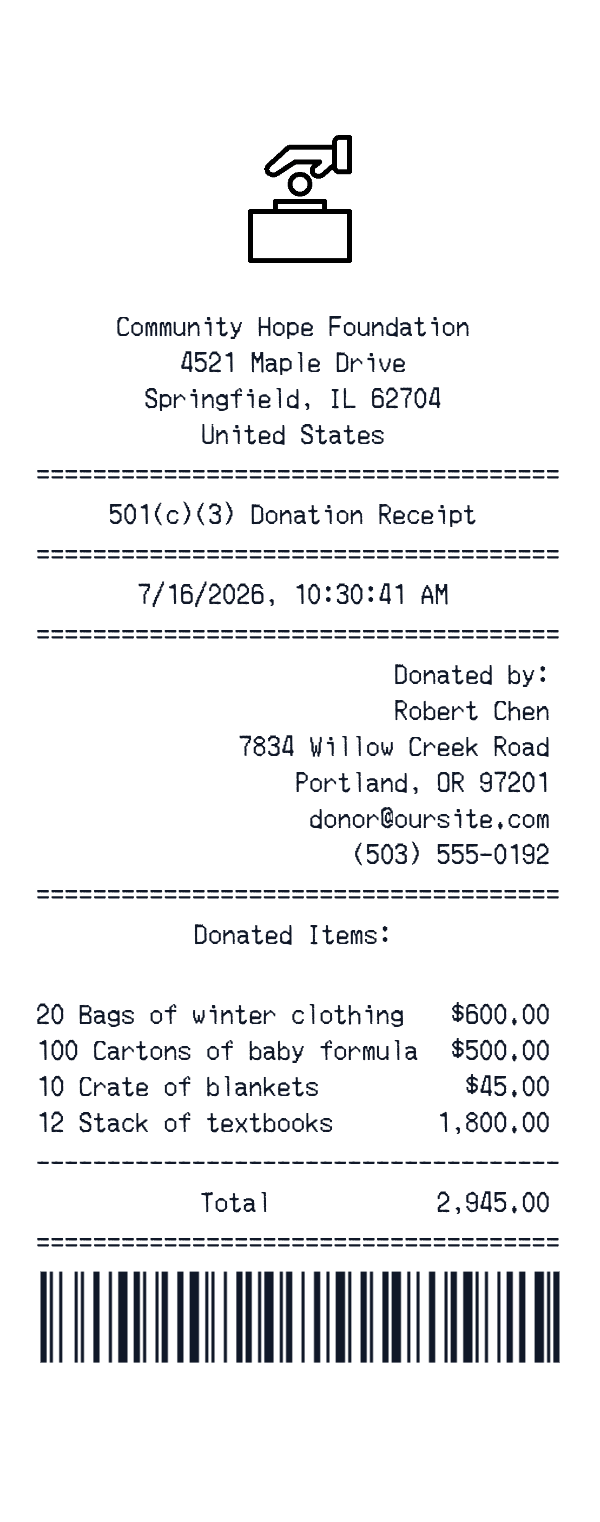
This 501(c)(3) donation receipt template is a pre-filled form for documenting in-kind or cash gifts. It shows an organization header, donor details, itemized donation lines, a total, and a barcode. It is useful for personal giving records, nonprofit training samples, creative mockups, or digitizing paper donation receipts. The editor is where you adjust the fields, logo, colors, and layout.
- ✔Create a receipt in seconds
- ✔No design skills needed
- ✔Fully customizable
- ✔Add custom logo
- ✔Edit line items
- ✔Choose payment method
- ✔Add or remove receipt elements
What's on a real 501(c)(3) Donation Receipt?
Every part of the receipt has a purpose. Here is what you will find on this template and why it matters.
Organization header
The organization name and address identify the nonprofit issuing the receipt.
Receipt title
The title states the document type, such as a 501(c)(3) donation receipt.
Date and time
The date and time record when the donation was processed.
Donor information
The donor name and optional contact details identify who made the gift.
Itemized donation list
The item list breaks down donated goods or funds by quantity and value.
Total
The total gives the combined value of the donation in one clear figure.
Barcode
The barcode is a scannable reference element at the bottom of the receipt.
How the sample is arranged
This template comes pre-filled with a realistic sample receipt. Here is what it contains, top to bottom.
Community Hope Foundation, 4521 Maple Drive, Springfield, IL 62704, United States. The sample title reads 501(c)(3) Donation Receipt, followed by 7/16/2026, 10:30:41 AM. Donor block: Robert Chen, 7834 Willow Creek Road, Portland, OR 97201, donor@oursite.com, (503) 555-0192. Donated Items: Bags of winter clothing, 20, $600.00; Cartons of baby formula, 100, $500.00; Crate of blankets, 10, $45.00; Stack of textbooks, 12, $1,800.00. Total: $2,945.00. No payment method is shown. A barcode appears at the bottom.
How to make a 501(c)(3) Donation Receipt?
With our Receipt Maker, creating any receipt is as easy as 1, 2, 3.
Customize your receipt
Customize every detail, from items to pricing and payment details, with ease.
Export your receipt
One-click export, ready to print.
Where a 501(c)(3) Donation Receipt comes in handy
Personal giving records
Keep a personal record of charitable giving across the year.
Year-end giving review
Review the year of charitable giving in one clean summary.
Donation history
Organize donation history for personal bookkeeping.
Nonprofit training
Prepare sample donation documents for nonprofit training or education.
Film and design mockups
Build mockups for film, TV, or design projects.
Digitizing paper receipts
Digitize paper donation receipts into a clean digital format.
Tips for a 501(c)(3) Donation Receipt
- 1State the donation amount clearly and separately from any other figures.
- 2For cash gifts with nothing given in return, use the standard 'no goods or services were provided' line.
- 3Add a receipt number and the donation date — both are common on donation documents.
- 4Keep the layout formal — donation receipts are plainer than retail receipts.
- 5This template pre-fills an itemized donation list, so keep quantities and values aligned.
Similar Templates
More receipt templates like this one — pick one and generate your own receipt in seconds.
Get started in 1 minute
- ✔Create receipts in seconds
- ✔Customize everything
- ✔Easy with our Receipt Builder
