Free Circle K Receipt Generator
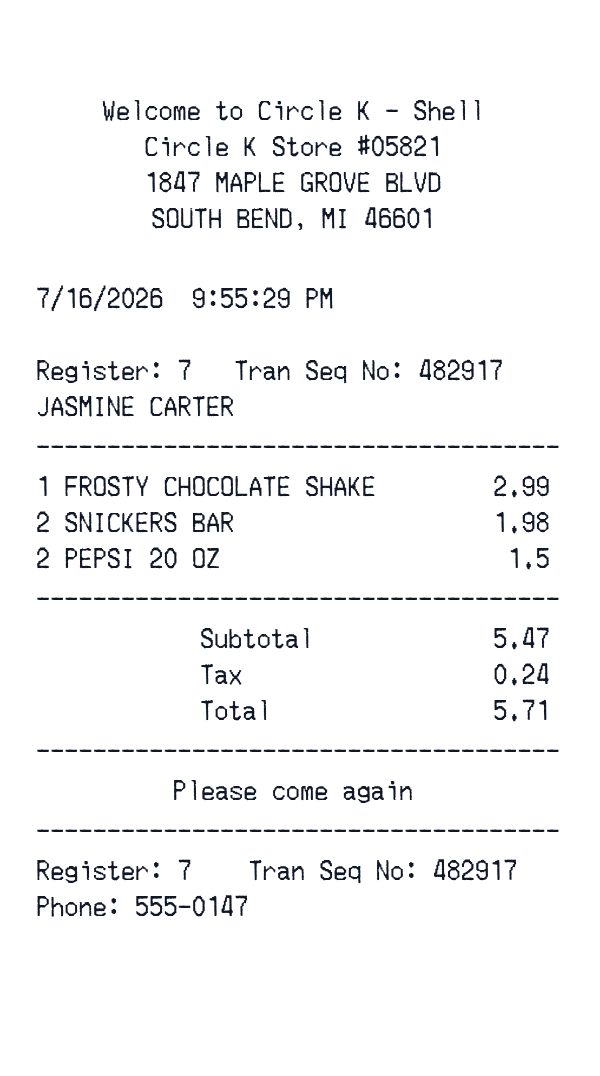
This Circle K receipt template is a Circle K-style itemized convenience store receipt. It includes a store header, date/register line, product lines, subtotal, tax, and total, with a short closing message. The editor lets you replace the sample text with your own store details, items, and amounts.
- ✔Create a receipt in seconds
- ✔No design skills needed
- ✔Fully customizable
- ✔Add custom logo
- ✔Edit line items
- ✔Choose payment method
- ✔Add or remove receipt elements
What's on a real Circle K Receipt?
Every part of the receipt has a purpose. Here is what you will find on this template and why it matters.
Store header
Shows the store name, store number, and location so the receipt identifies the point of sale.
Date and register line
Records when the purchase happened and which register or transaction sequence handled it.
Itemized products
Lists each purchased product with quantity and price, making the line-by-line cost easy to review.
Subtotal and tax
Separates the pre-tax amount from the tax charge before the final total is shown.
Payment details
Indicates how the purchase was paid, such as cash, card, or store payment method.
Closing message
Adds a short courtesy line, register or phone reference, and other store-specific notes.
How the sample is arranged
This template comes pre-filled with a realistic sample receipt. Here is what it contains, top to bottom.
Business header: Welcome to Circle K - Shell, Circle K Store #05821, 1847 Maple Grove Blvd, South Bend, MI 46601. Custom message: 7/16/2026 9:55:29 PM, Register: 7, Tran Seq No: 482917, Jasmine Carter. Items: 1 Frosty Chocolate Shake at 2.99, 2 Snickers Bar at 1.98, 2 Pepsi 20 OZ at 1.50. Totals: Subtotal 5.47, Tax 0.24, Total 5.71. Payment: no payment line is pre-filled. Closing message: Please come again, Register: 7, Tran Seq No: 482917, Phone: 555-0147.
How to make a Circle K Receipt?
With our Receipt Maker, creating any receipt is as easy as 1, 2, 3.
Customize your receipt
Customize every detail, from items to pricing and payment details, with ease.
Export your receipt
One-click export, ready to print.
Where a Circle K Receipt comes in handy
Personal purchase records
Keep a record of convenience store snacks and their costs.
Household food budget
Track household spending on snacks, drinks, and quick food items.
Trip cost review
Review what a convenience stop cost, line by line.
Film and app mockups
Build mockups for retail scenes, apps, or design projects.
Retail education
Prepare sample itemized receipts for retail or bookkeeping lessons.
Digitizing paper receipts
Turn paper convenience store receipts into a clean digital format.
Tips for a Circle K Receipt
- 1Use short product names, such as snack or drink items, to keep the item list concise.
- 2Keep the subtotal, tax, and total amounts consistent with the listed quantities and unit prices.
- 3Include a date, time, register, and transaction sequence number in the top or closing message areas.
- 4If the store has a phone number, place it in a closing note rather than the main header.
Similar Templates
More receipt templates like this one — pick one and generate your own receipt in seconds.
Get started in 1 minute
- ✔Create receipts in seconds
- ✔Customize everything
- ✔Easy with our Receipt Builder
