Free Child Care Receipt Generator
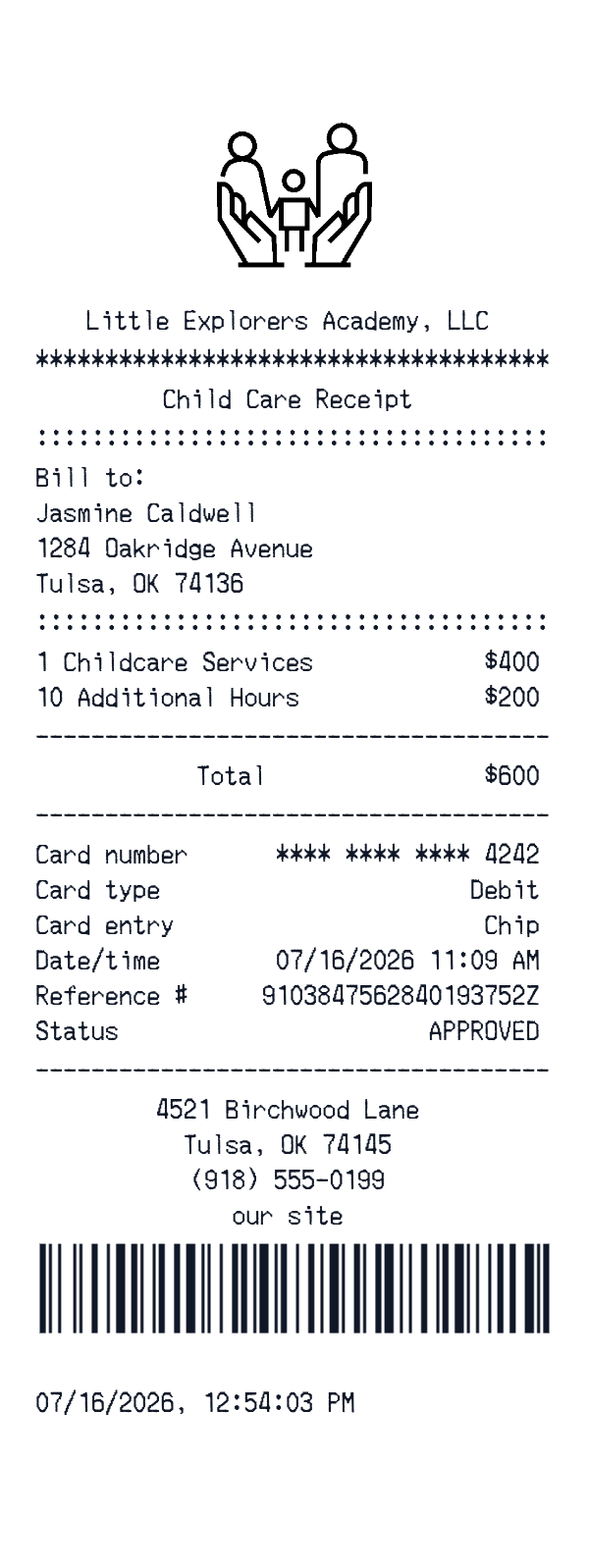
This child care receipt template is an itemized layout for a childcare payment record. It includes a provider name, bill-to block, service lines, total, and card payment details.
The sample uses common line items, and the editor is where you can adjust every field.
- ✔Create a receipt in seconds
- ✔No design skills needed
- ✔Fully customizable
- ✔Add custom logo
- ✔Edit line items
- ✔Choose payment method
- ✔Add or remove receipt elements
What's on a real Child Care Receipt?
Every part of the receipt has a purpose. Here is what you will find on this template and why it matters.
Provider header
Identifies the childcare provider and leaves room for contact details.
Bill-to block
Names the client or household and gives a place for an address.
Service lines
Lists each childcare service or hour block with a quantity and price.
Total
Shows the final amount after the line items are added.
Payment details
Describes the payment method and, for a card, shows only the last four digits.
Date and reference
Adds the transaction date, time, and any reference or barcode element for filing.
How the sample is arranged
This template comes pre-filled with a realistic sample receipt. Here is what it contains, top to bottom.
Little Explorers Academy, LLC Child Care Receipt Bill to Jasmine Caldwell, 1284 Oakridge Avenue, Tulsa, OK 74136 Provider line: 4521 Birchwood Lane, Tulsa, OK 74145, (918) 555-0199, our site Childcare Services, 1 at 400; Additional Hours, 10 at 200 Total 600 Card payment: **** **** **** 4242, Debit, Chip, 07/16/2026 11:09 AM, reference 9103847562840193752Z, APPROVED Barcode 07/16/2026, 12:54:03 PM
How to make a Child Care Receipt?
With our Receipt Maker, creating any receipt is as easy as 1, 2, 3.
Customize your receipt
Customize every detail, from items to pricing and payment details, with ease.
Export your receipt
One-click export, ready to print.
Where a Child Care Receipt comes in handy
Childcare payment records
Keeping a personal record of childcare charges with full line items.
Bookkeeping samples
Preparing itemized childcare samples for personal bookkeeping practice.
Spending breakdown
Tracking family spending with a line-item view of care hours.
Film and app mockups
Building childcare receipt mockups for film, TV, apps, or websites.
Education and training
Preparing sample childcare receipts for education and training exercises.
Digitizing paper receipts
Turning a paper childcare receipt into a clean digital image.
Tips for a Child Care Receipt
- 1List each childcare service on its own line with a quantity and price.
- 2Keep the math consistent: each line amount should add up to the final total.
- 3Show only the last four digits when the sample uses a card payment.
- 4Use plain service names such as base care or additional hours instead of marketing copy.
- 5Add the client name, address, and transaction date so the layout is complete.
Similar Templates
More receipt templates like this one — pick one and generate your own receipt in seconds.
Get started in 1 minute
- ✔Create receipts in seconds
- ✔Customize everything
- ✔Easy with our Receipt Builder
