Free Daycare Receipt Generator
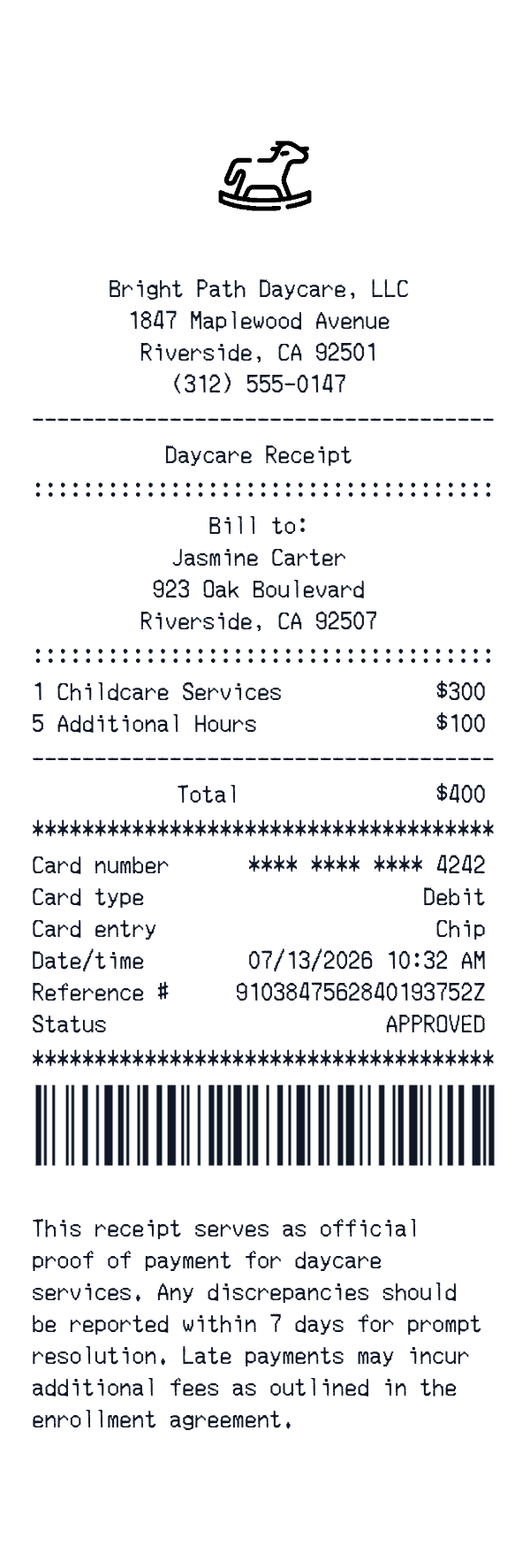
Daycare Receipt is an itemized receipt template for childcare providers. It shows a business header, a bill-to block, service lines, totals, and card payment details. Use it to create a clean record of daycare charges or to practice itemized receipt layouts. The editor lets you customize every field before downloading or printing.
- ✔Create a receipt in seconds
- ✔No design skills needed
- ✔Fully customizable
- ✔Add custom logo
- ✔Edit line items
- ✔Choose payment method
- ✔Add or remove receipt elements
What's on a real Daycare Receipt?
Every part of the receipt has a purpose. Here is what you will find on this template and why it matters.
Business header
This block identifies the daycare provider and gives the location and contact point. It helps the reader know which business issued the receipt.
Bill-to block
This section names the client or account receiving the receipt. It helps match the document to the correct child, parent, or family record.
Itemized service lines
Each service or add-on appears on its own line with a quantity and price. This is what makes the receipt itemized rather than just a total.
Totals block
The totals area adds the line items into the final amount. It gives a clear ending figure for the listed services.
Payment block
This part records how the payment was made and the card status. It can include the last four digits, entry method, date/time, and reference number.
Barcode
The barcode is a compact identifier at the bottom of the layout. It is often used for scanning or quick document reference.
Closing policy line
A short closing note can state how payment questions are handled or what the agreement covers. It rounds off the receipt after the payment details.
How the sample is arranged
This template comes pre-filled with a realistic sample receipt. Here is what it contains, top to bottom.
Business header: Bright Path Daycare, LLC, 1847 Maplewood Avenue, Riverside, CA 92501, phone (312) 555-0147. Title and bill-to: Daycare Receipt, then Jasmine Carter at 923 Oak Boulevard, Riverside, CA 92507. Items: Childcare Services, 1 at 300; Additional Hours, 5 at 100. Total: 400. Payment: approved debit card ending 4242, chip entry, date/time 07/13/2026 10:32 AM, reference 9103847562840193752Z. Closing: barcode and a short policy note.
How to make a Daycare Receipt?
With our Receipt Maker, creating any receipt is as easy as 1, 2, 3.
Customize your receipt
Customize every detail, from items to pricing and payment details, with ease.
Export your receipt
One-click export, ready to print.
Where a Daycare Receipt comes in handy
Personal childcare records
Keep a clear record of monthly childcare charges and add-ons.
Bookkeeping practice samples
Create itemized daycare samples for personal bookkeeping practice.
Childcare budget breakdown
Track childcare spending with separate service and hourly lines.
Receipt education examples
Use the sample to teach itemized receipt structure in a childcare context.
Creative project mockups
Build a daycare receipt mockup for film, app, or design work.
Digitizing paper receipts
Turn a paper daycare receipt into a clean image for storage.
Tips for a Daycare Receipt
- 1List childcare services and additional hours on separate lines so the charges are easy to follow.
- 2Keep quantities visible, even for a single childcare service, so the item count matches the total.
- 3Use plain service names rather than promotional language, and keep prices aligned with the enrollment terms.
- 4Show only the last four digits for the card, and include the approval status and reference number.
- 5Add a short closing note about payment review or late fees to complete the daycare receipt layout.
Get started in 1 minute
- ✔Create receipts in seconds
- ✔Customize everything
- ✔Easy with our Receipt Builder
