Free Chemist Warehouse Receipt Generator
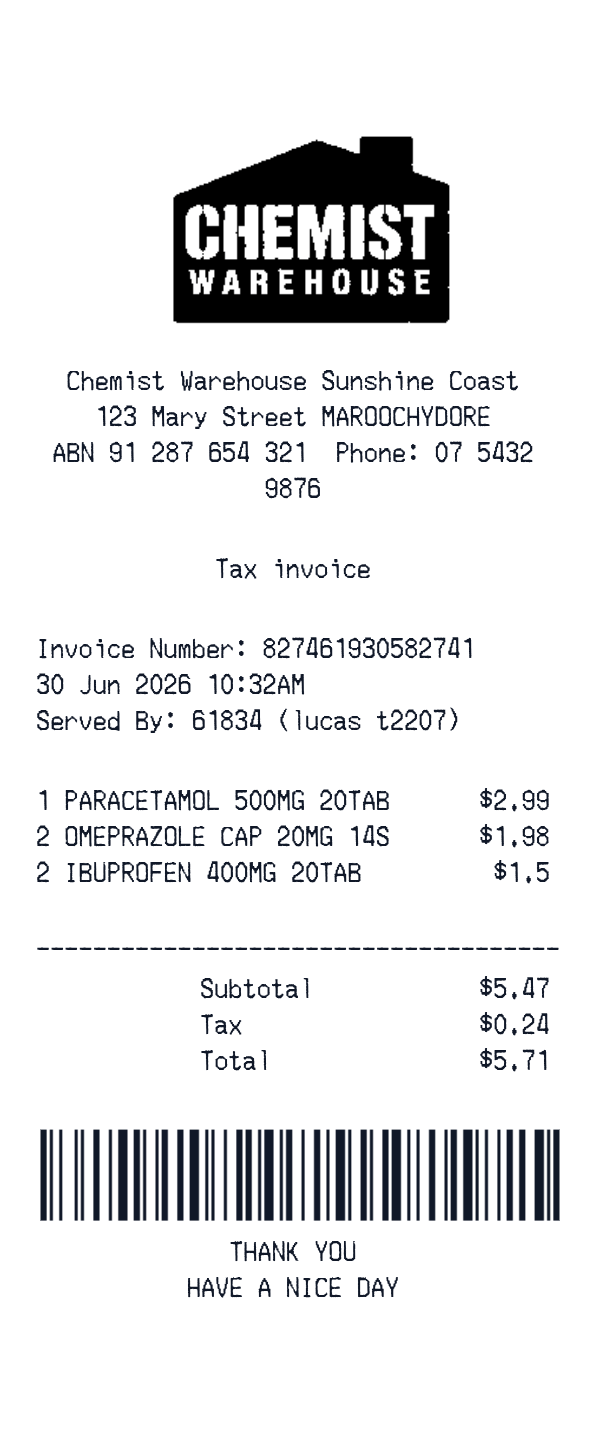
This Chemist Warehouse-style receipt template is a pre-filled pharmacy receipt layout for itemized medication purchases. It shows a store header, transaction details, item lines, totals, and a barcode, making it useful for personal records, education, or design mockups. The editor is where you can adjust the text, items, and totals.
- ✔Create a receipt in seconds
- ✔No design skills needed
- ✔Fully customizable
- ✔Add custom logo
- ✔Edit line items
- ✔Choose payment method
- ✔Add or remove receipt elements
What's on a real Chemist Warehouse Receipt?
Every part of the receipt has a purpose. Here is what you will find on this template and why it matters.
Pharmacy header
The pharmacy name, address, and contact details identify the location where the purchase was made. This helps separate records from different stores.
Invoice details
The invoice number, date, time, and served-by line identify the transaction. These details make the receipt easier to file or reference.
Medication lines
Each item line lists the medication name, strength, quantity, and price. This is the core of an itemized pharmacy receipt.
Subtotal and tax
The subtotal adds up the item prices, and the tax line shows the amount of tax applied. Together they lead to the final total.
Total
The total shows the final amount for the purchase. It is usually the last amount before any closing notes or codes.
Barcode
A barcode can provide a scannable reference for the transaction. In this template, it appears between the item list and the closing note.
How the sample is arranged
This template comes pre-filled with a realistic sample receipt. Here is what it contains, top to bottom.
Chemist Warehouse Sunshine Coast header with 123 Mary Street Maroochydore, ABN, and phone. Tax invoice label, invoice number 827461930582741, 30 Jun 2026 10:32AM, and served-by line. Item lines: paracetamol 500mg 20tab at 2.99, omeprazole cap 20mg 14s at 1.98, ibuprofen 400mg 20tab at 1.50. Subtotal 5.47, tax 0.24, total 5.71. No payment method is shown. Barcode and thank-you closing line.
How to make a Chemist Warehouse Receipt?
With our Receipt Maker, creating any receipt is as easy as 1, 2, 3.
Customize your receipt
Customize every detail, from items to pricing and payment details, with ease.
Export your receipt
One-click export, ready to print.
Where a Chemist Warehouse Receipt comes in handy
Pharmacy purchase records
Keep a personal record of medication purchases and their costs.
Prescription spending
Track prescription spending across the year.
Personal files copy
Keep a clean copy of a prescription record for personal files.
Pharmacy education
Prepare sample pharmacy documents for education or training.
Film and design mockups
Build pharmacy mockups for film, TV, or design projects.
Digitizing paper receipts
Digitize paper pharmacy receipts into a clean digital format.
Tips for a Chemist Warehouse Receipt
- 1Show the medication name, strength, and quantity on the same line.
- 2Include an invoice or transaction number near the top of the receipt.
- 3Keep the layout plain and information-dense, with clear line items and totals.
- 4For card payments, show only the last four digits on the payment line.
Similar Templates
More receipt templates like this one — pick one and generate your own receipt in seconds.
Get started in 1 minute
- ✔Create receipts in seconds
- ✔Customize everything
- ✔Easy with our Receipt Builder
