Free Best Havasu Hardware Receipt Generator
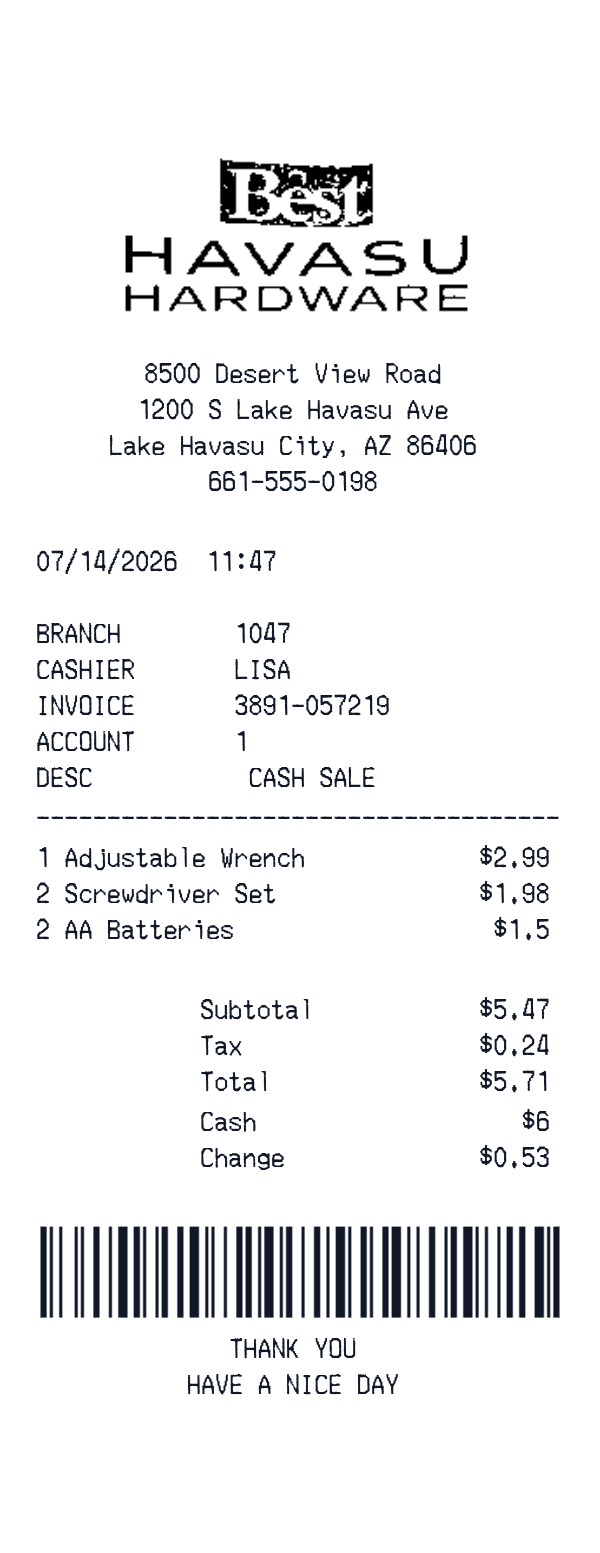
This Best Havasu Hardware Receipt template is a retail receipt layout for itemized hardware purchases. It shows a store-style header, transaction details, line items, tax, total, cash payment, and a closing message. Open it in the editor to adjust fields, colors, and layout before downloading as a PNG or printing.
- ✔Create a receipt in seconds
- ✔No design skills needed
- ✔Fully customizable
- ✔Add custom logo
- ✔Edit line items
- ✔Choose payment method
- ✔Add or remove receipt elements
What's on a real Best Havasu Hardware Receipt?
Every part of the receipt has a purpose. Here is what you will find on this template and why it matters.
Store header
The business name and location identify the store where the purchase was recorded, helping the reader know which shop issued the receipt.
Date and time
A date and time stamp records when the sale was made, which is useful for matching the receipt to a shopping trip or log entry.
Transaction details
Branch, cashier, invoice, and sale type fields add transaction context that many register receipts include.
Itemized products
Each line shows a product, quantity, and price so the purchase can be reviewed line by line.
Subtotal, tax, total
These lines break out pre-tax amount, tax, and final amount so the charge can be checked against the item lines.
Cash payment
The payment block records the tender amount and change due for a cash sale.
Closing elements
A short thank-you note and barcode area round out the register-style bottom of the receipt.
How the sample is arranged
This template comes pre-filled with a realistic sample receipt. Here is what it contains, top to bottom.
Business header: 8500 Desert View Road, 1200 S Lake Havasu Ave, Lake Havasu City, AZ 86406, phone 661-555-0198. Transaction line: 07/14/2026 11:47, Branch 1047, Cashier LISA, Invoice 3891-057219, Account 1, Cash Sale. Items: Adjustable Wrench 1 at 2.99, Screwdriver Set 2 at 1.98, AA Batteries 2 at 1.5. Totals: Subtotal 5.47, Tax 0.24, Total 5.71. Payment: Cash 6, Change 0.53. Closing: barcode, THANK YOU, HAVE A NICE DAY.
How to make a Best Havasu Hardware Receipt?
With our Receipt Maker, creating any receipt is as easy as 1, 2, 3.
Customize your receipt
Customize every detail, from items to pricing and payment details, with ease.
Export your receipt
One-click export, ready to print.
Where a Best Havasu Hardware Receipt comes in handy
Personal purchase records
Keep a clean record of hardware purchases and their line-item costs.
Trip cost review
Review what a hardware store trip cost, line by line.
Business spending log
Track business purchase spending in a personal log.
Digitizing paper receipts
Digitize paper hardware receipts into a clean digital format.
Retail training material
Prepare sample receipts for retail training and education.
Design and film mockups
Create retail mockups for design, film, or TV projects.
Tips for a Best Havasu Hardware Receipt
- 1Keep product names short and register-style, like wrench, battery, or fastener names.
- 2Include branch, cashier, invoice, and sale type fields to match a register receipt.
- 3Match the tax amount to the subtotal and final total shown in the sample.
- 4Add a short thank-you line and barcode area at the bottom for a store-style finish.
- 5Use one consistent date and time across the receipt so the sample stays internally clear.
Similar Templates
More receipt templates like this one — pick one and generate your own receipt in seconds.
Get started in 1 minute
- ✔Create receipts in seconds
- ✔Customize everything
- ✔Easy with our Receipt Builder
