Free Storage Receipt Generator
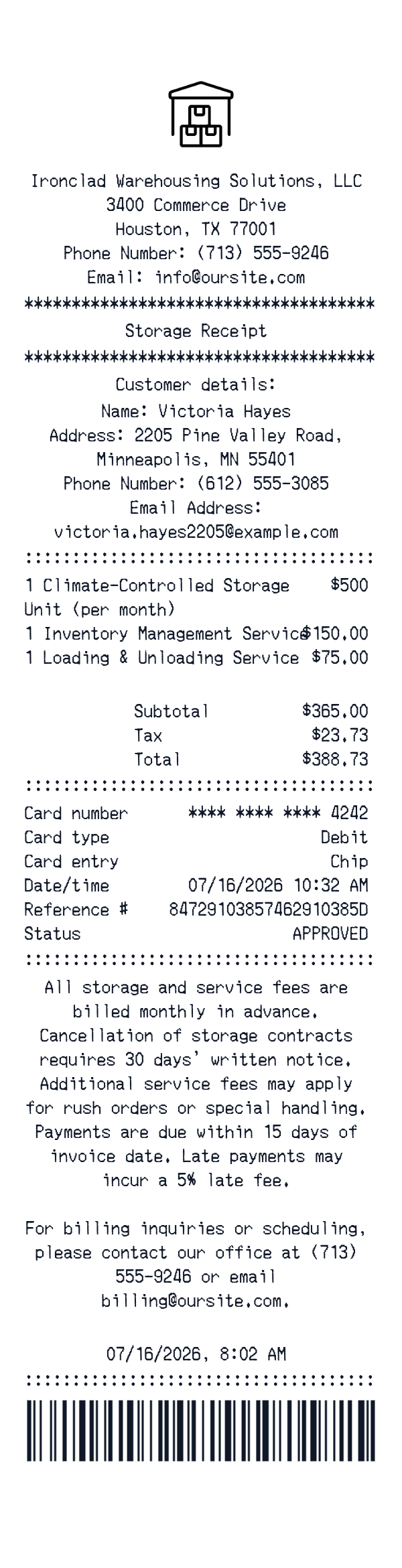
This storage receipt template is an itemized rental receipt for storage units and related services. It includes a business header, customer details, service lines, totals, card payment details, and a barcode.
The editor lets you adjust the fields, colors, and layout before downloading the finished receipt as a PNG image or printing it.
- ✔Create a receipt in seconds
- ✔No design skills needed
- ✔Fully customizable
- ✔Add custom logo
- ✔Edit line items
- ✔Choose payment method
- ✔Add or remove receipt elements
What's on a real Storage Receipt?
Every part of the receipt has a purpose. Here is what you will find on this template and why it matters.
Business header
Company name, street address, phone, and email identify the storage or rental provider.
Customer details
Customer name, address, phone, and email identify the person or business receiving the service.
Storage or service line
The rented storage unit or service, with quantity and rate, identifies what is being billed.
Itemized charges
Separate lines for services, fees, or handling make it easy to review each charge.
Totals
Subtotal, tax where applicable, and final total summarize the amount due.
Payment details
Payment method, card last four digits when used, status, and reference number record how the charge was paid.
Billing terms
Notes on billing timing, cancellation, or late fees set expectations for the customer.
Barcode and timestamp
A barcode and date or time mark the transaction and support quick scanning.
How the sample is arranged
This template comes pre-filled with a realistic sample receipt. Here is what it contains, top to bottom.
Ironclad Warehousing Solutions, LLC, 3400 Commerce Drive, Houston, TX 77001, appears first with phone and email. Storage Receipt and customer details for Victoria Hayes follow, with address, phone, and email. The item list shows Climate-Controlled Storage Unit (per month), Inventory Management Service, and Loading & Unloading Service. Totals show Subtotal 365.00, Tax 23.73, and Total 388.73. Payment is a debit card ending 4242, approved, with reference number and date/time. Billing terms, timestamp, and barcode close the receipt.
How to make a Storage Receipt?
With our Receipt Maker, creating any receipt is as easy as 1, 2, 3.
Customize your receipt
Customize every detail, from items to pricing and payment details, with ease.
Export your receipt
One-click export, ready to print.
Where a Storage Receipt comes in handy
Personal payment records
Keeping a personal record of storage or rental payments.
Rental cost review
Verifying a storage charge against the unit, rate, and total.
Rental expense log
Tracking storage and service expenses in a personal log.
Film and app mockups
Building mockups for film, TV, apps, or design projects.
Property management training
Preparing sample storage receipts for bookkeeping or property management training.
Digitizing paper receipts
Digitizing faded paper storage receipts into a clean digital format.
Tips for a Storage Receipt
- 1Keep the math consistent: line items, subtotal, tax, and total should all add up.
- 2Use a clear monthly rate for the storage unit and service lines.
- 3Include the customer name and the billing period, since they help match charges to the storage term.
- 4List each storage or service charge on its own line for clarity.
- 5For card payments, show only the last four digits of the card.
Similar Templates
More receipt templates like this one — pick one and generate your own receipt in seconds.
Get started in 1 minute
- ✔Create receipts in seconds
- ✔Customize everything
- ✔Easy with our Receipt Builder
