Free Staples Receipt Generator
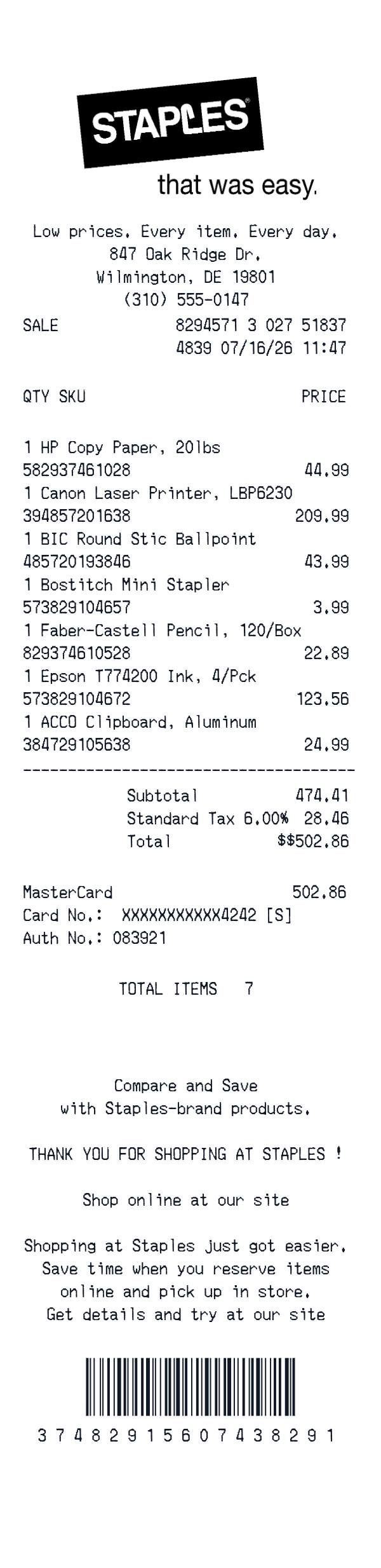
This Staples-style store receipt template is an itemized retail receipt for office supplies and stationery. It pre-fills a sample purchase with product lines, subtotal, tax, total, card payment, and a bottom barcode. The editor is where you can change the sample details and download the finished receipt as a PNG image or print it.
- ✔Create a receipt in seconds
- ✔No design skills needed
- ✔Fully customizable
- ✔Add custom logo
- ✔Edit line items
- ✔Choose payment method
- ✔Add or remove receipt elements
What's on a real Staples Receipt?
Every part of the receipt has a purpose. Here is what you will find on this template and why it matters.
Store header
Business name, street address, and phone number identify the retail location at the top of the receipt.
Transaction line
A sale code, date, and time record when the purchase was completed.
Itemized products
Each line lists a product name or short description, product code, quantity, and price.
Subtotal and tax
The subtotal adds the line prices, and the tax line shows the rate and tax amount.
Final total
The total shows the amount charged after tax.
Payment details
The payment section states the tender type, card network, last four digits, and authorization number.
Barcode
A barcode near the bottom carries transaction information for store price checks.
How the sample is arranged
This template comes pre-filled with a realistic sample receipt. Here is what it contains, top to bottom.
Low prices. Every item. Every day. 847 Oak Ridge Dr., Wilmington, DE 19801, (310) 555-0147 SALE 8294571 3 027 51837 4839 07/16/26 11:47 QTY SKU PRICE Seven lines: HP Copy Paper, Canon Laser Printer, BIC Round Stic Ballpoint, Bostitch Mini Stapler, Faber-Castell Pencil, Epson T774200 Ink, ACCO Clipboard. Subtotal 474.41, Standard Tax 6.00% 28.46, Total 502.86 MasterCard 502.86, card ending 4242, Auth No. 083921 TOTAL ITEMS 7 Compare and Save with Staples-brand products. THANK YOU FOR SHOPPING AT STAPLES ! Barcode
How to make a Staples Receipt?
With our Receipt Maker, creating any receipt is as easy as 1, 2, 3.
Customize your receipt
Customize every detail, from items to pricing and payment details, with ease.
Export your receipt
One-click export, ready to print.
Where a Staples Receipt comes in handy
Personal purchase records
Keep a personal record of office supply purchases and line items.
Household budget tracking
Track household spending on office supplies and stationery.
Line-by-line review
Review each office supply line after a purchase.
Film and TV mockups
Build a store receipt mockup for film, TV, or website work.
Retail education
Prepare a sample retail receipt for bookkeeping or retail training.
Digitizing paper receipts
Turn a faded paper store receipt into a clean image.
Shopping summary
Organize a week of office supply shopping into one summary.
Tips for a Staples Receipt
- 1Use abbreviated product names and product codes to keep the layout compact.
- 2Keep the math consistent: quantities times prices should add to the 474.41 subtotal.
- 3Make the tax amount match the 6.00% rate applied to the subtotal.
- 4For card payments, show only the last four digits, as in the MasterCard line ending 4242.
- 5Match the TOTAL ITEMS line to the seven product lines in the sample.
Similar Templates
More receipt templates like this one — pick one and generate your own receipt in seconds.
Get started in 1 minute
- ✔Create receipts in seconds
- ✔Customize everything
- ✔Easy with our Receipt Builder
