Free Square POS Receipt Generator
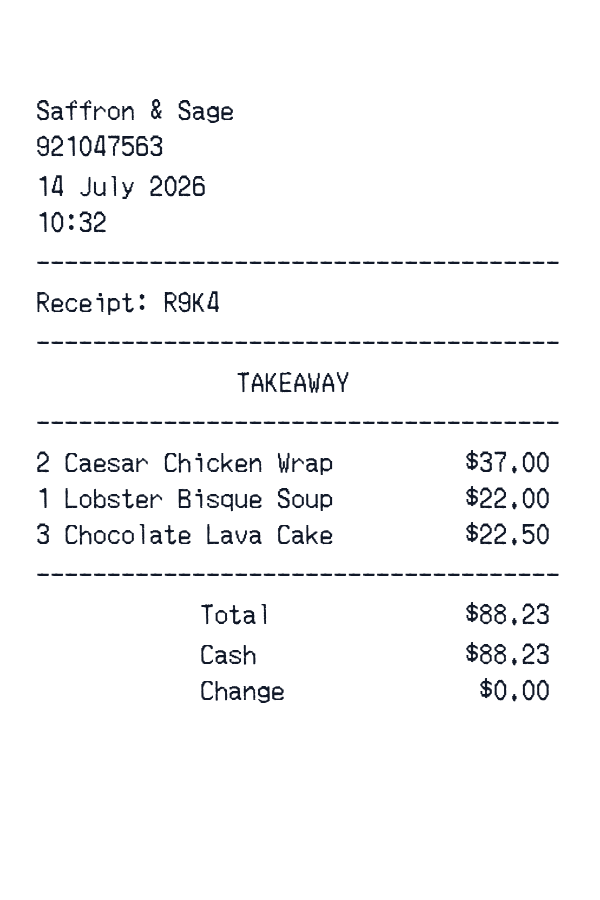
This Square-style POS receipt template is a clean, itemized restaurant receipt for takeaway orders. It shows a small business header, date and time, order number, service mode, item lines, and cash payment. Use it for personal dining records, training samples, or design mockups. The editor lets you replace the sample values.
- ✔Create a receipt in seconds
- ✔No design skills needed
- ✔Fully customizable
- ✔Add custom logo
- ✔Edit line items
- ✔Choose payment method
- ✔Add or remove receipt elements
What's on a real Square POS Receipt?
Every part of the receipt has a purpose. Here is what you will find on this template and why it matters.
Business header
The restaurant or takeout service name and contact details identify the merchant at the top.
Date, time, and receipt number
The visit time and a short receipt number help match the order to a date and distinguish one sale from another.
Service mode
A takeaway or delivery label explains how the customer received the order.
Itemized order lines
Each line lists the food or drink, quantity, and unit price so the customer can see exactly what was ordered.
Total
The final amount due after all items are added, shown as a single line.
Payment details
Cash or card payment details record how the customer settled the order, including change when relevant.
How the sample is arranged
This template comes pre-filled with a realistic sample receipt. Here is what it contains, top to bottom.
Saffron & Sage appears at the top with phone number 921047563. 14 July 2026, 10:32, Receipt: R9K4, and TAKEAWAY follow. Items are Caesar Chicken Wrap (2 at 37.00), Lobster Bisque Soup (1 at 22.00), and Chocolate Lava Cake (3 at 22.50). The total is 88.23. Payment shows Cash 88.23 and Change 0.00.
How to make a Square POS Receipt?
With our Receipt Maker, creating any receipt is as easy as 1, 2, 3.
Customize your receipt
Customize every detail, from items to pricing and payment details, with ease.
Export your receipt
One-click export, ready to print.
Where a Square POS Receipt comes in handy
Personal dining records
Keep a personal record of takeaway orders and what they cost.
Dining budget
Track takeaway spending and build a personal dining budget.
Meal cost review
Review a takeaway order against itemized lines and the total.
Film and app mockups
Build a clean POS receipt mockup for film, TV, or design.
Hospitality training
Prepare sample takeaway checks for hospitality or bookkeeping training.
Digitizing paper checks
Turn faded paper takeaway checks into a clean digital format.
Tips for a Square POS Receipt
- 1Keep the math consistent: item prices, total, and payment should all add up.
- 2List takeaway items in the order they were ordered, such as mains, sides, and desserts.
- 3Use a clear date, time, and short receipt number for the sample order.
- 4For cash payments, show the cash amount and change line so the payment section is complete.
- 5Keep the takeaway label visible, since it explains the service mode for the order.
Get started in 1 minute
- ✔Create receipts in seconds
- ✔Customize everything
- ✔Easy with our Receipt Builder
