Free Pandora Receipt Generator
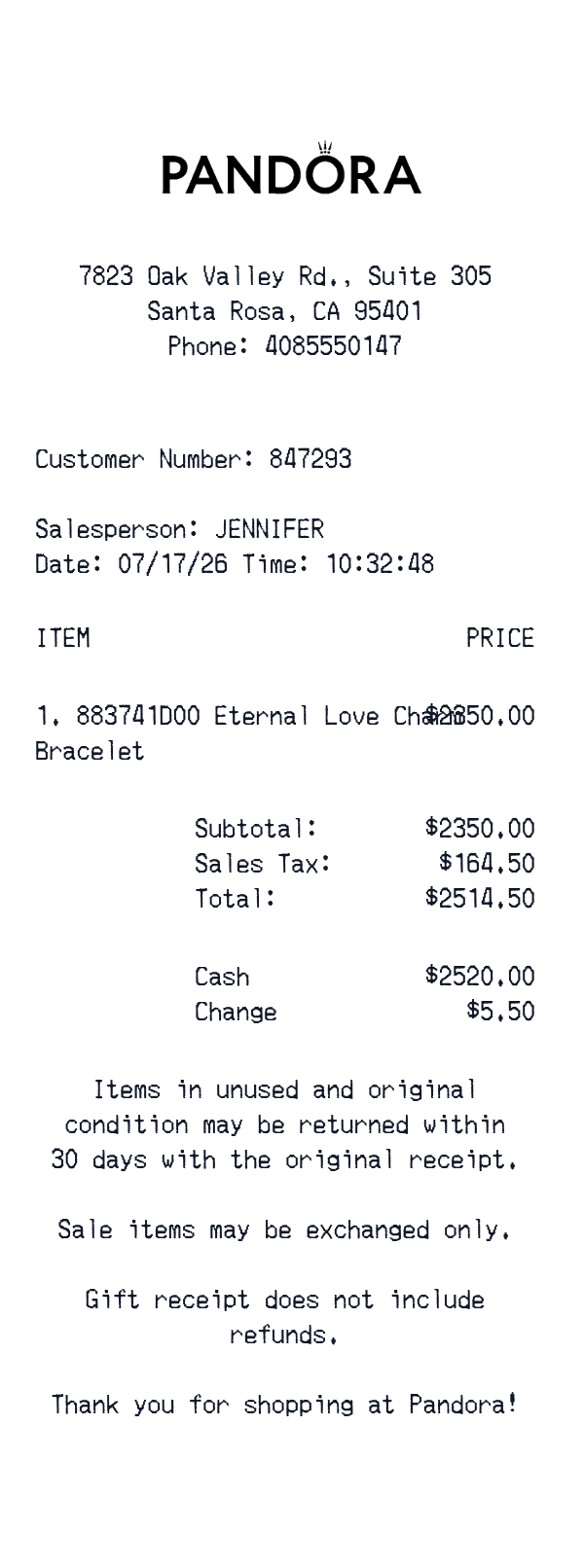
This Pandora-style receipt template is an itemized retail receipt layout for a single charm bracelet purchase. The sample shows one item line, subtotal, sales tax, total, and a cash payment with change.
The editor lets you replace the store header, product line, totals, and payment details with your own values.
- ✔Create a receipt in seconds
- ✔No design skills needed
- ✔Fully customizable
- ✔Add custom logo
- ✔Edit line items
- ✔Choose payment method
- ✔Add or remove receipt elements
What's on a real Pandora Receipt?
Every part of the receipt has a purpose. Here is what you will find on this template and why it matters.
Store location block
The top block identifies the store location and contact point, giving the receipt a clear point of origin.
Customer and transaction line
This line records the customer number, salesperson, date, and time, which helps with personal records and review.
Itemized product line
Each product line names the item and its price, so the purchase can be reviewed line by line.
Subtotal and sales tax
These lines separate the pre-tax amount from the tax added, making the math easier to check.
Final total
The total shows the amount due after tax and is the amount matched to the payment.
Payment and change
The payment section records the tender received and any change returned, completing the transaction record.
Return policy and closing note
A short policy or thank-you line at the bottom adds context to the transaction without changing the totals.
How the sample is arranged
This template comes pre-filled with a realistic sample receipt. Here is what it contains, top to bottom.
The header shows 7823 Oak Valley Rd., Suite 305, Santa Rosa, CA 95401, and Phone: 4085550147. A customer block lists Customer Number: 847293, Salesperson: JENNIFER, Date: 07/17/26, Time: 10:32:48. The item list has one line: 1. 883741D00 Eternal Love Charm Bracelet at 2350.00. Totals show Subtotal: 2350.00, Sales Tax: 164.50, and Total: 2514.50. Payment is Cash 2520.00 with Change 5.50. The closing block includes the 30-day return note and Thank you for shopping at Pandora!
How to make a Pandora Receipt?
With our Receipt Maker, creating any receipt is as easy as 1, 2, 3.
Customize your receipt
Customize every detail, from items to pricing and payment details, with ease.
Export your receipt
One-click export, ready to print.
Where a Pandora Receipt comes in handy
Personal purchase records
Keep a personal record of a charm or jewelry purchase and its line item.
Household budget tracking
Track household spending on accessories and gifts with a clear line-item summary.
Line-by-line review
Review a single bracelet purchase line by line after the fact.
Screen and film mockups
Build a Pandora-style retail receipt mockup for screen, film, TV, or website projects.
Retail education
Prepare a sample jewelry-store receipt for retail or bookkeeping education and training.
Digitizing paper receipts
Turn a faded paper store receipt into a clean, editable image.
Tips for a Pandora Receipt
- 1Keep the product line short, like register output, using the code and abbreviated item name.
- 2Make the subtotal, tax, total, cash, and change values stay consistent with one another.
- 3Use the date and time that match the purchase or project you are documenting.
- 4If the layout includes a return policy, keep it short and separate from the totals.
Similar Templates
More receipt templates like this one — pick one and generate your own receipt in seconds.
Get started in 1 minute
- ✔Create receipts in seconds
- ✔Customize everything
- ✔Easy with our Receipt Builder
