Free Notary Receipt Generator
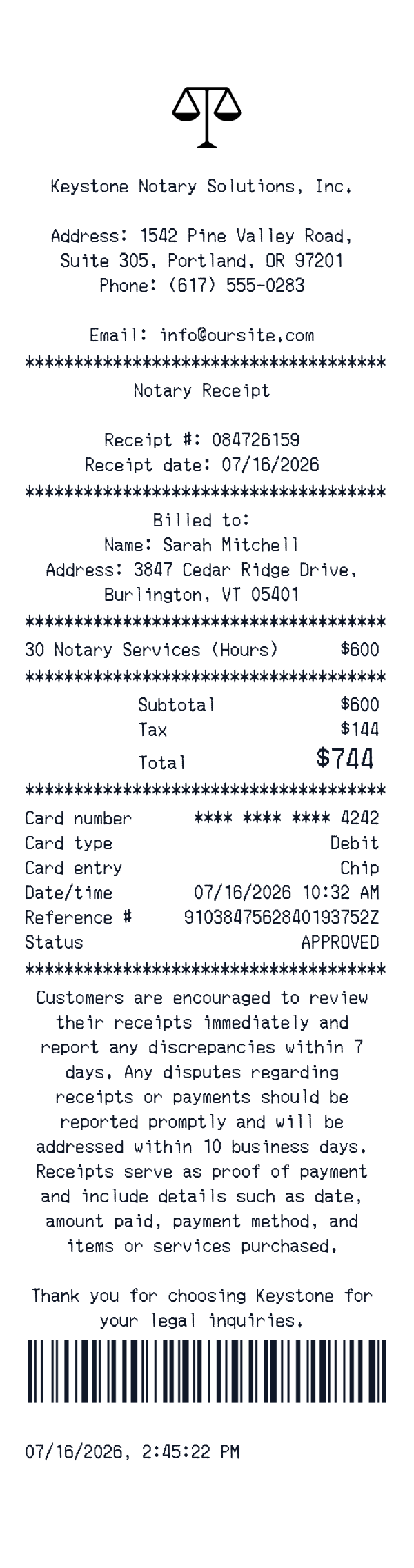
This Notary Receipt template is an itemized receipt layout for notary service fees. It pre-fills a business header, a billed-to block, one service line, totals with tax, card payment details, a barcode, and a timestamp. It is useful for personal records, bookkeeping practice, education, or a creative project. The editor lets you replace the sample fields with your own.
- ✔Create a receipt in seconds
- ✔No design skills needed
- ✔Fully customizable
- ✔Add custom logo
- ✔Edit line items
- ✔Choose payment method
- ✔Add or remove receipt elements
What's on a real Notary Receipt?
Every part of the receipt has a purpose. Here is what you will find on this template and why it matters.
Business header
The header names the notary business and lists contact details so the service source is clear.
Receipt reference
A receipt number and date give the record a unique reference and timestamp.
Billed-to block
The billed-to section records the customer's name and address for the service record.
Service line items
Each notary service is listed with quantity and price, so the itemized breakdown is easy to check.
Totals block
Subtotal, tax, and total show how the final amount is calculated.
Payment details
Payment information notes the method and, for card payments, the masked card number and status.
Barcode and timestamp
A barcode and printed date-time provide a machine-readable element and a final transaction timestamp.
How the sample is arranged
This template comes pre-filled with a realistic sample receipt. Here is what it contains, top to bottom.
Keystone Notary Solutions, Inc. header with 1542 Pine Valley Road, Suite 305, Portland, OR 97201, (617) 555-0283, and info@oursite.com. Notary Receipt title, receipt number 084726159, and receipt date 07/16/2026. Billed to Sarah Mitchell with 3847 Cedar Ridge Drive, Burlington, VT 05401. One line: Notary Services (Hours), quantity 30, price 600. Totals: subtotal 600, tax 144, total 744. Card payment: debit card ending 4242, chip entry, approved, with 07/16/2026 10:32 AM and reference number 9103847562840193752Z. Closing review note, barcode, and timestamp 07/16/2026, 2:45:22 PM.
How to make a Notary Receipt?
With our Receipt Maker, creating any receipt is as easy as 1, 2, 3.
Customize your receipt
Customize every detail, from items to pricing and payment details, with ease.
Export your receipt
One-click export, ready to print.
Where a Notary Receipt comes in handy
Personal service records
Keeping a personal record of notary fees with line items.
Bookkeeping samples
Preparing itemized notary fee samples for bookkeeping practice.
Spending breakdown
Tracking notary-related spending with a full line-item breakdown.
Film and app mockups
Building sample notary receipts for film, TV, or app projects.
Education and training
Preparing sample notary receipts for classroom or training exercises.
Digitizing paper receipts
Turning paper notary receipts into a clean, searchable image.
Tips for a Notary Receipt
- 1List each notary service on its own line so the itemized breakdown is easy to follow.
- 2Keep the math consistent: line amounts, subtotal, tax, and total should match the intended fee.
- 3Use a plain service name such as Notary Services, with a quantity and price on the same line.
- 4Show only the last four digits for card payments, and include the status and reference number.
- 5Add a receipt number, date, and closing note to round off the layout.
Get started in 1 minute
- ✔Create receipts in seconds
- ✔Customize everything
- ✔Easy with our Receipt Builder
