Free NAPA Auto Parts Receipt Generator
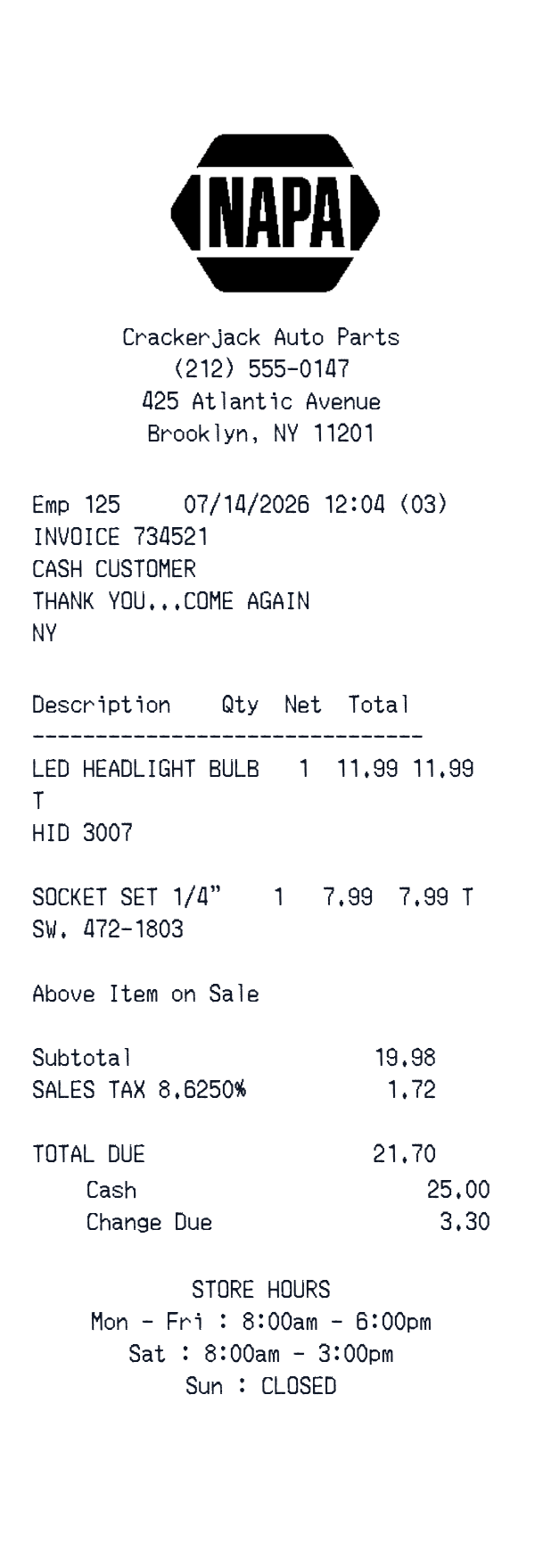
This NAPA-style auto parts receipt template is a narrow store receipt layout for auto parts purchases. It includes a shop header, date and time, itemized parts lines, subtotal, sales tax, total, cash payment with change, and store hours.
The editor lets you adjust the business details, part names, prices, totals, and payment before downloading a PNG image or printing it.
- ✔Create a receipt in seconds
- ✔No design skills needed
- ✔Fully customizable
- ✔Add custom logo
- ✔Edit line items
- ✔Choose payment method
- ✔Add or remove receipt elements
What's on a real NAPA Auto Parts Receipt?
Every part of the receipt has a purpose. Here is what you will find on this template and why it matters.
Store header
The shop name, address, and phone identify the location where the parts purchase was recorded.
Date and time
The purchase timestamp records when the transaction was entered.
Transaction codes
Short employee, invoice, or terminal codes identify the specific transaction inside the store system.
Itemized parts
Each line lists an abbreviated part name or code, quantity, and price for a clear itemized record.
Subtotal and tax
The subtotal, sales tax rate, and final total show how the amount due was calculated.
Cash payment
The payment block records the tender amount and change due for cash transactions.
Store hours
The closing block lists the shop's weekly opening hours for customer reference.
How the sample is arranged
This template comes pre-filled with a realistic sample receipt. Here is what it contains, top to bottom.
Crackerjack Auto Parts logo and header: (212) 555-0147, 425 Atlantic Avenue, Brooklyn, NY 11201. Emp 125, 07/14/2026 12:04 (03), INVOICE 734521, CASH CUSTOMER, THANK YOU...COME AGAIN, NY. Items: LED HEADLIGHT BULB HID 3007, 1 at 11.99, total 11.99; SOCKET SET 1/4" SW. 472-1803, 1 at 7.99, total 7.99, marked Above Item on Sale. Subtotal 19.98, SALES TAX 8.6250% 1.72, TOTAL DUE 21.70. Cash 25.00, Change Due 3.30. Store hours: Mon-Fri 8:00am-6:00pm, Sat 8:00am-3:00pm, Sun CLOSED.
How to make a NAPA Auto Parts Receipt?
With our Receipt Maker, creating any receipt is as easy as 1, 2, 3.
Customize your receipt
Customize every detail, from items to pricing and payment details, with ease.
Export your receipt
One-click export, ready to print.
Where a NAPA Auto Parts Receipt comes in handy
Personal purchase records
Keeping a personal record of auto parts purchases and line items
Household budget tracking
Tracking household spending on parts and maintenance items
Line-by-line review
Reviewing a parts purchase line by line after the fact
App and film mockups
Building auto parts receipt mockups for app, film, TV, or website projects
Retail education
Preparing sample auto parts receipts for retail or bookkeeping education
Digitizing paper receipts
Digitizing a paper auto parts receipt you already have into a clean image
Tips for a NAPA Auto Parts Receipt
- 1Use abbreviated auto parts names, such as LED HEADLIGHT BULB or SOCKET SET, to fit a narrow store receipt layout.
- 2Keep the math consistent so each quantity times price adds to the line total and subtotal.
- 3Make the sales tax amount match the printed 8.6250% rate applied to the subtotal.
- 4For cash payments, show the tender amount and change due so the payment block balances with the total due.
- 5Include the employee number, invoice number, and store hours if the layout has room for those register details.
Similar Templates
More receipt templates like this one — pick one and generate your own receipt in seconds.
Get started in 1 minute
- ✔Create receipts in seconds
- ✔Customize everything
- ✔Easy with our Receipt Builder
