Free Moving Receipt Generator
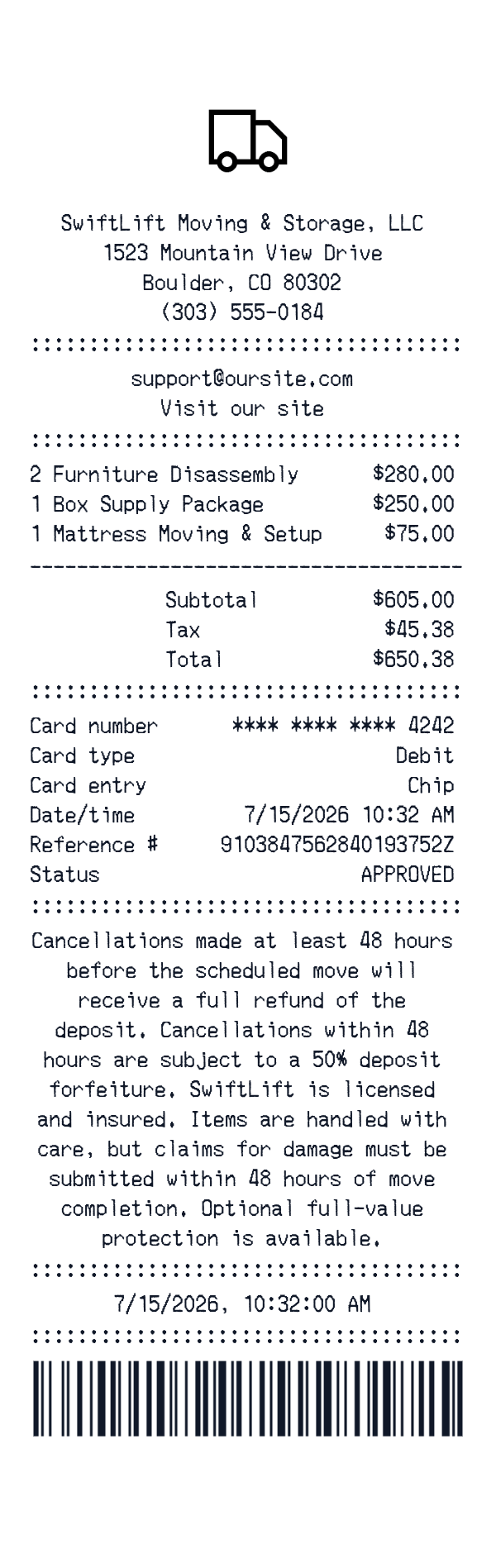
This Moving Receipt template is an itemized receipt layout for moving services. It shows a business header, line items for services and supplies, totals, and card payment details. Use it to create a sample moving receipt for personal records, bookkeeping practice, or visual projects. The editor lets you adjust each field before downloading or printing.
- ✔Create a receipt in seconds
- ✔No design skills needed
- ✔Fully customizable
- ✔Add custom logo
- ✔Edit line items
- ✔Choose payment method
- ✔Add or remove receipt elements
What's on a real Moving Receipt?
Every part of the receipt has a purpose. Here is what you will find on this template and why it matters.
Business header
Company name and address identify the moving business providing the service. Contact details can appear beside or below the name.
Service line items
Each moving task or supply is listed separately with a quantity and price. This makes the cost breakdown easy to follow.
Totals block
Subtotal and tax are shown before the final amount. The totals summarize the itemized charges.
Payment details
Payment method and card details show how the charge was completed. Card numbers are typically masked.
Date and time
The transaction date and time place the moving service in a timeline. They help organize records.
Closing notice
A short policy, support, or service-note line can appear near the bottom. It rounds off the receipt layout.
How the sample is arranged
This template comes pre-filled with a realistic sample receipt. Here is what it contains, top to bottom.
SwiftLift Moving & Storage, LLC 1523 Mountain View Drive Boulder, CO 80302 (303) 555-0184 support@oursite.com Visit our site Furniture Disassembly, 2 x $280.00 Box Supply Package, 1 x $250.00 Mattress Moving & Setup, 1 x $75.00 Subtotal $605.00 Tax $45.38 Total $650.38 Debit card **** **** **** 4242, chip, approved Reference 9103847562840193752Z Cancellation and service-policy note 7/15/2026, 10:32:00 AM Barcode
How to make a Moving Receipt?
With our Receipt Maker, creating any receipt is as easy as 1, 2, 3.
Customize your receipt
Customize every detail, from items to pricing and payment details, with ease.
Export your receipt
One-click export, ready to print.
Where a Moving Receipt comes in handy
Personal moving records
Keep a line-item record of moving services and supplies.
Bookkeeping samples
Prepare itemized moving-service samples for bookkeeping practice.
Moving budget breakdown
Track moving costs by service, supply, and tax.
Film and app mockups
Create sample moving receipts for film, TV, or app scenes.
Education and training
Use a moving-service example for receipt-reading or bookkeeping lessons.
Digitizing paper receipts
Turn a paper moving receipt into a clean image.
Tips for a Moving Receipt
- 1List each moving service, such as disassembly or setup, on its own line with a quantity and price.
- 2Keep line totals, subtotal, tax, and final total consistent so the moving cost breakdown is easy to check.
- 3Show only the last four digits when adding card payment details to the receipt.
- 4Include a short cancellation or service-policy line near the bottom, matching the sample's closing note.
- 5Use plain service names for line items instead of marketing language.
Similar Templates
More receipt templates like this one — pick one and generate your own receipt in seconds.
Get started in 1 minute
- ✔Create receipts in seconds
- ✔Customize everything
- ✔Easy with our Receipt Builder
