Free Lawyer Receipt Generator
This lawyer receipt template is an itemized legal-services receipt. It pre-fills a law firm header, a billed-to block, legal service lines, totals with tax, and a card payment block.
Use it for personal records, bookkeeping samples, training, or creative mockups. The editor opens with these fields ready to customize.
- ✔Create a receipt in seconds
- ✔No design skills needed
- ✔Fully customizable
- ✔Add custom logo
- ✔Edit line items
- ✔Choose payment method
- ✔Add or remove receipt elements
What's on a real Lawyer Receipt?
Every part of the receipt has a purpose. Here is what you will find on this template and why it matters.
Firm header
The business name, address, and phone number identify the legal office issuing the receipt. This header anchors the document and gives the reader the source of the charge.
Billed-to block
The client name, address, phone number, and email identify the person or entity being billed. It helps keep the receipt tied to the correct account or matter.
Service lines
Each legal service appears as its own line with quantity and price. Line items make the itemized breakdown easy to read and check.
Totals block
The subtotal, tax amount, and final total summarize the charges. These lines show how the final amount is calculated.
Payment details
The payment section records the card type, last four digits, entry method, reference number, and approval status. It documents how the charge was captured.
Policy note
A short note about fee terms, cancellation notice, and billing contact explains the office's standard billing rules. It rounds out the receipt with practical information.
Date and barcode
The transaction date and time place the receipt in time, while the barcode provides a machine-readable closing element. Both help with record organization.
How the sample is arranged
This template comes pre-filled with a realistic sample receipt. Here is what it contains, top to bottom.
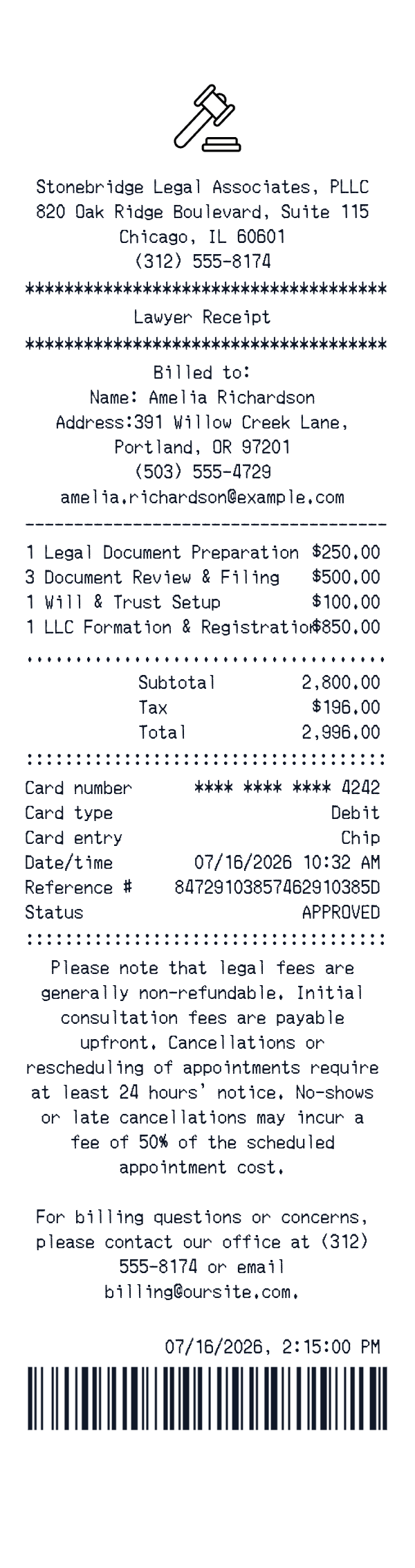
Stonebridge Legal Associates, PLLC, 820 Oak Ridge Boulevard, Suite 115, Chicago, IL 60601, (312) 555-8174. Lawyer Receipt. Billed to Amelia Richardson, 391 Willow Creek Lane, Portland, OR 97201, (503) 555-4729, amelia.richardson@example.com. Legal Document Preparation 1 at 250.00; Document Review & Filing 3 at 500.00; Will & Trust Setup 1 at 100.00; LLC Formation & Registration 1 at 850.00. Subtotal 2,800.00, Tax 196.00, Total 2,996.00. Debit card, chip, **** **** **** 4242, reference 84729103857462910385D, approved 07/16/2026 10:32 AM. Policy note, then date 07/16/2026, 2:15:00 PM, and barcode.
How to make a Lawyer Receipt?
With our Receipt Maker, creating any receipt is as easy as 1, 2, 3.
Customize your receipt
Customize every detail, from items to pricing and payment details, with ease.
Export your receipt
One-click export, ready to print.
Where a Lawyer Receipt comes in handy
Personal legal records
Keep a personal record of legal services with full line items.
Bookkeeping samples
Prepare itemized legal-service samples for bookkeeping practice.
Education and training
Create sample legal receipts for classroom or training exercises.
Film and design mockups
Build a legal-office receipt mockup for film, TV, or design.
Digitizing paper receipts
Turn a paper legal receipt you already have into a clean image for storage.
Legal spending breakdown
Track legal service costs with a full line-item breakdown.
Tips for a Lawyer Receipt
- 1List each legal service on its own line, with quantity and price, so the itemized breakdown stays easy to read.
- 2Keep the math consistent: line items should add to the subtotal, and tax should match the amount shown.
- 3Show only the last four digits for card payments, and include the reference number and approval status.
- 4Use plain service names for legal work, such as document preparation, review, filing, or registration, rather than marketing copy.
- 5Add a short fee-policy or billing-contact line near the end to round off the legal receipt layout.
Get started in 1 minute
- ✔Create receipts in seconds
- ✔Customize everything
- ✔Easy with our Receipt Builder
