Free Law Firm Receipt Generator
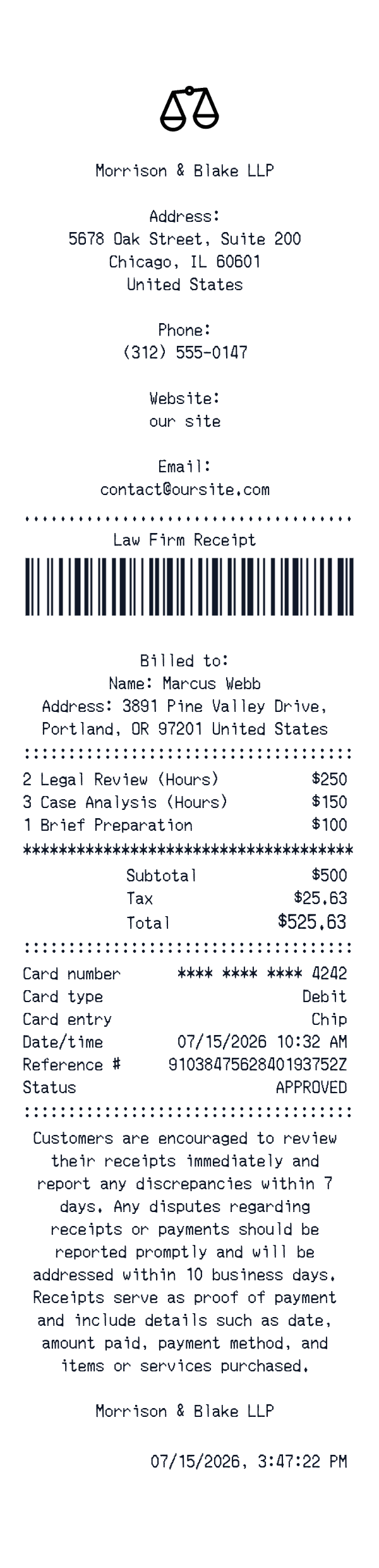
This law firm receipt template is an itemized layout for legal services. It shows a firm header, billed-to client, service lines, totals, card payment, and closing details.
The editor is where you can adjust the fields, colors, and layout before downloading or printing.
- ✔Create a receipt in seconds
- ✔No design skills needed
- ✔Fully customizable
- ✔Add custom logo
- ✔Edit line items
- ✔Choose payment method
- ✔Add or remove receipt elements
What's on a real Law Firm Receipt?
Every part of the receipt has a purpose. Here is what you will find on this template and why it matters.
Business header
The firm name, address, phone, website, and email identify the provider at the top of the receipt.
Billed-to block
The client name and address show who the receipt is issued to.
Service line items
Each legal service or task appears as a separate line with a quantity and price, so the itemized breakdown is clear.
Totals block
Subtotal, tax, and final total summarize the billed amount after all service lines.
Payment details
Card type, last four digits, entry method, status, and reference number record how payment was completed.
Barcode and reference
A barcode and transaction reference give the receipt a machine-readable identifier.
Closing note
A short policy or review note rounds off the document with practical information.
Date and time
The timestamp records when the receipt was generated or the transaction was completed.
How the sample is arranged
This template comes pre-filled with a realistic sample receipt. Here is what it contains, top to bottom.
Morrison & Blake LLP header shows the Chicago address, phone, website, and email. A billed-to block names Marcus Webb in Portland, then a short line and a barcode appear. Line items list Legal Review (Hours), Case Analysis (Hours), and Brief Preparation with quantities and prices. Totals show a 500 subtotal, 25.63 tax, and 525.63 total. Payment is a debit card ending 4242, entered by chip, approved, with a reference number and card date. A closing note and the date-time stamp finish the layout.
How to make a Law Firm Receipt?
With our Receipt Maker, creating any receipt is as easy as 1, 2, 3.
Customize your receipt
Customize every detail, from items to pricing and payment details, with ease.
Export your receipt
One-click export, ready to print.
Where a Law Firm Receipt comes in handy
Personal legal records
Keep a personal record of legal services with full line items
Bookkeeping samples
Prepare itemized samples for personal bookkeeping practice
Legal spending breakdown
Track legal service spending with a full line-item breakdown
Film and app mockups
Build mockups for film, TV, apps, or website projects
Education and training
Prepare sample law firm receipts for education and training
Digitizing paper receipts
Digitize paper legal receipts into a clean, searchable image
Tips for a Law Firm Receipt
- 1List each legal service on its own line so the itemized breakdown is clear and easy to follow.
- 2Keep the math consistent: line totals should add up to the subtotal, and tax should match its rate.
- 3Include quantities even when they are 1, because registers print them and it keeps the item count clear.
- 4Show only the last four digits for card payments, and include the card type, entry method, and status.
- 5Add a short closing note and a date-time stamp to round off the law firm receipt layout.
Get started in 1 minute
- ✔Create receipts in seconds
- ✔Customize everything
- ✔Easy with our Receipt Builder
