Free Landscaping Receipt Generator
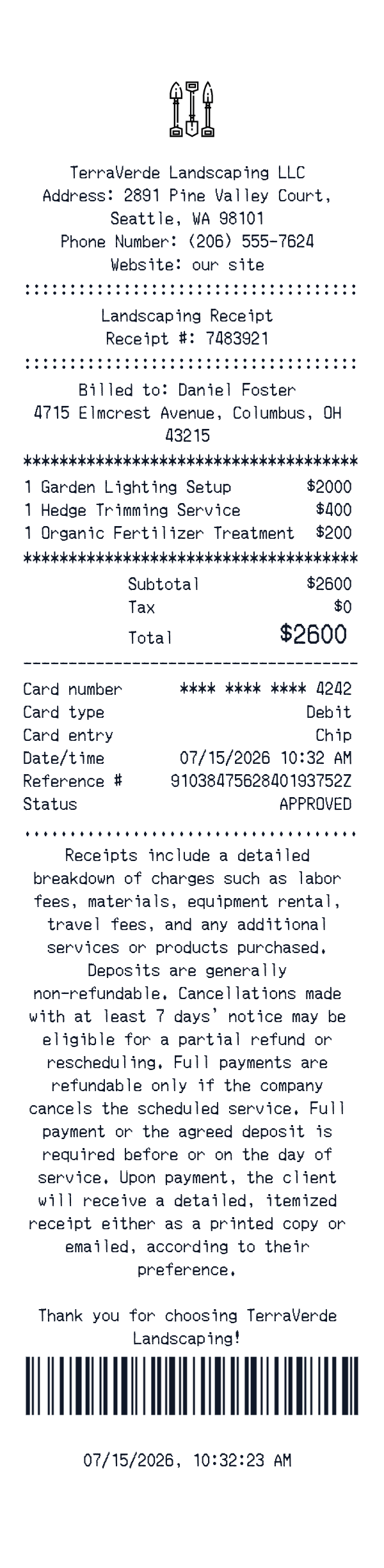
This landscaping receipt template is an itemized layout for recording outdoor service work, materials, and related charges. It includes a business header, billed-to block, line items, totals, card details, and a barcode. The editor lets you replace the sample text with your own details.
- ✔Create a receipt in seconds
- ✔No design skills needed
- ✔Fully customizable
- ✔Add custom logo
- ✔Edit line items
- ✔Choose payment method
- ✔Add or remove receipt elements
What's on a real Landscaping Receipt?
Every part of the receipt has a purpose. Here is what you will find on this template and why it matters.
Business header
Company name, address, phone number, and website line identify the landscaping business.
Client billing block
Customer name and address show who was billed for the service.
Itemized service lines
Each service or material appears with a quantity and price, making the charges easy to review.
Totals block
Subtotal, tax, and final total summarize the itemized charges.
Card payment details
Payment method, last four digits, entry method, status, and reference number record how the charge was approved.
Policy and closing notes
Deposit, cancellation, payment, and thank-you lines explain the service terms.
Barcode and timestamp
A barcode and date-time line provide a quick reference and transaction time.
How the sample is arranged
This template comes pre-filled with a realistic sample receipt. Here is what it contains, top to bottom.
TerraVerde Landscaping LLC, 2891 Pine Valley Court, Seattle, WA 98101, phone (206) 555-7624, website our site, and Receipt # 7483921 open the sample. Billed to Daniel Foster, 4715 Elmcrest Avenue, Columbus, OH 43215. Line items: Garden Lighting Setup, 1 at $2,000; Hedge Trimming Service, 1 at $400; Organic Fertilizer Treatment, 1 at $200. Subtotal $2,600, tax $0, total $2,600. Card payment: debit, chip, **** 4242, approved, reference 9103847562840193752Z. A policy note, thank-you line, barcode, and 07/15/2026, 10:32:23 AM close the layout.
How to make a Landscaping Receipt?
With our Receipt Maker, creating any receipt is as easy as 1, 2, 3.
Customize your receipt
Customize every detail, from items to pricing and payment details, with ease.
Export your receipt
One-click export, ready to print.
Where a Landscaping Receipt comes in handy
Personal service records
Keep a record of landscaping services, materials, and charges.
Bookkeeping samples
Prepare itemized samples for personal bookkeeping practice.
Spending breakdown
Track seasonal landscaping costs with a full line-item breakdown.
Film and app mockups
Build mockups for film, TV, apps, or website projects.
Education and training
Use sample landscaping receipts for education and training.
Digitizing paper receipts
Turn paper landscaping receipts into a clean, searchable image.
Tips for a Landscaping Receipt
- 1List each landscaping service or material on its own line, with quantity and price.
- 2Keep line totals consistent so the subtotal, tax, and final total add up correctly.
- 3Show only the last four digits for card payments, and include the card entry method.
- 4Add a receipt number, date, and time so the sample feels complete.
- 5Use plain service names like trimming, lighting, or fertilizer treatment rather than marketing copy.
Similar Templates
More receipt templates like this one — pick one and generate your own receipt in seconds.

Get started in 1 minute
- ✔Create receipts in seconds
- ✔Customize everything
- ✔Easy with our Receipt Builder
