Free JCPenney Receipt Generator
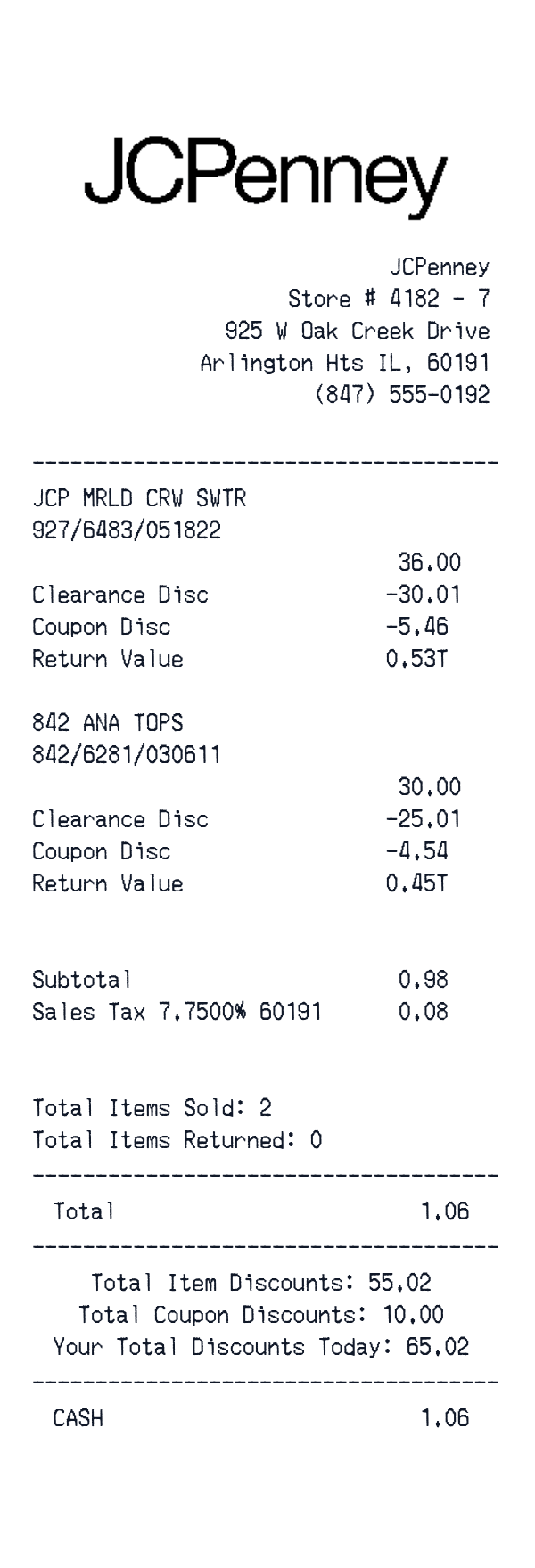
This JCPenney-style receipt template provides a retail store layout with a header, item blocks, discount lines, tax, total, and cash payment. It is useful for personal purchase records, bookkeeping samples, classroom retail exercises, and design or film mockups.
The template opens in the editor, where store details, product lines, amounts, and layout can be adjusted.
- ✔Create a receipt in seconds
- ✔No design skills needed
- ✔Fully customizable
- ✔Add custom logo
- ✔Edit line items
- ✔Choose payment method
- ✔Add or remove receipt elements
What's on a real JCPenney Receipt?
Every part of the receipt has a purpose. Here is what you will find on this template and why it matters.
Store header
The store name, address, and phone number identify the retail location for the record.
Product blocks
Each product line carries a short register-style name, code, and base price so the sale can be reviewed line by line.
Discount lines
Clearance and coupon discount lines show how much was reduced from each product before totals are calculated.
Subtotal and tax
The subtotal and tax amount separate taxable value from the final amount owed.
Total amount
The final total combines the subtotal and tax into the amount paid for the transaction.
Payment line
The payment line records the tender used to settle the total, such as cash.
How the sample is arranged
This template comes pre-filled with a realistic sample receipt. Here is what it contains, top to bottom.
JCPenney header shows Store # 4182 - 7, 925 W Oak Creek Drive, Arlington Hts IL, 60191, and (847) 555-0192. Two product blocks appear: JCP MRLD CRW SWTR 927/6483/051822 at 36.00, and 842 ANA TOPS 842/6281/030611 at 30.00. Each block lists Clearance Disc and Coupon Disc lines. Subtotal 0.98, Sales Tax 7.7500% 60191 0.08, Total Items Sold: 2. Total 1.06, with discount totals 55.02, 10.00, and 65.02. CASH 1.06 closes the sample.
How to make a JCPenney Receipt?
With our Receipt Maker, creating any receipt is as easy as 1, 2, 3.
Customize your receipt
Customize every detail, from items to pricing and payment details, with ease.
Export your receipt
One-click export, ready to print.
Where a JCPenney Receipt comes in handy
Personal purchase records
Keep a clean personal record of apparel or home goods purchases.
Business spending log
Track store spending in a simple personal log.
Trip cost review
Review what a shopping trip cost, line by line.
Design and film mockups
Create a retail mockup for design, film, or TV scenes.
Retail training material
Prepare sample receipts for retail training and education.
Digitizing paper receipts
Digitize paper receipts into a clean digital format.
Tips for a JCPenney Receipt
- 1Keep product names short and register-style rather than marketing titles.
- 2Match the tax amount to the tax rate shown on the receipt.
- 3Keep the cash amount equal to the final total when the sample uses cash.
- 4Add a short customer-service line at the bottom for a complete store layout.
Similar Templates
More receipt templates like this one — pick one and generate your own receipt in seconds.
Get started in 1 minute
- ✔Create receipts in seconds
- ✔Customize everything
- ✔Easy with our Receipt Builder
