Free Hospital Receipt Generator
This hospital receipt template is an itemized medical receipt layout for recording services, patient details, and payment. It is useful for personal records, training samples, creative mockups, or digitizing paper receipts you already have.
You can open it in the editor to adjust the fields and download or print the finished image.
- ✔Create a receipt in seconds
- ✔No design skills needed
- ✔Fully customizable
- ✔Add custom logo
- ✔Edit line items
- ✔Choose payment method
- ✔Add or remove receipt elements
What's on a real Hospital Receipt?
Every part of the receipt has a purpose. Here is what you will find on this template and why it matters.
Provider header
The hospital or clinic name, address, and contact details identify the care provider. This block sets the context for the whole receipt.
Patient block
The patient name, date of birth, phone number, and address identify the person receiving care. It helps place the visit in a personal record.
Practitioner details
The provider name and license number connect the services to the responsible clinician. It is common on medical receipts for accountability.
Itemized services
Each service, test, or procedure appears on its own line with quantity and price. This makes the cost breakdown easier to follow.
Subtotal, tax, and total
The subtotal adds the listed services, and tax may appear as a separate line. The final total shows the amount charged.
Payment details
The payment method shows how the charge was paid, often a card with last four digits. Card type, entry method, status, and reference number can also appear.
Reference and barcode
A reference number helps track the transaction in the provider's records. A barcode may be included for the billing system to read.
How the sample is arranged
This template comes pre-filled with a realistic sample receipt. Here is what it contains, top to bottom.
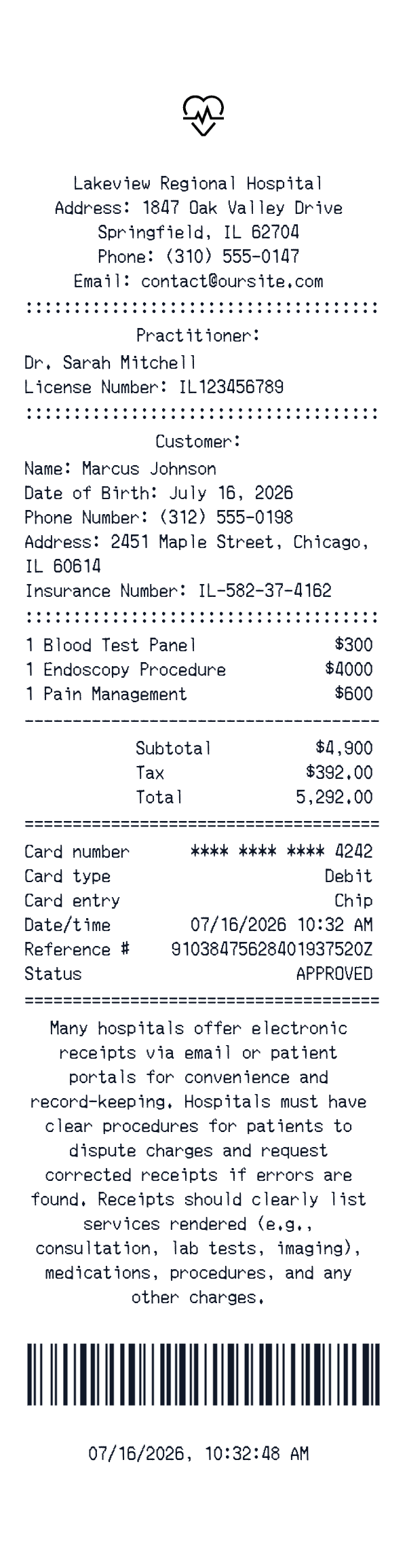
Lakeview Regional Hospital, 1847 Oak Valley Drive, Springfield, IL 62704, phone (310) 555-0147, email contact@oursite.com. Practitioner Dr. Sarah Mitchell, license IL123456789; customer Marcus Johnson, date of birth July 16, 2026, phone (312) 555-0198, address 2451 Maple Street, Chicago, IL 60614. A note about electronic receipts appears before the items. Items: Blood Test Panel, 1, $300; Endoscopy Procedure, 1, $4,000; Pain Management, 1, $600. Subtotal $4,900, tax $392.00, total $5,292.00. Debit card **** 4242, chip, approved, reference 91038475628401937520Z. Barcode and date/time 07/16/2026, 10:32:48 AM.
How to make a Hospital Receipt?
With our Receipt Maker, creating any receipt is as easy as 1, 2, 3.
Customize your receipt
Customize every detail, from items to pricing and payment details, with ease.
Export your receipt
One-click export, ready to print.
Where a Hospital Receipt comes in handy
Personal medical records
Keeping a personal record of hospital visits and their costs
Out-of-pocket tracking
Tracking out-of-pocket medical costs in a personal budget
Charge review
Verifying a medical charge against itemized services and total
Film and media mockups
Building sample receipts for film, TV, or design projects
Medical office training
Preparing sample hospital receipts for office or bookkeeping training
Digitizing paper receipts
Digitizing faded paper hospital receipts into a clean digital format
Tips for a Hospital Receipt
- 1Keep the math consistent: service prices, subtotal, tax, and total should all add up.
- 2Use specific medical service names, such as lab tests, procedures, or pain management, with one line each.
- 3Include the patient name, date of service, and practitioner details, since they are expected on hospital receipts.
- 4For card payments, print only the last four digits and include card type, entry method, and status.
- 5Use a clear date and time for the visit, matching the payment date and the printed receipt date.
Similar Templates
More receipt templates like this one — pick one and generate your own receipt in seconds.
Get started in 1 minute
- ✔Create receipts in seconds
- ✔Customize everything
- ✔Easy with our Receipt Builder
