Free Generic POS Receipt Generator
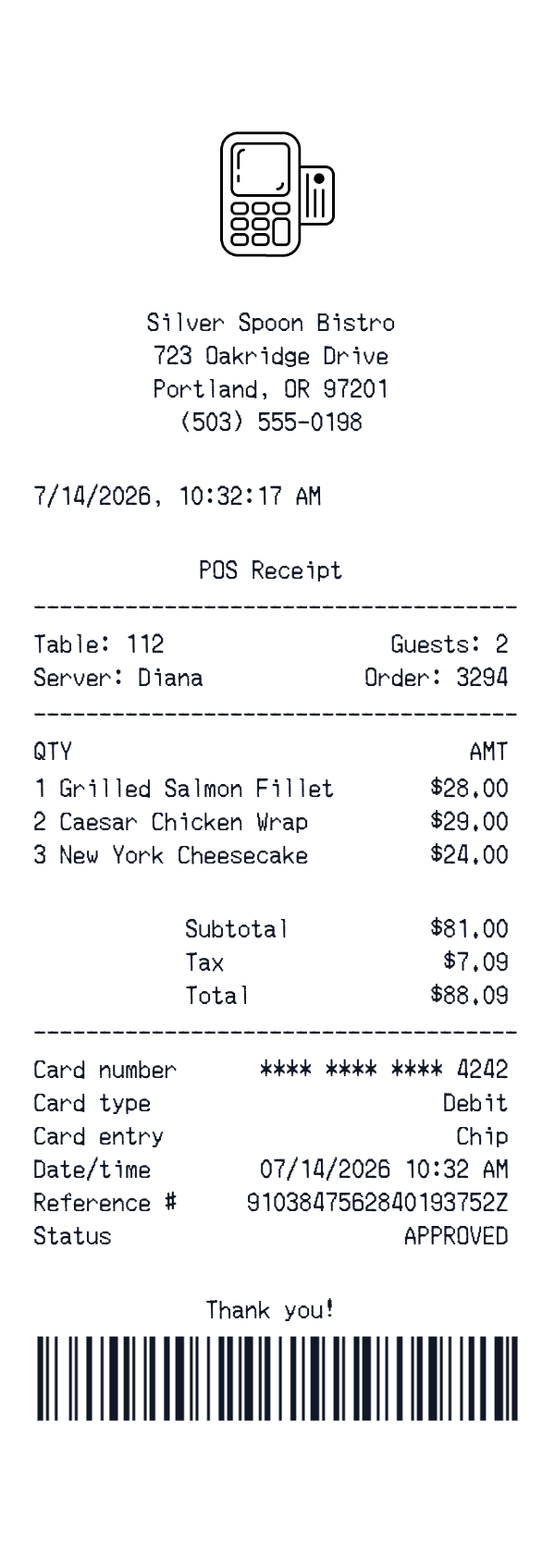
The Generic POS Receipt template is a simple itemized sales receipt for a restaurant-style purchase. It includes a business header, date and time, item lines, subtotal, tax, total, card payment details, and a closing barcode. It is useful for personal records, training samples, and creative mockups. You can open it in the editor and adjust the fields to match your own sample.
- ✔Create a receipt in seconds
- ✔No design skills needed
- ✔Fully customizable
- ✔Add custom logo
- ✔Edit line items
- ✔Choose payment method
- ✔Add or remove receipt elements
What's on a real Generic POS Receipt?
Every part of the receipt has a purpose. Here is what you will find on this template and why it matters.
Business header
The top block names the merchant and gives location and contact details. It identifies who issued the receipt.
Date and time
It records when the sale happened, often to the minute. This helps place the purchase in a timeline.
POS label
A short label identifies the document as a point-of-sale receipt. It helps distinguish it from invoices or other slips.
Itemized lines
Each purchased item appears with its quantity and price. This is the core detail used to check the sale.
Subtotal and tax
The subtotal shows the amount before tax, and the tax line shows the added tax amount. Together they lead to the total.
Total
The final amount is shown after the tax line. It gives the amount due for the purchase.
Card payment
The payment block states the card type, last four digits, entry method, and approval status. It documents how the sale was settled.
Barcode
A barcode can appear near the footer for scanning or visual closure. It is common on point-of-sale prints.
How the sample is arranged
This template comes pre-filled with a realistic sample receipt. Here is what it contains, top to bottom.
Silver Spoon Bistro 723 Oakridge Drive Portland, OR 97201 (503) 555-0198 7/14/2026, 10:32:17 AM POS Receipt Grilled Salmon Fillet 1 x 28.00 Caesar Chicken Wrap 2 x 29.00 New York Cheesecake 3 x 24.00 Subtotal 81.00 Tax 7.09 Total 88.09 Card number **** **** **** 4242 Card type Debit Card entry Chip Date/time 07/14/2026 10:32 AM Reference # 9103847562840193752Z Status APPROVED Thank you! Barcode
How to make a Generic POS Receipt?
With our Receipt Maker, creating any receipt is as easy as 1, 2, 3.
Customize your receipt
Customize every detail, from items to pricing and payment details, with ease.
Export your receipt
One-click export, ready to print.
Where a Generic POS Receipt comes in handy
Personal dining records
Keep a record of restaurant visits and total costs.
Dining budget tracking
Track dining-out spending and build a monthly budget.
Meal cost review
Review an itemized dining purchase against the printed total.
Film and app mockups
Create sample receipts for film, TV, apps, or design.
Hospitality training materials
Prepare sample POS checks for hospitality or bookkeeping lessons.
Digitizing paper checks
Convert faded paper checks into clean digital records.
Tips for a Generic POS Receipt
- 1Keep the math consistent: item prices, subtotal, tax, and total should all add up.
- 2List items in course order, such as main, wrap, and dessert, like a dining check.
- 3Show the card payment with only the last four digits and an approval status.
- 4Use a plausible date, time, and reference number for the POS transaction.
Similar Templates
More receipt templates like this one — pick one and generate your own receipt in seconds.
Get started in 1 minute
- ✔Create receipts in seconds
- ✔Customize everything
- ✔Easy with our Receipt Builder
