Free Dollar Tree Receipt Generator
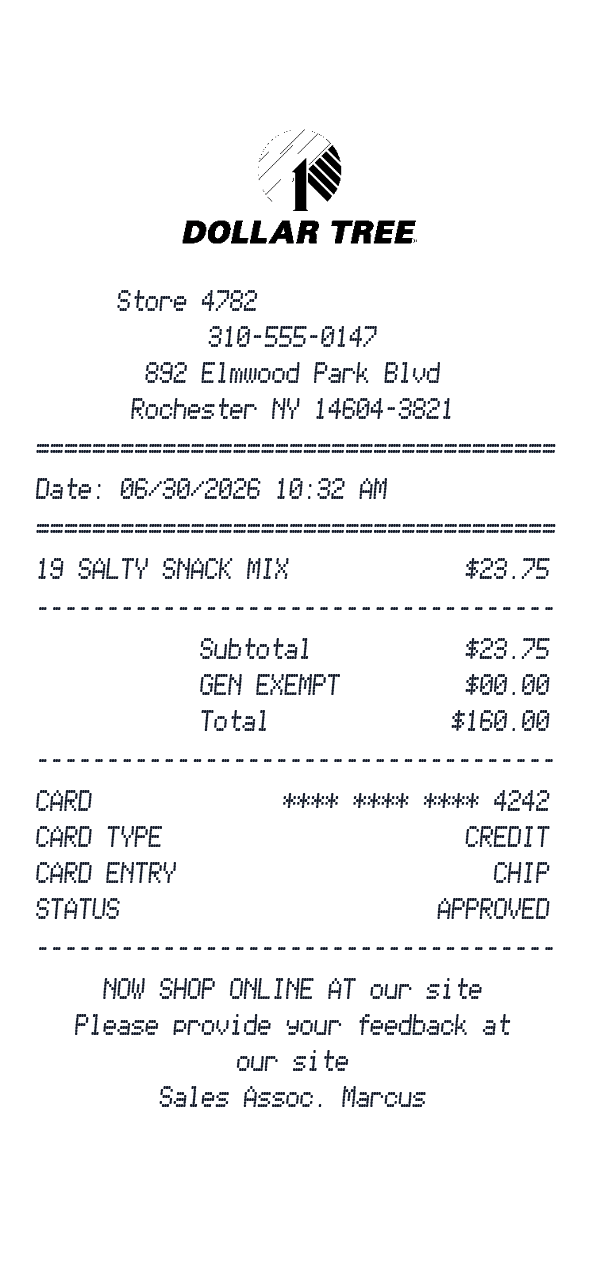
This Dollar Tree-style receipt template shows a narrow store receipt with an address header, date and time, itemized lines, card payment, and closing message. It is useful for personal purchase notes, budget summaries, retail training samples, and creative mockups. The editor lets you adjust the store details, product lines, totals, and payment fields.
- ✔Create a receipt in seconds
- ✔No design skills needed
- ✔Fully customizable
- ✔Add custom logo
- ✔Edit line items
- ✔Choose payment method
- ✔Add or remove receipt elements
What's on a real Dollar Tree Receipt?
Every part of the receipt has a purpose. Here is what you will find on this template and why it matters.
Store header
The top block identifies the store location and contact point, so the receipt can be matched to a specific outlet.
Store and transaction codes
Short codes can identify the store, operator, terminal, or transaction. They help narrow down where and when a purchase happened.
Date and time
The timestamp records when the purchase was made. It is useful for personal records and later review.
Itemized products
Each line lists a product, quantity, and price. This makes it easier to review what was included in the purchase.
Totals
Subtotal, tax or exemption lines, and the final total show how the purchase amount is calculated.
Payment details
The payment block records the tender type and card details, usually showing only the last four digits.
Closing message
A short closing note may include a sales associate line or a store message. It completes the narrow receipt layout.
How the sample is arranged
This template comes pre-filled with a realistic sample receipt. Here is what it contains, top to bottom.
The header shows 892 Elmwood Park Blvd, Rochester NY 14604-3821, Store 4782, and 310-555-0147. Date: 06/30/2026 10:32 AM. The item line is SALTY SNACK MIX, quantity 19, price 23.75. Totals list Subtotal 23.75, GEN EXEMPT 00.00, and Total 160.00. Payment shows CARD **** **** **** 4242, CARD TYPE CREDIT, CARD ENTRY CHIP, and STATUS APPROVED. Closing messages include online shopping, feedback, and Sales Assoc. Marcus.
How to make a Dollar Tree Receipt?
With our Receipt Maker, creating any receipt is as easy as 1, 2, 3.
Customize your receipt
Customize every detail, from items to pricing and payment details, with ease.
Export your receipt
One-click export, ready to print.
Where a Dollar Tree Receipt comes in handy
Personal purchase records
Keep a simple record of store purchases and line items.
Household budget tracking
Track household spending and review what a shopping trip cost.
Line-by-line review
Review each product line after a purchase to check quantities and prices.
App and film mockups
Build receipt mockups for app, film, TV, or website projects.
Retail education
Prepare sample store receipts for retail or bookkeeping training.
Digitizing paper receipts
Turn a faded paper receipt into a clean digital image.
Tips for a Dollar Tree Receipt
- 1Use abbreviated product names, as registers often print short labels, instead of full product titles.
- 2Keep quantities, line prices, subtotal, and total aligned so the numbers read cleanly.
- 3For card payments, show only the last four digits of the card number.
- 4Include a store number and a short date and time if the layout has room.
- 5Match the closing message to a simple store note, such as a sales associate line.
Get started in 1 minute
- ✔Create receipts in seconds
- ✔Customize everything
- ✔Easy with our Receipt Builder
