Free Computer Repair Receipt Generator
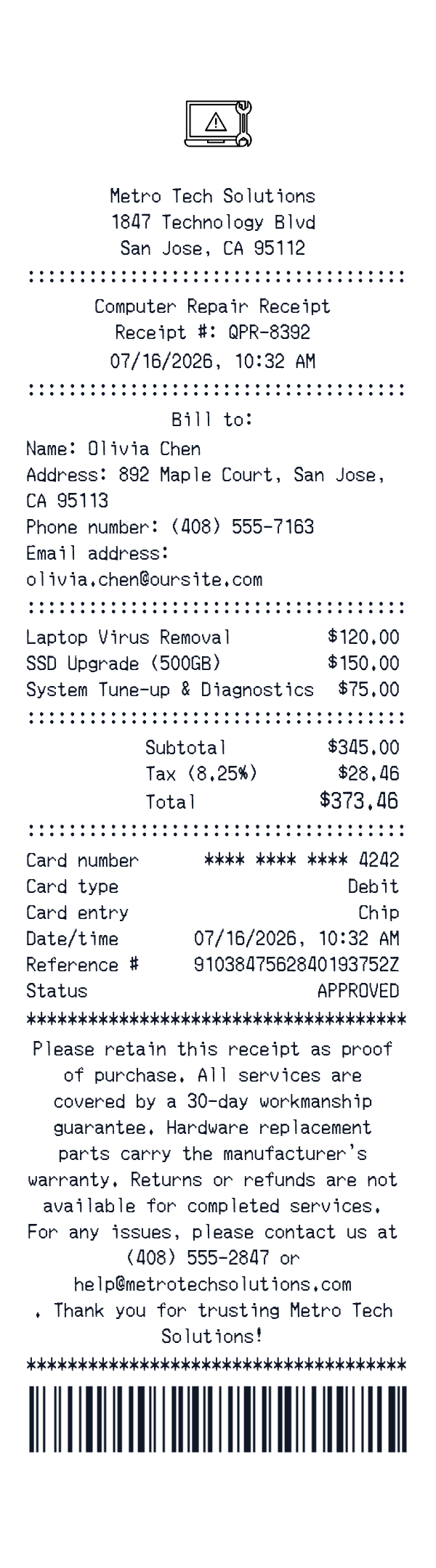
This computer repair receipt template is an itemized service receipt for tech repair work. The sample shows a repair shop, three service lines, a subtotal, tax, and a card payment. Use it to build a clean record of a repair transaction, a training example, or a creative mockup. The template opens in the editor, where you can adjust the business details, line items, totals, and payment fields.
- ✔Create a receipt in seconds
- ✔No design skills needed
- ✔Fully customizable
- ✔Add custom logo
- ✔Edit line items
- ✔Choose payment method
- ✔Add or remove receipt elements
What's on a real Computer Repair Receipt?
Every part of the receipt has a purpose. Here is what you will find on this template and why it matters.
Business header
The shop name and address identify the repair business issuing the receipt.
Receipt title and number
A title and receipt number label the document and help keep records distinct.
Date and time
The transaction date and time show when the repair service was completed or paid.
Bill-to block
Customer name, address, and contact details identify the person or business receiving the service.
Itemized service lines
Each repair service or part gets its own line with a price, making the work easy to review.
Totals block
Subtotal, tax, and final total summarize the charges after all line items are listed.
Payment details
Payment method and card details show how the account was settled.
Closing note and barcode
A short policy or thank-you line and a barcode close the document.
How the sample is arranged
This template comes pre-filled with a realistic sample receipt. Here is what it contains, top to bottom.
Business header: Metro Tech Solutions at 1847 Technology Blvd, San Jose, CA 95112. Title and receipt number: Computer Repair Receipt, QPR-8392. Date and bill-to: 07/16/2026, 10:32 AM; Olivia Chen at 892 Maple Court, San Jose, CA 95113, phone and email. Items: Laptop Virus Removal $120.00, SSD Upgrade (500GB) $150.00, System Tune-up & Diagnostics $75.00. Totals: Subtotal $345.00, Tax (8.25%) $28.46, Total $373.46. Payment: Debit card ending 4242, chip entry, approved, with reference number. Closing: policy note and barcode.
How to make a Computer Repair Receipt?
With our Receipt Maker, creating any receipt is as easy as 1, 2, 3.
Customize your receipt
Customize every detail, from items to pricing and payment details, with ease.
Export your receipt
One-click export, ready to print.
Where a Computer Repair Receipt comes in handy
Personal repair records
Keep a clear record of repair services and parts for your own files.
Bookkeeping samples
Prepare an itemized repair receipt for bookkeeping practice or study.
Spending breakdown
Review repair spending with each service line itemized separately.
Film and app mockups
Create a repair receipt visual for film, app, or website scenes.
Education and training
Use a sample computer repair receipt in training or classroom materials.
Digitizing paper receipts
Turn a paper repair receipt into a clean digital image.
Tips for a Computer Repair Receipt
- 1List each repair service or part on its own line so the itemized breakdown is clear.
- 2Keep quantities visible even for single services, because itemized receipts usually print them.
- 3Make sure line prices add to the subtotal before adding tax and the final total.
- 4Show only the last four digits for card payments in the payment block.
- 5Add a short policy or thank-you line before the barcode to close the layout.
Get started in 1 minute
- ✔Create receipts in seconds
- ✔Customize everything
- ✔Easy with our Receipt Builder
