Free Cleaning Invoice Receipt Generator
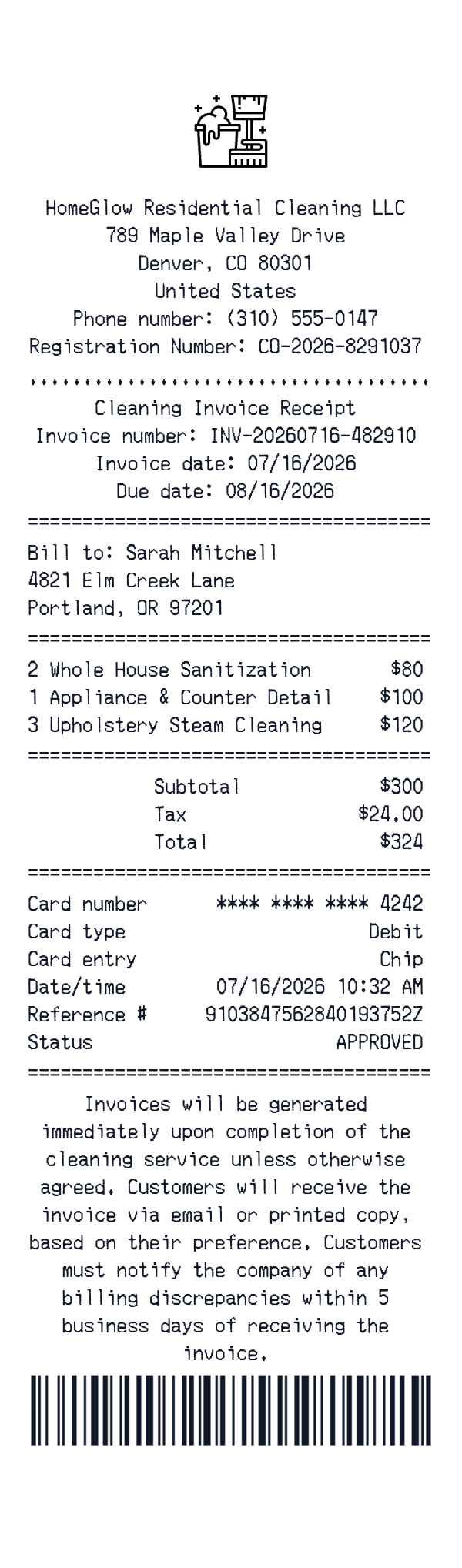
This Cleaning Invoice Receipt template is an itemized service receipt layout for residential cleaning jobs. It pairs a business header with a line-item list, invoice dates, bill-to details, totals, and card payment information.
It can be used to build a clean sample invoice receipt for personal records, bookkeeping practice, or design projects. The editor lets you adjust every field, upload a logo, and download the finished image.
- ✔Create a receipt in seconds
- ✔No design skills needed
- ✔Fully customizable
- ✔Add custom logo
- ✔Edit line items
- ✔Choose payment method
- ✔Add or remove receipt elements
What's on a real Cleaning Invoice Receipt?
Every part of the receipt has a purpose. Here is what you will find on this template and why it matters.
Business header
Lists the cleaning company's name, address, phone, and registration details. It gives the document a clear provider identity.
Invoice details
Shows the invoice number, invoice date, and due date. These fields make the document easy to reference and track.
Bill-to block
Names the customer and provides their address. It identifies who the service and billing are associated with.
Service line items
Each cleaning service appears on its own line with quantity and price. This itemized structure makes the charges easy to review.
Totals block
Adds the subtotal, tax, and final total. It shows how the line items combine into the amount due.
Payment details
Records the card payment information, including card type, last four digits, entry method, timestamp, reference number, and status.
Closing note
Includes a short billing or discrepancy notice. It rounds off the layout with a practical reference line.
Barcode
Provides a machine-readable identifier at the bottom of the receipt. It is a common closing element for scanned or archived records.
How the sample is arranged
This template comes pre-filled with a realistic sample receipt. Here is what it contains, top to bottom.
HomeGlow Residential Cleaning LLC, 789 Maple Valley Drive, Denver, CO 80301, United States, registration CO-2026-8291037, phone (310) 555-0147. Invoice INV-20260716-482910, dated 07/16/2026, due 08/16/2026. Billed to Sarah Mitchell, 4821 Elm Creek Lane, Portland, OR 97201. Items: Whole House Sanitization, 2 at $80; Appliance & Counter Detail, 1 at $100; Upholstery Steam Cleaning, 3 at $120. Totals: subtotal $300, tax $24.00, total $324. Payment: debit card ending 4242, chip, 07/16/2026 10:32 AM, reference 9103847562840193752Z, APPROVED. A billing note and barcode close the layout.
How to make a Cleaning Invoice Receipt?
With our Receipt Maker, creating any receipt is as easy as 1, 2, 3.
Customize your receipt
Customize every detail, from items to pricing and payment details, with ease.
Export your receipt
One-click export, ready to print.
Where a Cleaning Invoice Receipt comes in handy
Cleaning service records
Keeps a clear record of services, quantities, and amounts charged.
Personal bookkeeping samples
Itemized cleaning invoice samples support personal bookkeeping practice.
Household spending breakdown
Tracks home service spending with a full line-item breakdown.
Film and design mockups
Creates cleaning invoice mockups for film, TV, websites, or design projects.
Education and training
Sample cleaning invoices support bookkeeping or invoicing training.
Digitizing paper invoices
Turn paper cleaning invoices into a clean digital image.
Tips for a Cleaning Invoice Receipt
- 1List each cleaning service on its own line so the itemized layout stays easy to follow.
- 2Keep the math consistent: line totals should add up to the subtotal, and tax should match its rate.
- 3Include quantities even when they are 1, because registers and invoices often print every count.
- 4Show only the last four digits for the card payment in the payment details block.
- 5Add the invoice number, invoice date, and due date to make the document complete.
Similar Templates
More receipt templates like this one — pick one and generate your own receipt in seconds.
Get started in 1 minute
- ✔Create receipts in seconds
- ✔Customize everything
- ✔Easy with our Receipt Builder
