Free Chuck E. Cheese Play Pass Receipt Generator
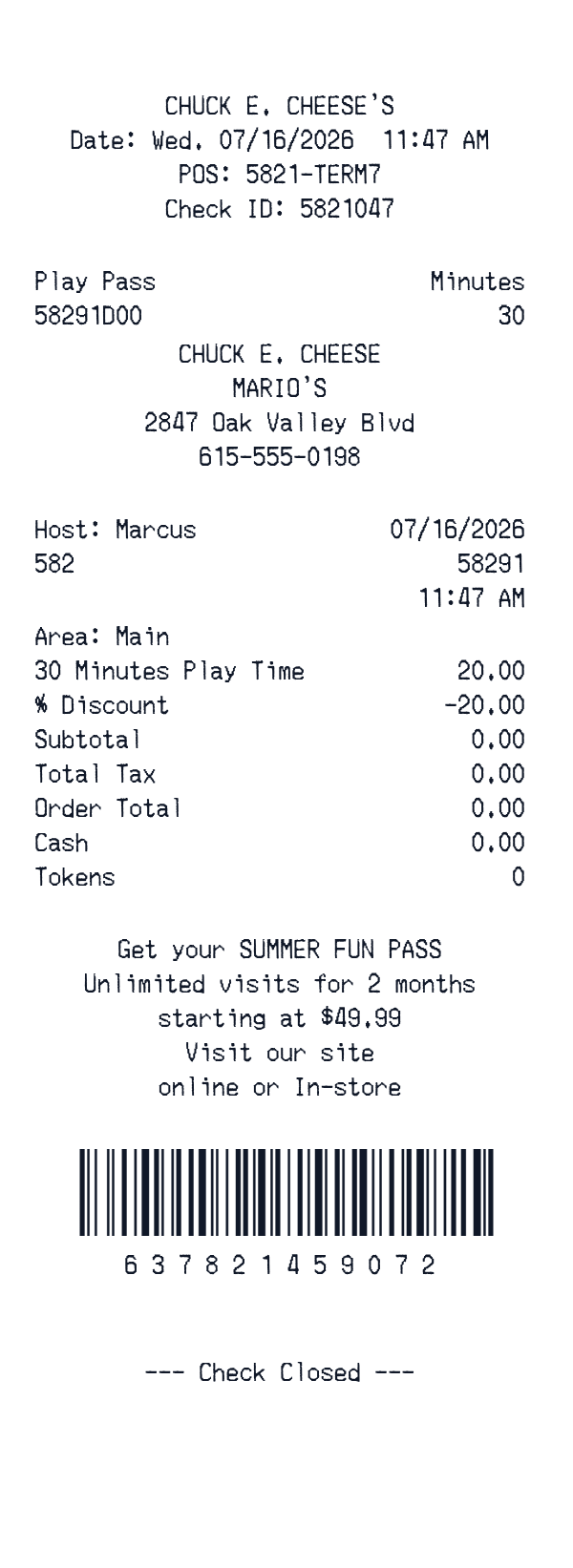
This Chuck E. Cheese-style play pass receipt template is an itemized receipt layout for a play pass transaction. It includes a store header, play time and token lines, discount and total lines, and a closing barcode section.
The template opens in the editor, where every field can be adjusted.
- ✔Create a receipt in seconds
- ✔No design skills needed
- ✔Fully customizable
- ✔Add custom logo
- ✔Edit line items
- ✔Choose payment method
- ✔Add or remove receipt elements
What's on a real Chuck E. Cheese Play Pass Receipt?
Every part of the receipt has a purpose. Here is what you will find on this template and why it matters.
Business header
The top block identifies the location and gives the transaction date, time, POS identifier, and check number.
Store details
An address and phone line can appear below the header to identify the specific store.
Line items
Each play pass, token, service, host, area, or discount gets its own line with the relevant value.
Totals block
Subtotal, tax, order total, cash, and token lines make the charge and adjustment easy to review.
Payment lines
The payment section shows how the order was settled, such as cash or tokens, with the amount or count.
Closing elements
A promo message, barcode, and check-closed line round off the bottom of the receipt.
How the sample is arranged
This template comes pre-filled with a realistic sample receipt. Here is what it contains, top to bottom.
The sample starts with CHUCK E. CHEESE'S, date Wed. 07/16/2026 11:47 AM, POS: 5821-TERM7, and Check ID: 5821047. It shows CHUCK E. CHEESE MARIO'S, 2847 Oak Valley Blvd, and 615-555-0198. Lines include Play Pass Minutes, 58291D00 30, Host: Marcus 07/16/2026, 582 58291, Area: Main, 30 Minutes Play Time 20.00, and % Discount -20.00. Totals list Subtotal 0.00, Total Tax 0.00, Order Total 0.00, Cash 0.00, and Tokens 0. Summer Fun Pass message, barcode 6 3 7 8 2 1 4 5 9 0 7 2, and Check Closed finish it.
How to make a Chuck E. Cheese Play Pass Receipt?
With our Receipt Maker, creating any receipt is as easy as 1, 2, 3.
Customize your receipt
Customize every detail, from items to pricing and payment details, with ease.
Export your receipt
One-click export, ready to print.
Where a Chuck E. Cheese Play Pass Receipt comes in handy
Personal play records
Keep a personal record of play pass purchases and line details.
Bookkeeping samples
Prepare itemized play pass samples for bookkeeping practice.
Spending breakdown
Track arcade spending with a full line-item breakdown.
Film and app mockups
Build arcade play pass mockups for film, TV, or apps.
Education and training
Create sample play pass receipts for education and training.
Digitizing paper receipts
Turn paper play pass receipts into clean searchable images.
Tips for a Chuck E. Cheese Play Pass Receipt
- 1List each play pass, token, or service on its own line so the itemized structure is clear.
- 2Keep the math consistent: line prices, discounts, subtotal, tax, and order total should add up correctly.
- 3Include a date, time, POS identifier, and check number in the header for a complete receipt layout.
- 4Use plain line-item names for play time, hosts, areas, and discount lines rather than marketing copy.
- 5Add a short closing line and barcode at the bottom to round off the receipt.
Get started in 1 minute
- ✔Create receipts in seconds
- ✔Customize everything
- ✔Easy with our Receipt Builder
