Free Car Rental Receipt Generator
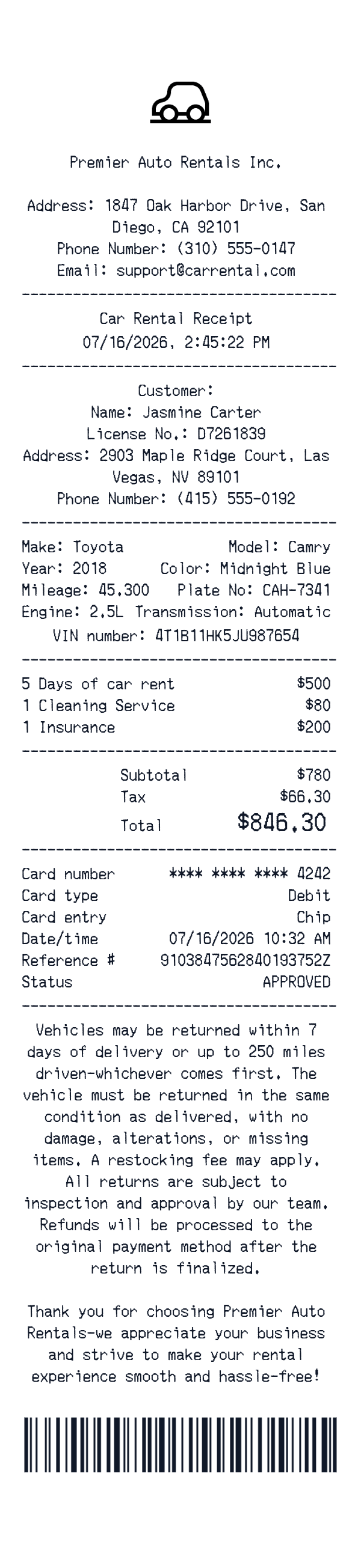
This car rental receipt template is an itemized rental receipt for a vehicle rental. It is useful for personal records, bookkeeping samples, training materials, or creative mockups. The layout includes a business header, customer and VIN details, line items for rental days, cleaning, and insurance, totals with tax, and a card payment block.
The pre-filled sample can be adjusted in the editor.
- ✔Create a receipt in seconds
- ✔No design skills needed
- ✔Fully customizable
- ✔Add custom logo
- ✔Edit line items
- ✔Choose payment method
- ✔Add or remove receipt elements
What's on a real Car Rental Receipt?
Every part of the receipt has a purpose. Here is what you will find on this template and why it matters.
Business header
Rental company name, address, phone, and email identify the business issuing the receipt.
Transaction date
The date and time show when the rental charge was recorded.
Customer details
Customer name, license, address, and phone connect the receipt to the renter.
Vehicle identifier
A VIN or plate field identifies the specific vehicle tied to the rental.
Itemized charges
Lines for rental days, insurance, cleaning, or service fees break down the cost.
Totals
Subtotal, tax, and final total show how the amount due is calculated.
Payment details
Card type, last four digits, reference number, and status record how the charge was paid.
Barcode
A barcode at the bottom can be used for scanning or reference in digital records.
How the sample is arranged
This template comes pre-filled with a realistic sample receipt. Here is what it contains, top to bottom.
Business header: Premier Auto Rentals Inc., 1847 Oak Harbor Drive, San Diego, CA 92101, phone (310) 555-0147, support@carrental.com. Title and date: Car Rental Receipt, 07/16/2026, 2:45:22 PM. Customer block: Jasmine Carter, license D7261839, 2903 Maple Ridge Court, Las Vegas, NV 89101, phone (415) 555-0192; VIN 4T1B11HK5JU987654. Items: Days of car rent 5 at 500, Cleaning Service 1 at 80, Insurance 1 at 200. Totals: Subtotal 780, Tax 66.30, Total 846.30. Payment: debit card ending 4242, chip, approval reference, then closing note and barcode.
How to make a Car Rental Receipt?
With our Receipt Maker, creating any receipt is as easy as 1, 2, 3.
Customize your receipt
Customize every detail, from items to pricing and payment details, with ease.
Export your receipt
One-click export, ready to print.
Where a Car Rental Receipt comes in handy
Personal payment records
Keep a personal record of a vehicle rental payment.
Rental cost review
Check rental days, extras, tax, and total against the rate.
Rental expense log
Track vehicle rental costs in a personal expense log.
Film and app mockups
Create sample rental receipts for film, TV, apps, or design.
Bookkeeping training samples
Prepare sample car rental receipts for bookkeeping or training materials.
Digitizing paper receipts
Convert paper car rental receipts you already have into a clean digital layout.
Tips for a Car Rental Receipt
- 1Keep line items, subtotal, tax, and total consistent so the numbers add up.
- 2Use the intended rental date, customer name, and VIN when filling the fields.
- 3List rental days, cleaning, insurance, or service charges one per line.
- 4For card payments, show only the last four digits and an approval reference.
- 5Match the closing note to the rental terms, such as return window and condition.
Get started in 1 minute
- ✔Create receipts in seconds
- ✔Customize everything
- ✔Easy with our Receipt Builder
